Issue with Hue and Bloom light

2020-11-27T15:00:27+0100 <warn> scene.executeActions.js:37 (executeAction) ApiError: Light with id:12 was not found on this bridge
    at /src/server/services/philips-hue/node_modules/node-hue-api/lib/api/Lights.js:54:17
    at async PhilipsHueLightHandler.setValue (/src/server/services/philips-hue/lib/light/light.setValue.js:31:3)
2020-11-27T15:01:52+0100 <warn> scene.executeActions.js:37 (executeAction) ApiError: Light with id:12 was not found on this bridge
    at /src/server/services/philips-hue/node_modules/node-hue-api/lib/api/Lights.js:54:17
    at async PhilipsHueLightHandler.setValue (/src/server/services/philips-hue/lib/light/light.setValue.js:31:3)
2020-11-27T15:02:05+0100 <warn> scene.executeActions.js:37 (executeAction) ApiError: Light with id:12 was not found on this bridge
    at /src/server/services/philips-hue/node_modules/node-hue-api/lib/api/Lights.js:54:17
    at async PhilipsHueLightHandler.setValue (/src/server/services/philips-hue/lib/light/light.setValue.js:31:3)

The device is in the configuration section and detected on the bridge.

You live up to your nickname well :smile:

image

And so?

Is it from me or Gladys?

Both :joy:

Try removing Gladys’s lamp and adding it back

Problem still present after removal and addition:

2020-11-28T15:06:15+0100 <warn> scene.executeActions.js:37 (executeAction) ApiError: Light with id:12 was not found on this bridge
    at /src/server/services/philips-hue/node_modules/node-hue-api/lib/api/Lights.js:54:17
    at async PhilipsHueLightHandler.setValue (/src/server/services/philips-hue/lib/light/light.setValue.js:31:3)

And its state is stuck on ON in Gladys

It’s the bridge side that’s messed up, try removing it and reconnecting it to the bridge.

The Zigbee network is indeed propagated from device to device at Philips, it’s not just the bridge that propagates, right?
Because the thing is out of range of the Wi-Fi where the bridge is placed.

But well, with the Hue app, no problem…

No, Zigbee devices do not act as relays

So I didn’t understand your WiFi story

Hum… Looking a bit on the net, I often find the opposite, it seems that the bulbs serve as relays (and that could make sense because I think I am out of range of the bridge with the bloom)

Why does it work perfectly with the Hue app? It should work with Gladys, the commands go through the bridge?

Gladys is using the bridge API. I don’t see why it’s not working.

Did you remove your lamp from the bridge?

Zigbee mesh is not automatic, so it’s systematic.
The Zigbee device must also be a Zigbee router. It seems that at Philips, this is the case for the bulbs. But it’s completely false to say that for all devices.

… Yeah…
One all, ball in the middle…

Don’t want to remove it from the bridge, I configured a whole bunch of scenes with the Hue app behind it, it’s the nightlight of the little one… :confused:

I don’t see why Gladys finds it on the bridge in detection and then it bugs with the ID.

As soon as I have time, I remove it from the bridge to put it back but I have 3 scenes behind it, and a configured zone…

Gladys has a lamp ID that doesn’t match the bridge one. I need you to retrieve some information. I’ll tell you more tomorrow.

I have the same bug with 2 new bulbs freshly added to the bridge.

I’m debugging…

What my bridge returns

The bulb with ID 6

    "6": {
        "state": {
            "on": false,
            "bri": 254,
            "alert": "none",
            "mode": "homeautomation",
            "reachable": true
        },
        "swupdate": {
            "state": "noupdates",
            "lastinstall": "2020-12-05T18:49:03"
        },
        "type": "Dimmable light",
        "name": "Entrance",
        "modelid": "LWA001",
        "manufacturername": "Signify Netherlands B.V.",
        "productname": "Hue white lamp",
        "capabilities": {
            "certified": true,
            "control": {
                "mindimlevel": 5000,
                "maxlumen": 800
            },
            "streaming": {
                "renderer": false,
                "proxy": false
            }
        },
        "config": {
            "archetype": "sultanbulb",
            "function": "functional",
            "direction": "omnidirectional",
            "startup": {
                "mode": "safety",
                "configured": true
            }
        },
        "uniqueid": "00:17:88:01:08:b6:5d:cd-0b",
        "swversion": "1.65.9_hB3217DF",
        "swconfigid": "44288730",
        "productid": "Philips-LWA001-1-A19DLv5"
    }

The Gladys API also has an external ID at 6

[
    {
        "name": "Entrance",
        "service_id": "037d42bb-4265-4db0-afbf-685d0084bacd",
        "external_id": "philips-hue-light:001788286ece:6",
        "selector": "philips-hue-light:001788286ece:6",
        "should_poll": true,
        "model": "LWA001",
        "poll_frequency": 60000,
        "features": [
            {
                "name": "Entrance On/Off",
                "read_only": false,
                "has_feedback": false,
                "external_id": "philips-hue-light:001788286ece:6:binary",
                "selector": "philips-hue-light:001788286ece:6:binary",
                "category": "light",
                "type": "binary",
                "min": 0,
                "max": 1
            },
            {
                "name": "Entrance Brightness",
                "read_only": false,
                "has_feedback": false,
                "external_id": "philips-hue-light:001788286ece:6:brightness",
                "selector": "philips-hue-light:001788286ece:6:brightness",
                "category": "light",
                "type": "brightness",
                "min": 0,
                "max": 100
            }
        ]
    }
]

The Gladys console (the lib) returns an error (always on ID 6)

<warn> scene.executeActions.js:37 (executeAction) ApiError: Light with id:6 was not found on this bridge
    at /src/server/services/philips-hue/node_modules/node-hue-api/lib/api/Lights.js:54:17
    at async PhilipsHueLightHandler.setValue (/src/server/services/philips-hue/lib/light/light.setValue.js:31:3)

I updated the hue library (3.4.3), which fixed the issue for me @Hamtaro. I’ll continue testing and submit a PR next week.

Before doing anything, could you just restart your Gladys container and try again?

docker restart gladys

I’ll do it as soon as I can (the kid is napping now, with the nightlight…)

I have this:

2020-12-06T17:11:10+0100 <info> device.notify.js:35 (DeviceManager.notify) Function device.postCreate in service undefined does not exist.
2020-12-06T17:11:10+0100 <error> bluetooth.connectDevices.js:37 () Bluetooth: peripheral 001788acb6c5 not found
2020-12-06T17:11:11+0100 <error> bluetooth.connectDevices.js:37 () Bluetooth: peripheral bridge not found
2020-12-06T17:11:12+0100 <error> bluetooth.connectDevices.js:37 () Bluetooth: peripheral 001788acb6c5 not found
2020-12-06T17:11:15+0100 <error> bluetooth.connectDevices.js:37 () Bluetooth: peripheral 001788acb6c5 not found
2020-12-06T17:11:16+0100 <error> bluetooth.connectDevices.js:37 () Bluetooth: peripheral 001788acb6c5 not found
2020-12-06T17:11:17+0100 <error> bluetooth.connectDevices.js:37 () Bluetooth: peripheral 001788acb6c5 not found
2020-12-06T17:11:20+0100 <error> bluetooth.connectDevices.js:37 () Bluetooth: peripheral 001788acb6c5 not found
2020-12-06T17:11:21+0100 <error> bluetooth.connectDevices.js:37 () Bluetooth: peripheral 158d0002329c09 not found
2020-12-06T17:11:22+0100 <error> bluetooth.connectDevices.js:37 () Bluetooth: peripheral 158d000236f978 not found
2020-12-06T17:11:25+0100 <error> bluetooth.connectDevices.js:37 () Bluetooth: peripheral 001788acb6c5 not found
2020-12-06T17:11:26+0100 <error> bluetooth.connectDevices.js:37 () Bluetooth: peripheral 001788acb6c5 not found
2020-12-06T17:11:29+0100 <info> device.notify.js:35 (DeviceManager.notify) Function device.postUpdate in service undefined does not exist.

I don’t know why the Bluetooth is screaming like that…

And the control on the night light works…

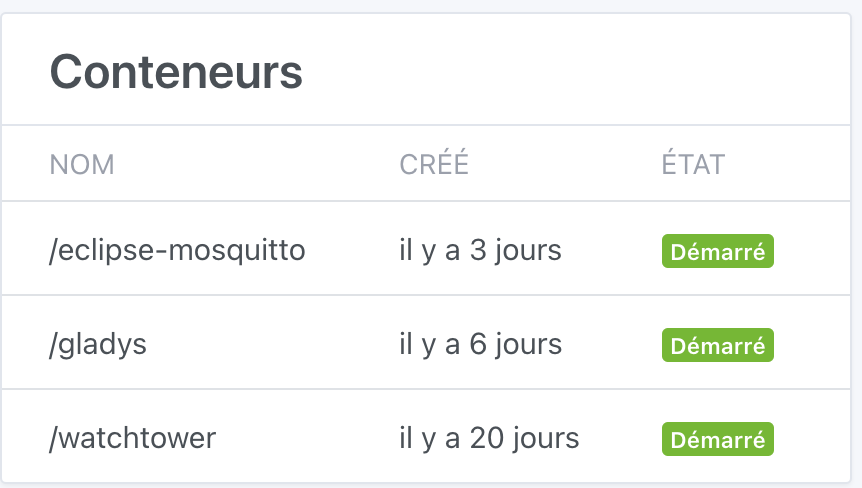
And my docker restart gladys didn’t change the info in the system, is that normal?

Well yes, created doesn’t mean restarted :wink:

OK so that means it’s the restart that fixes the problem. I don’t know why.

And what about the Bluetooth? ^^

A priori he doesn’t find your devices :laughing: ( @AlexTrovato if you pass by here )

I created an issue for the Philips part.

Oops, the Bluetooth had a bug fix in version 4.0.3, if you’re up to date, it shouldn’t happen anymore.

Oops