I have a Philips Hue dimmer switch remote
this model: Philips 324131092621 control via MQTT | Zigbee2MQTT
Is it possible to add it to the Zigbee2mqtt integration or to the Philips Hue integration?
I have a Philips Hue dimmer switch remote
this model: Philips 324131092621 control via MQTT | Zigbee2MQTT
Is it possible to add it to the Zigbee2mqtt integration or to the Philips Hue integration?
Hello  It’s possible to add it to the Zigbee2mqtt integration (you just need to map the actions)
If someone can make a PR! @_Will_71 this is probably for you
It’s exactly the same work as this PR:
If, however, you want to keep this remote in the Philips ecosystem, it won’t be possible to have information in Gladys, because on Philips’ side they only expose the « controllers » in the API (lights), but not the remotes
Thank you for thinking of me.
As soon as I can, I’ll take a look.
I suspected there was an issue on Philips’ side.
Thanks @_Will_71 
Hi @Tlse-vins,
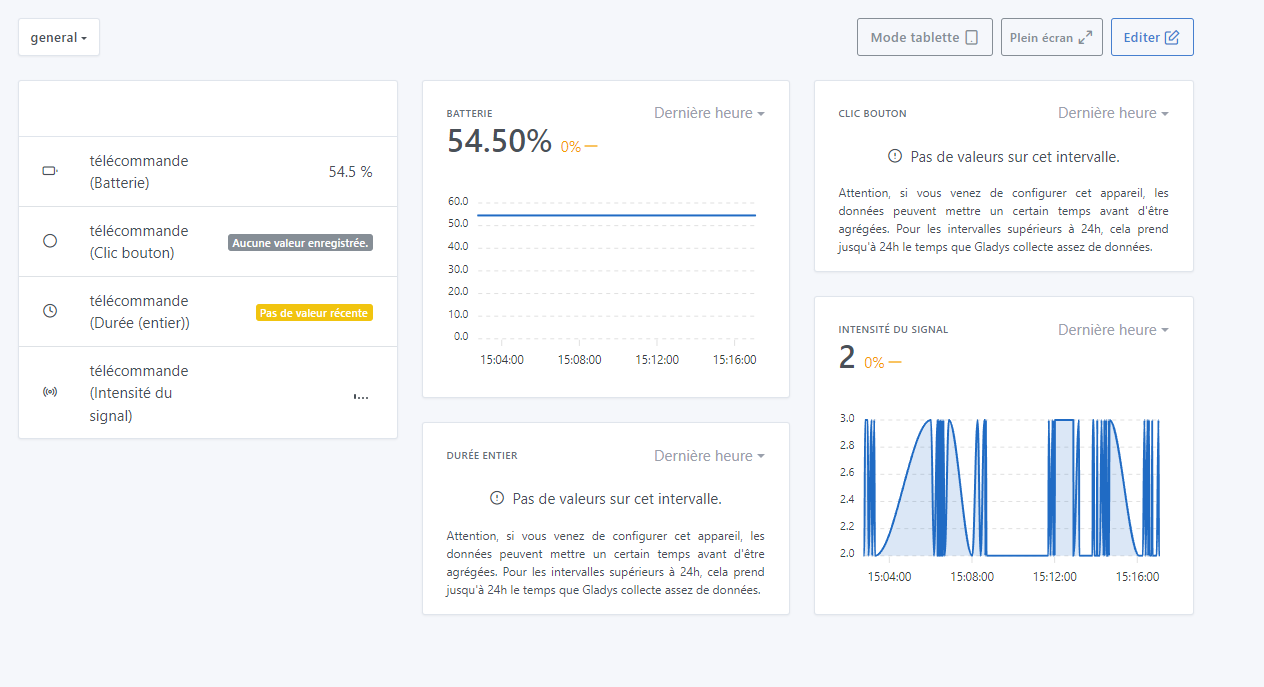
I started integrating the Philips remote and I’ve already added all the button states with the expose action.
It’s annoying actually — manufacturers could do common things instead of giving exposes names specific to each.
Then there’s the expose battery and linkquality which are already available.
There’s still the expose action_duration which indicates a time in seconds, do you want that too?
If I make a Docker image available to you, could you test it?
It’s supposed to be used during a long press, right?
No problem for the test image, I have what I need.
Yes, it must be to indicate how long the button was held down.
I’ll let you know when the image is available
@Tlse-vins , here is the image. I’m waiting for your feedback.
willde71/gladys-test:zigbee2mqtt-philips-324131092621
I have a doubt about the possibility of testing, I have a Raspberry Pi that I use for testing but I only have one Zigbee USB stick and I don’t remember, but if I remove it from my production instance to put it on my test instance, I think I’ll lose my devices.
Can someone confirm or deny?
I don’t think so but I can’t confirm it 100%.
However, do you see anything displayed for the button click or the duration?
In the Zigbee interface, yes, there is the press duration on the 4 buttons.
I’m talking on the Gladys side
I forgot some states:
On the Gladys side, I do see a change in signal intensity when pressing the buttons.
I tried to create a scene when I press ON or OFF, choosing « state change » → « remote (button click) » → « single click or ON or button on pressed or … »
But nothing, it doesn’t work.
However, if I make a scene with
« state change » → « remote (signal intensity) » → « equal to 3 ».
That works for the ON for example, which is a bit strange.
Do you have the possibility to remove features like right arrow click, left arrow click, cube shaken, … which don’t belong to this remote.
From what I saw in Gladys you programmed 4 states:
I would replace:
Note: « relâché » has a circumflex accent on the A.
Here is my first feedback.
Thanks for the work done.
On my side I didn’t touch the signal intensity because it’s a feature already present and used by all Zigbee devices.
I think that pressing a button changes the signal intensity and that’s all, but under no circumstances do you get button feedback instead of the intensity.
For the available actions, I added all the actions indicated in the zigbee2mqtt doc, so all those you listed.
I’ll check tomorrow evening why other actions are showing up, I must have forgotten something. I’ll keep you posted.
For the duration, do you have a value showing in Gladys?
No, I don’t have a duration, I couldn’t get the press-for-x-seconds to work.
I’ve checked and at first glance I haven’t made any mistake.
Do you have a way (like MQTT Explorer) to check the exposes sent by your remote control?
Okay, I’ll try to test tonight.
@Tlse-vins, the modified image following our tests will be ready in about 40 min
willde71/gladys-test:zigbee2mqtt-philips-324131092621