After reinstalling Gladys and restoring the backup with Gladys Plus: there is still no localhost connection from Node-RED to MQTT (I’m still forced to use the Pi’s external IP) 
Is your Pi on DHCP or using a static IP? Give your IP settings
It is set to DHCP but the router always gives it the same IP:
pi@gladys:~ $ ifconfig
docker0: flags=4163<UP,BROADCAST,RUNNING,MULTICAST>  mtu 1500
        inet 172.17.0.1  netmask 255.255.0.0  broadcast 172.17.255.255
        inet6 fe80::42:bbff:fe07:dd17  prefixlen 64  scopeid 0x20<link>
        ether 02:42:bb:07:dd:17  txqueuelen 0  (Ethernet)
        RX packets 1263  bytes 89070 (86.9 KiB)
        RX errors 0  dropped 0  overruns 0  frame 0
        TX packets 658  bytes 50030 (48.8 KiB)
        TX errors 0  dropped 0 overruns 0  carrier 0  collisions 0

eth0: flags=4099<UP,BROADCAST,MULTICAST>  mtu 1500
        ether b8:27:eb:04:da:85  txqueuelen 1000  (Ethernet)
        RX packets 0  bytes 0 (0.0 B)
        RX errors 0  dropped 0  overruns 0  frame 0
        TX packets 0  bytes 0 (0.0 B)
        TX errors 0  dropped 0 overruns 0  carrier 0  collisions 0

lo: flags=73<UP,LOOPBACK,RUNNING>  mtu 65536
        inet 127.0.0.1  netmask 255.0.0.0
        inet6 ::1  prefixlen 128  scopeid 0x10<host>
        loop  txqueuelen 1000  (Local Loopback)
        RX packets 488  bytes 49332 (48.1 KiB)
        RX errors 0  dropped 0  overruns 0  frame 0
        TX packets 488  bytes 49332 (48.1 KiB)
        TX errors 0  dropped 0 overruns 0  carrier 0  collisions 0

vethaa1435d: flags=4163<UP,BROADCAST,RUNNING,MULTICAST>  mtu 1500
        inet 169.254.185.214  netmask 255.255.0.0  broadcast 169.254.255.255
        inet6 fe80::ee34:67b3:cc3b:d1fb  prefixlen 64  scopeid 0x20<link>
        inet6 fe80::d42d:56ff:fe28:216b  prefixlen 64  scopeid 0x20<link>
        ether d6:2d:56:28:21:6b  txqueuelen 0  (Ethernet)
        RX packets 1198  bytes 99545 (97.2 KiB)
        RX errors 0  dropped 0  overruns 0  frame 0
        TX packets 677  bytes 61013 (59.5 KiB)
        TX errors 0  dropped 0 overruns 0  carrier 0  collisions 0

vethf80d102: flags=4163<UP,BROADCAST,RUNNING,MULTICAST>  mtu 1500
        inet 169.254.7.213  netmask 255.255.0.0  broadcast 169.254.255.255
        inet6 fe80::ca34:d937:f71d:8d6a  prefixlen 64  scopeid 0x20<link>
        ether de:36:65:bf:9a:a7  txqueuelen 0  (Ethernet)
        RX packets 14  bytes 1992 (1.9 KiB)
        RX errors 0  dropped 0  overruns 0  frame 0
        TX packets 115  bytes 22736 (22.2 KiB)
        TX errors 0  dropped 0 overruns 0  carrier 0  collisions 0

wlan0: flags=4163<UP,BROADCAST,RUNNING,MULTICAST>  mtu 1500
        inet 192.168.3.2  netmask 255.255.255.0  broadcast 192.168.3.255
        inet6 fe80::295e:6747:d5b8:a66e  prefixlen 64  scopeid 0x20<link>
        ether b8:27:eb:51:8f:d0  txqueuelen 1000  (Ethernet)
        RX packets 20426  bytes 4225635 (4.0 MiB)
        RX errors 0  dropped 0  overruns 0  frame 0
        TX packets 57141  bytes 5969442 (5.6 MiB)
        TX errors 0  dropped 0 overruns 0  carrier 0  collisions 0
Is your router handling DHCP? Have you changed any settings on that side?
I’d lean toward a problem on that side, like the address pool being too small (an address in the 169 range is APIPA when a DHCP server doesn’t provide an address)
My Pi is connected to the WLAN at
yes, but when it connects, it gets an IP and the DNS from the DHCP server; if the DNS isn’t good there’s no name resolution for localhost, so you need to check those points
what do you get if you do a « ping localhost »?
pi@gladys:~ $ ping localhost
PING localhost(localhost (::1)) 56 data bytes
64 bytes from localhost (::1): icmp_seq=1 ttl=64 time=0.198 ms
64 bytes from localhost (::1): icmp_seq=2 ttl=64 time=0.127 ms
64 bytes from localhost (::1): icmp_seq=3 ttl=64 time=0.129 ms
64 bytes from localhost (::1): icmp_seq=4 ttl=64 time=0.121 ms
64 bytes from localhost (::1): icmp_seq=5 ttl=64 time=0.125 ms
64 bytes from localhost (::1): icmp_seq=6 ttl=64 time=0.118 ms
^C
--- localhost ping statistics ---
6 packets transmitted, 6 received, 0% packet loss, time 5117ms
rtt min/avg/max/mdev = 0.118/0.136/0.198/0.027 ms
Oh, it’s using IPv6! 
I only just realized you were talking about the vethaa1435d and vethf80d102 interfaces… Are those Docker interfaces?
In fact the DHCP server is on a router running pfSense, and they upgraded not long ago, switching to Kea DHCP.

First, you should restrict your IP range (how many machines can connect in total?) then check that there aren’t static leases assigned within the DHCP range, your range end is .254 — what are the DHCP configuration settings? Post screenshots

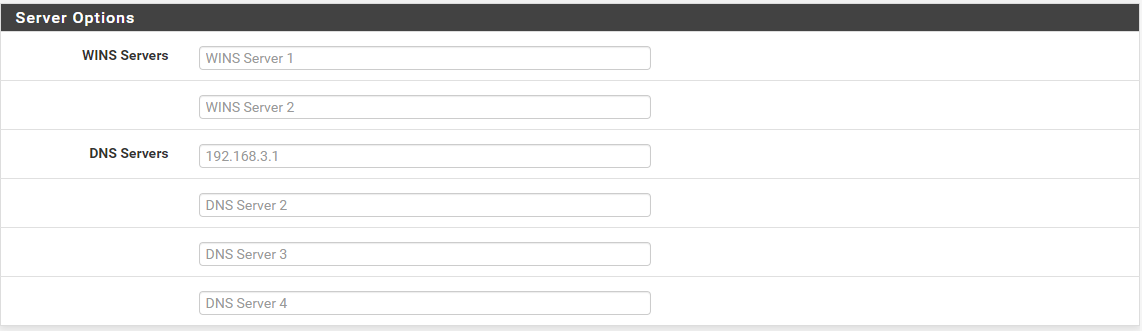
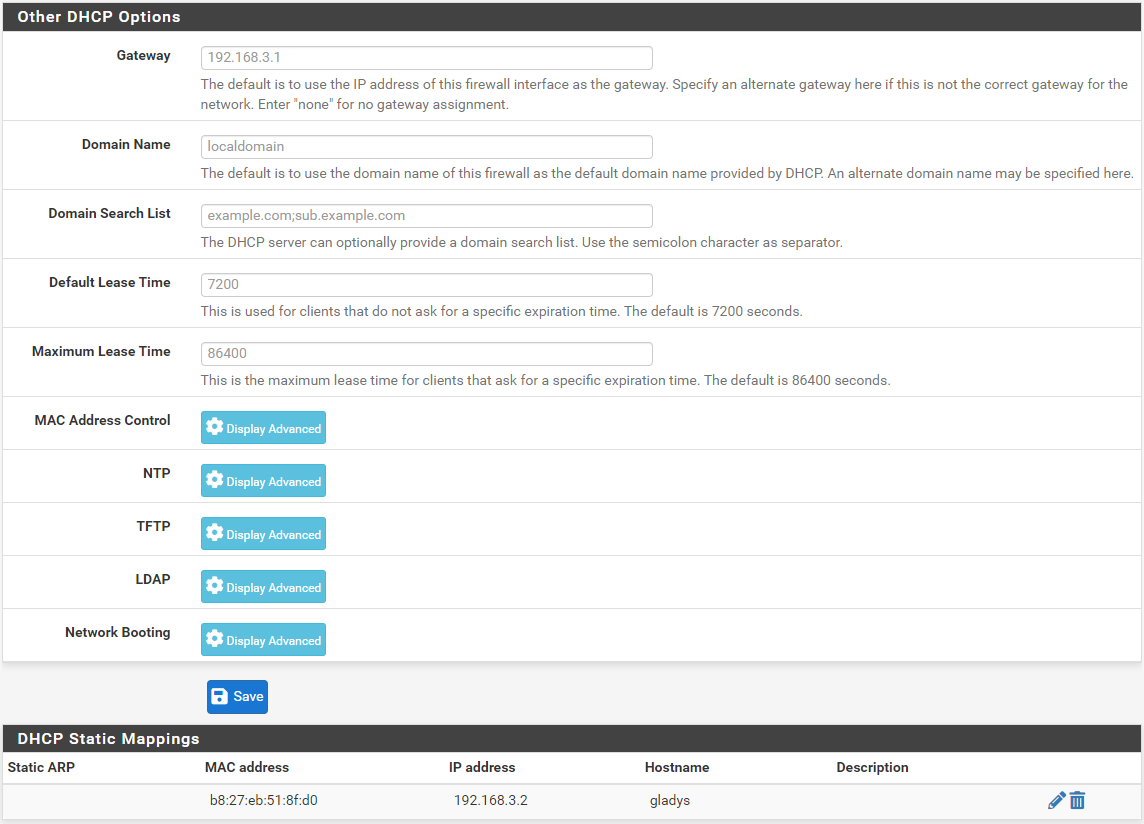
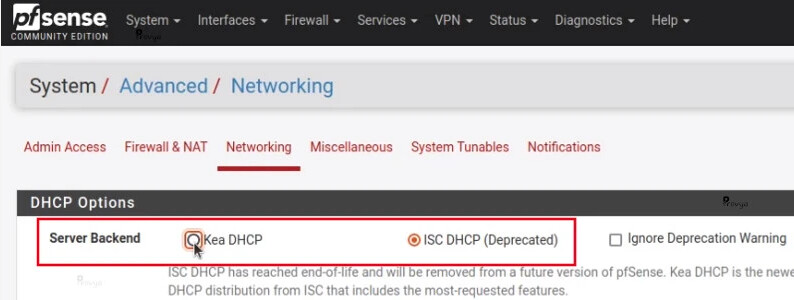
Unfortunately this does not solve the problem…
My Pi still has APIPA IP settings:
ifconfig
docker0: flags=4163\u003cUP,BROADCAST,RUNNING,MULTICAST\u003e  mtu 1500
        inet 172.17.0.1  netmask 255.255.0.0  broadcast 172.17.255.255
        inet6 fe80::42:f9ff:fed3:6c69  prefixlen 64  scopeid 0x20\u003clink\u003e
        ether 02:42:f9:d3:6c:69  txqueuelen 0  (Ethernet)
        RX packets 1718  bytes 3679458 (3.5 MiB)
        RX errors 0  dropped 0  overruns 0  frame 0
        TX packets 1311  bytes 176803 (172.6 KiB)
        TX errors 0  dropped 0 overruns 0  carrier 0  collisions 0

eth0: flags=4099\u003cUP,BROADCAST,MULTICAST\u003e  mtu 1500
        ether b8:27:eb:04:da:85  txqueuelen 1000  (Ethernet)
        RX packets 0  bytes 0 (0.0 B)
        RX errors 0  dropped 0  overruns 0  frame 0
        TX packets 0  bytes 0 (0.0 B)
        TX errors 0  dropped 0 overruns 0  carrier 0  collisions 0

lo: flags=73\u003cUP,LOOPBACK,RUNNING\u003e  mtu 65536
        inet 127.0.0.1  netmask 255.0.0.0
        inet6 ::1  prefixlen 128  scopeid 0x10\u003chost\u003e
        loop  txqueuelen 1000  (Local Loopback)
        RX packets 42  bytes 3908 (3.8 KiB)
        RX errors 0  dropped 0  overruns 0  frame 0
        TX packets 42  bytes 3908 (3.8 KiB)
        TX errors 0  dropped 0 overruns 0  carrier 0  collisions 0

vethd525927: flags=4163\u003cUP,BROADCAST,RUNNING,MULTICAST\u003e  mtu 1500
        inet 169.254.232.120  netmask 255.255.0.0  broadcast 169.254.255.255
        inet6 fe80::dc28:a3ff:fecb:5de0  prefixlen 64  scopeid 0x20\u003clink\u003e
        ether de:28:a3:cb:5d:e0  txqueuelen 0  (Ethernet)
        RX packets 10  bytes 1338 (1.3 KiB)
        RX errors 0  dropped 0  overruns 0  frame 0
        TX packets 84  bytes 13922 (13.5 KiB)
        TX errors 0  dropped 0 overruns 0  carrier 0  collisions 0

vethf524cbe: flags=4163\u003cUP,BROADCAST,RUNNING,MULTICAST\u003e  mtu 1500
        inet 169.254.242.6  netmask 255.255.0.0  broadcast 169.254.255.255
        inet6 fe80::d931:ac3f:980e:dfff  prefixlen 64  scopeid 0x20\u003clink\u003e
        ether a2:e3:28:58:34:f2  txqueuelen 0  (Ethernet)
        RX packets 1708  bytes 3702172 (3.5 MiB)
        RX errors 0  dropped 0  overruns 0  frame 0
        TX packets 1329  bytes 180485 (176.2 KiB)
        TX errors 0  dropped 0 overruns 0  carrier 0  collisions 0

wlan0: flags=4163\u003cUP,BROADCAST,RUNNING,MULTICAST\u003e  mtu 1500
        inet 192.168.3.2  netmask 255.255.255.0  broadcast 192.168.3.255
        inet6 fe80::295e:6747:d5b8:a66e  prefixlen 64  scopeid 0x20\u003clink\u003e
        ether b8:27:eb:51:8f:d0  txqueuelen 1000  (Ethernet)
        RX packets 3966  bytes 866577 (846.2 KiB)
        RX errors 0  dropped 0  overruns 0  frame 0
        TX packets 11066  bytes 4707450 (4.4 MiB)
        TX errors 0  dropped 0 overruns 0  carrier 0  collisions 0
if your network interface isn’t connected that’s normal
And in Node-RED what does it show after switching to ISC DHCP?
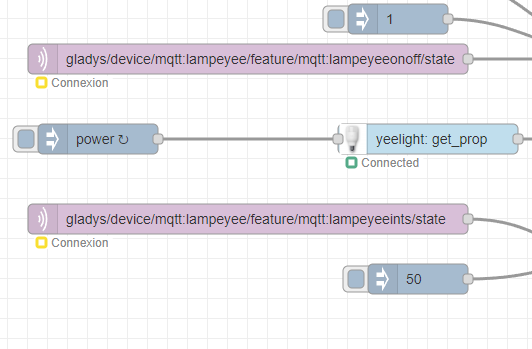
you’re going to have to resign yourself to putting the MQTT broker’s IP, by the way I realized I have this config!  why didn’t I compare earlier
A logical explanation: each container has its own IP so localhost in Node-RED points to the Node-RED container’s IP (I had mqtt://locahost that worked in Node-RED but because Node-RED wasn’t running in a container but installed on the machine it pointed to the machine’s IP, I didn’t remember  )
)
Yes, what you’re saying makes a lot of sense!
I’ll put the broker’s IP!
Anyway, thanks for the help and your patience! 
I’ll use the external IP instead because Eclipse Mosquitto doesn’t have an IP ^^
 docker network inspect host

...
 "8d5d3be6e46fd2bae5294c93c0a869abfff7885215147b10071e06e6a5d9f679": {
                "Name": "eclipse-mosquitto",
                "EndpointID": "ac5f67563a2ba5be196e203455dbabeb39c8878dafc9d7239b18088f4b2a437b",
                "MacAddress": "",
                "IPv4Address": "",
                "IPv6Address": ""
            }
...
yes… that of the Pi … so the external IP!
In this case it shares the machine’s IP
A bit more explanation here!