Integrating your devices using infrared technology into Gladys can be done very easily using the Tasmota integration, a Wemos D1 Mini and a little bit of soldering…
It is also possible to do the assembly using a « sucre » but well, don’t overdo it
Materials
A Wemos D1 Mini
An infrared LED (personally, I don’t buy them but salvage them from old remotes)
A resistor (between 100ohm and 220ohm), new or salvaged
An infrared receiver (TSOP type, new or salvaged from an old device such as a CD player)
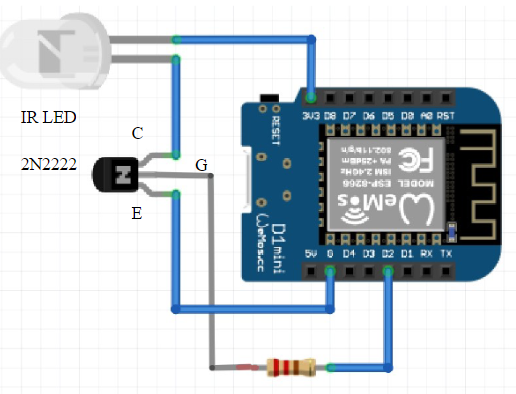
Optional: A 2N2222 transistor
Assembly
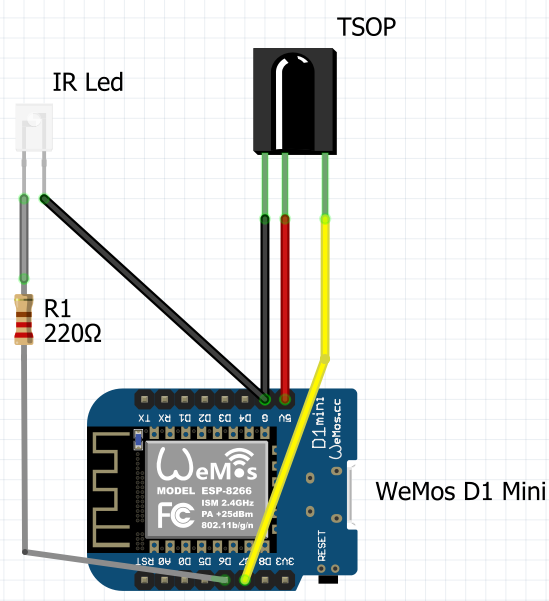
Simple version:
LED on D6, receiver on D7
Which one to choose?
If you plan to control an air conditioning system, the -IR version. Otherwise, the other one will work fine!
I refer you to this tutorial for flashing and configuration (I will rewrite a tutorial about that).
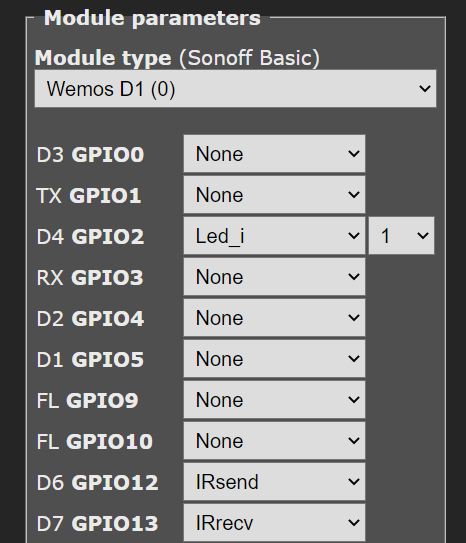
So I was saying, after flashing and configuring the module and MQTT in the Wemos module on the Tasmota page, click on Configuration>*Configure Module* and choose the following options:
Hello, @GBoulvin
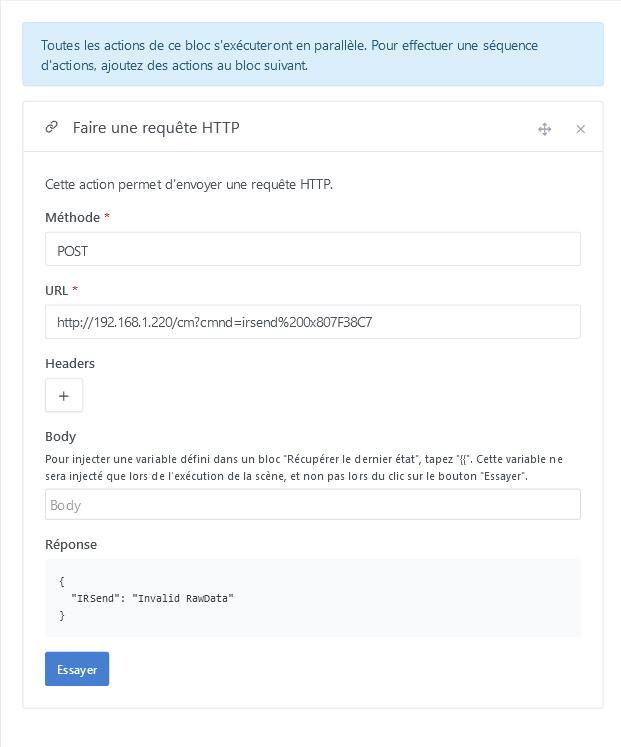
I’m back on my Wemos Infrared. So I followed your tutorial [RF433 in Gladys via Tasmota] and adapted it to IR, it works, I do receive my codes (in hex), but when I resend them with the direct command IP/cm?cmnd=irsend%20xxxxx, I get this response {"IRSend":"Invalid RawData"}, of course I’m sending a code in hex,
My question is how can I find the RAW data code corresponding to my hex code?
What does the trigger value « 123456 » correspond to?
To send a hexadecimal number to Tasmota, you need to add ‹ 0x › before your hex code, e.g.: irsend 0x0F0F0F…
Edit: never mind, I see you’ve done it
The Tasmota documentation page is this one: IRSend RAW Encoding - Tasmota
I’ll read it and get back to you
Edit 2: in the Tasmota console, what is the result when you receive an IR event (Received) to know whether it’s a specific protocol
and adapted for the URL, it gives this: http://192.168.1.220/cm?cmnd= IRSend {« Protocol »:« NEC »,« Bits »:32,« Data »: 0x807F38C7}
Thanks again for your help
Have a nice day
Excellent news!
Sorry for not following up on your request for the tutorial. I completely forgot about it.
I see I have several tutorials to finish. I’ll get back to them
Since it’s fresh in your mind, do you want to continue it (this tutorial)?