Have you tried setting the baud rate to 115200 in your program instead of 9600?
When I use 9600 baud I get this :
������������������������
Or
all little squares
Well, in Jérôme’s code you replace the baud rate 9600 with 115200.
Well, I think I found part of the solution.
By redoing the code step by step, I found that when I comment out these three lines of code, I get a result
// pinMode(TRIGGER_PIN, OUTPUT);
// digitalWrite(TRIGGER_PIN, LOW); // The TRIGGER pin must be LOW at rest
// pinMode(ECHO_PIN, INPUT);
I get this result:
…
WiFi connection established
=> IP Address : 192.168.1.59 MQTT Test :
Connecting to MQTT server…KO, error: -2 Waiting 5 seconds before retrying
Connecting to MQTT server…KO, error: -2 Waiting 5 seconds before retrying
if I uncomment them, I get this :
ets Jan 8 2013,rst cause:4, boot mode:(3,6)
wdt reset
load 0x4010f000, len 3460, room 16
tail 4
chksum 0xcc
load 0x3fff20b8, len 40, room 4
tail 4
chksum 0xc9
csum 0xc9
v00045410
~ld
These are the same details as in my message 44
No more WiFi connection
In my opinion, the problem comes from these three lines!
But why?
Any idea?

In your code you do have these lines:
We’re getting somewhere.
Why didn’t the MQTT connection work?
Otherwise, can you paste the full code for us?
Are you sure that your D6 and D7 pins are the right ones? Digital pins, not analog ones?
Here is the full code :
#include <ESP8266WiFi.h>
#include <PubSubClient.h>
/* WIFI */
#define wifi_ssid « Txxxxxxxxxxx8 » // your wifi ssid
#define wifi_password « xxxxxxxxxxx » // your wifi password/* MQTT */
#define mqtt_server « 192.168.1.1xx »
#define mqtt_user « gladys » // username
#define mqtt_password « bxxxxxxxxxxxxxxx » // MQTT password
#define gladys_topic « gladys/master/device/mqtt:citerne1:capteur-ultrason/feature/mqtt:citerne1:capteur-ultrason:quantite/state »
#define mqtt_cuve « mqtt:citerne1:capteur-ultrason » // Tank sensor topic/* Buffer qui permet de décoder les messages MQTT reçus /
/ Buffer that decodes received MQTT messages */
char message_buff[100];
long lastMsg = 0; // Timestamp of the last message published to MQTT
long lastRecu = 0;
bool debug = false; // Displays on the console if True/* Constantes pour les broches /
/ Constants for the pins */
const byte TRIGGER_PIN = 7; // TRIGGER pin
const byte ECHO_PIN = 6; // ECHO pin/* Constantes pour le timeout /
/ Constants for the timeout */
const unsigned long MEASURE_TIMEOUT = 25000UL; // 25ms = ~8m at 340m/s/* Vitesse du son dans l’air en mm/us /
/ Speed of sound in air in mm/us */
const float SOUND_SPEED = 340.0 / 1000;//Création des objets
// Creation of objects
WiFiClient espClient;
PubSubClient client(espClient);
//Connexion au réseau WiFi
// Connection to the WiFi networkvoid setup() {
Serial.begin(115200); // Optional for debug/* Initialise les broches /
/ Initialize the pins */
//pinMode(TRIGGER_PIN, OUTPUT);
//digitalWrite(TRIGGER_PIN, LOW); // The TRIGGER pin must be LOW at rest
//pinMode(ECHO_PIN, INPUT);setup_wifi(); // We connect to the wifi network
client.setServer(mqtt_server, 1883); // Configure the connection to the MQTT server
}
void setup_wifi() {
delay(10);
Serial.println(« \r\n\r\nxxxxxxxxxxx START xxxxxxxxxxxxxxx »);
Serial.print(« Connexion à « );
Serial.println(wifi_ssid);
//WiFi.disconnect();
//WiFi.mode(WIFI_STA);
WiFi.begin(wifi_ssid, wifi_password);
while (WiFi.status() != WL_CONNECTED) {
delay(500);
Serial.print( ». »);
}
Serial.println(« . »);
Serial.println("Connexion WiFi etablie « );
Serial.print( »=> Adresse IP : ");
Serial.print(WiFi.localIP());
}//Reconnexion
// Reconnection
void reconnect() {
Serial.println(" Test MQTT : ");//Boucle jusqu’à obtenir une reconnexion
// Loop until a reconnection is obtained
while (!client.connected()) {
Serial.print(« Connexion au serveur MQTT… »);
if (client.connect(« ESP8266Client », mqtt_user, mqtt_password)) {
Serial.println(« OK »);
} else {
Serial.print(« KO, erreur : « );
Serial.print(client.state());
Serial.println( » On attend 5 secondes avant de recommencer »);
delay(5000);
}
}
}
void loop() {
if (!client.connected()) {
reconnect();
}
client.loop();
long now = millis();/Envoi d’un message par minute/
/* Send a message every minute */
if (now - lastMsg > 1000 * 60) {
lastMsg = now;/* 1. Lance une mesure de distance en envoyant une impulsion HIGH de 10µs sur la broche TRIGGER */ /* 1. Start a distance measurement by sending a 10µs HIGH pulse on the TRIGGER pin */ digitalWrite(TRIGGER_PIN, HIGH); delayMicroseconds(10); digitalWrite(TRIGGER_PIN, LOW); /* 2. Mesure le temps entre l'envoi de l'impulsion ultrasonique et son écho (si il existe) */ /* 2. Measure the time between sending the ultrasonic pulse and its echo (if it exists) */ long measure = pulseIn(ECHO_PIN, HIGH, MEASURE_TIMEOUT); /* 3. Calcul la distance à partir du temps mesuré */ /* 3. Calculate the distance from the measured time */ int distance_mm = measure / 2.0 * SOUND_SPEED; float c = 20 - distance_mm; // VERY IMPORTANT Replace 2000 with the height of your tank c = c / 20; c = c * 100; //Inutile d'aller plus loin si le capteur ne renvoi rien // No need to go further if the sensor returns nothing if ( isnan(c)) { Serial.println("Echec de lecture ! Verifiez votre capteur HRC-04"); return; } if ( debug ) { Serial.print("Cuve : "); Serial.print(c); } client.publish(gladys_topic, String(c).c_str(), true); // Publie le % de la cuve sur le topic dans gladys}
}
I need to check
I don’t know!
Maybe the IP address!
Is it the eth0 or wlan0 address that you need to specify?
The one you use
If you’re on wifi => wlan
Cable => eth
Don’t hesitate to use tags to format the code, there’s a tutorial
It will be more readable for us
I just tested it — it’s indeed more readable
#include \u003cESP8266WiFi.h\u003e
#include \u003cPubSubClient.h\u003e
/* WIFI */
#define wifi_ssid "Txxxxxxxxx8" // your WiFi ssid
#define wifi_password "xxxxxxxxxx" // your WiFi password
/* MQTT */
#define mqtt_server "192.168.1.1xx"
#define mqtt_user "gladys" // username
#define mqtt_password "bxxxxxxxxxxxxxV" // MQTT password
#define gladys_topic "gladys/master/device/mqtt:citerne1:capteur-ultrason/feature/mqtt:citerne1:capteur-ultrason:quantite/state"
#define mqtt_cuve "mqtt:citerne1:capteur-ultrason" // Tank sensor topic
/* Buffer that allows decoding received MQTT messages */
char message_buff[100];
long lastMsg = 0; // Timestamp of the last message published on MQTT
long lastRecu = 0;
bool debug = false; // Displays on the console if true
/* Constants for the pins */

const byte TRIGGER_PIN = 7; // TRIGGER pin
const byte ECHO_PIN = 6;    // ECHO pin
/* Constants for the timeout */
const unsigned long MEASURE_TIMEOUT = 25000UL; // 25ms = ~8m at 340m/s
/* Speed of sound in air in mm/us */
const float SOUND_SPEED = 340.0 / 1000;
// Creation of objects
WiFiClient espClient;
PubSubClient mqttclient(espClient);
// Connection to the WiFi network
void setup() {
Serial.begin(115200); // Optional for debug
/* Initialize the pins */
//pinMode(TRIGGER_PIN, OUTPUT);
//digitalWrite(TRIGGER_PIN, LOW); // The TRIGGER pin must be LOW at rest
//pinMode(ECHO_PIN, INPUT);
setup_wifi(); // We connect to the WiFi network
mqttclient.setServer(mqtt_server, 1883); // Configuration of the connection to the MQTT server
}
void setup_wifi() {
delay(10);
Serial.println("\\r\\n\\r\\nxxxxxxxxxxx START xxxxxxxxxxxxxxx");
Serial.print("Connexion à ");
Serial.println(wifi_ssid);
//WiFi.disconnect();
//WiFi.mode(WIFI_STA);
WiFi.begin(wifi_ssid, wifi_password);
while (WiFi.status() != WL_CONNECTED) {
delay(500);
Serial.print(".");
}
Serial.println(".");
Serial.print("Connexion WiFi établie ");
Serial.print("=\\u003e Adresse IP : ");
Serial.println(WiFi.localIP());
}
// Reconnection
void reconnect() {
Serial.print("Test MQTT : ");
Serial.print("=\\u003e Adresse IP : ");
Serial.println(mqtt_server);
// Loop until reconnection obtained
while (!mqttclient.connected()) {
Serial.print("Connexion au serveur MQTT...");
if (mqttclient.connect("ESP8266Client", mqtt_user, mqtt_password)) {
Serial.println("OK");
} else {
Serial.print("KO, erreur : ");
Serial.print(mqttclient.state());
Serial.println(" On attend 5 secondes avant de recommencer");
delay(5000);
}
}
}
void loop() {
if (!mqttclient.connected()) {
reconnect();
}
mqttclient.loop();
long now = millis();
/*Send a message every minute*/
if (now - lastMsg \u003e 1000 * 60) {
lastMsg = now;
/* 1. Start a distance measurement by sending a 10µs HIGH pulse on the TRIGGER pin */
digitalWrite(TRIGGER_PIN, HIGH);
delayMicroseconds(10);
digitalWrite(TRIGGER_PIN, LOW);
/* 2. Measure the time between sending the ultrasonic pulse and its echo (if it exists) */
long measure = pulseIn(ECHO_PIN, HIGH, MEASURE_TIMEOUT);
/* 3. Calculate the distance from the measured time */
int distance_mm = measure / 2.0 * SOUND_SPEED;
float c = 20 - distance_mm; // VERY IMPORTANT Replace 2000 with the height of your tank
c = c / 20;
c = c * 100;
// No need to go further if the sensor returns nothing
if ( isnan(c)) {
Serial.println("Echec de lecture ! Verifiez votre capteur HRC-04");
return;
}
if ( debug ) {
Serial.print("Cuve : ");
Serial.print(c);
}
mqttclient.publish(gladys_topic, String(c).c_str(), true); // Publishes the % of the tank on the topic in Gladys
}
}
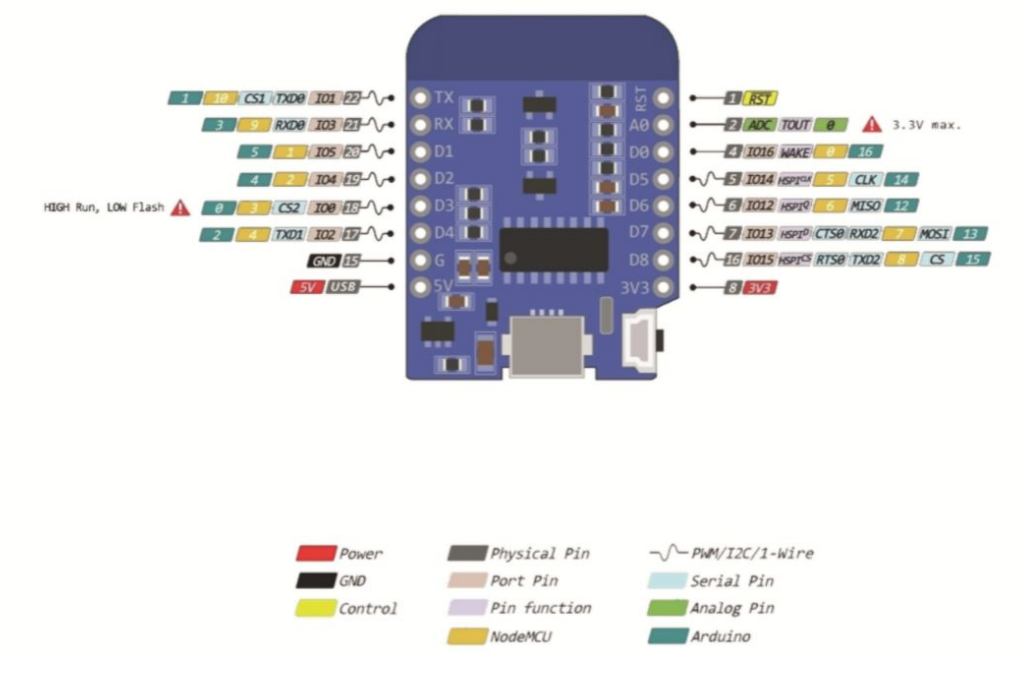
Why, after Serial.begin(115200), at the pinmode level did you put //?
This is used to add comments. You need to remove them, or was that just for the test you mentioned earlier to show that the WiFi connection was established without them?
It’s to put a comment
Hello,
Regarding the error reported in my post 84:
I found the solution to stop getting these messages:
it’s the ````"while
It just requires having something on the USB port; the day you set it up on your tank you won’t have anything on that port if I’m not mistaken.
Hello,
I’m continuing my exploration!
In this part of the script :
 //Reconnect
void reconnect() {
Serial.println("Connection MQTT : ");
Serial.println("=> Adresse IP : ");
Serial.println(mqtt_server);
  //Loop until a reconnection is obtained
  while (!mqttclient.connected()) {
    Serial.print("Connexion au serveur MQTT...");
    if (mqttclient.connect("ESP8266Client", mqtt_user, mqtt_password)) {
      Serial.println("OK");
    } else {
      Serial.print("KO, erreur : ");
      Serial.print(mqttclient.state());
      Serial.println(" On attend 5 secondes avant de recommencer");
      delay(5000);
    }
 }
}
Result :
........
Connexion WiFi établie => Adresse IP : 192.168.1.59
Connection MQTT : => Adresse IP : 192.168.1.188
Connexion au serveur MQTT...KO, erreur : -2 On attend 5 secondes avant de recommencer
Connexion au serveur MQTT...KO, erreur : -2 On attend 5 secondes avant de recommencer
Connexion au serveur MQTT...KO, erreur : -2 On attend 5 secondes avant de recommencer
When I test with « MQTT Explorer », I get the following result :
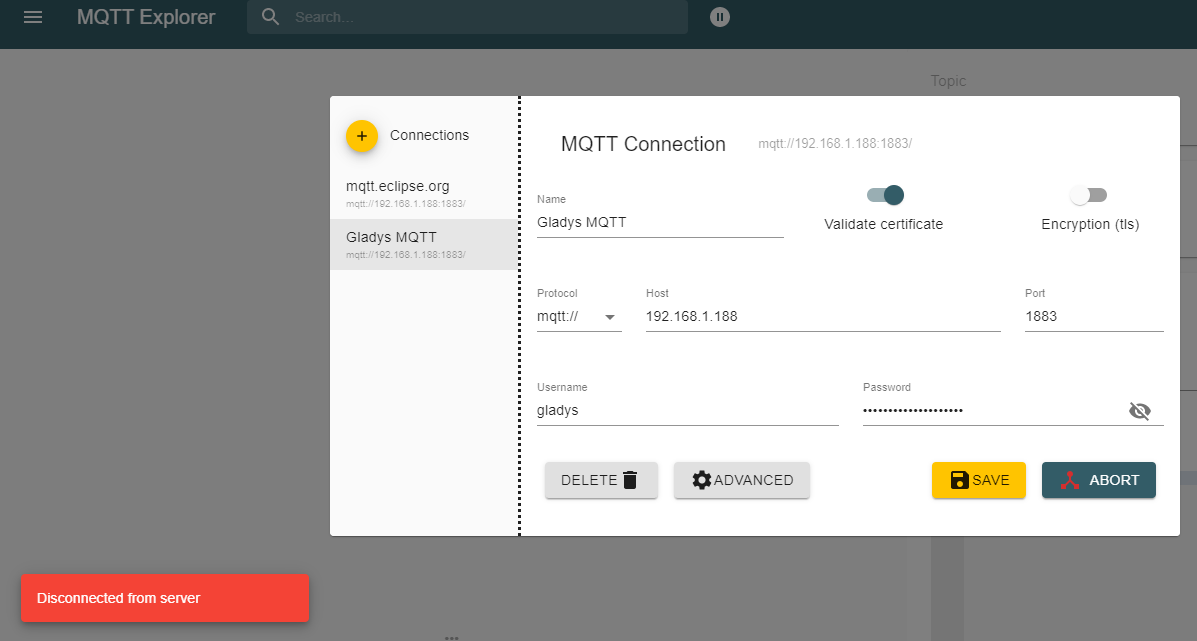
Disconnected from server
Do I need to do anything special on the Raspberry Pi?
My MQTT configuration :

Any idea?
On my side, no idea. I hope someone can help you
Is your address 192.168.1.188 your Gladys install? What is it installed on, a Raspberry Pi? A NAS server? Or something else?
Aside from asking ‹ are you sure you wrote down the password correctly, paying attention to lowercase and uppercase? ›, I don’t see it either…
Indeed, that’s the IP address of my Raspberry Pi on which Gladys is installed
I copied and pasted the password that is in the MQTT configuration