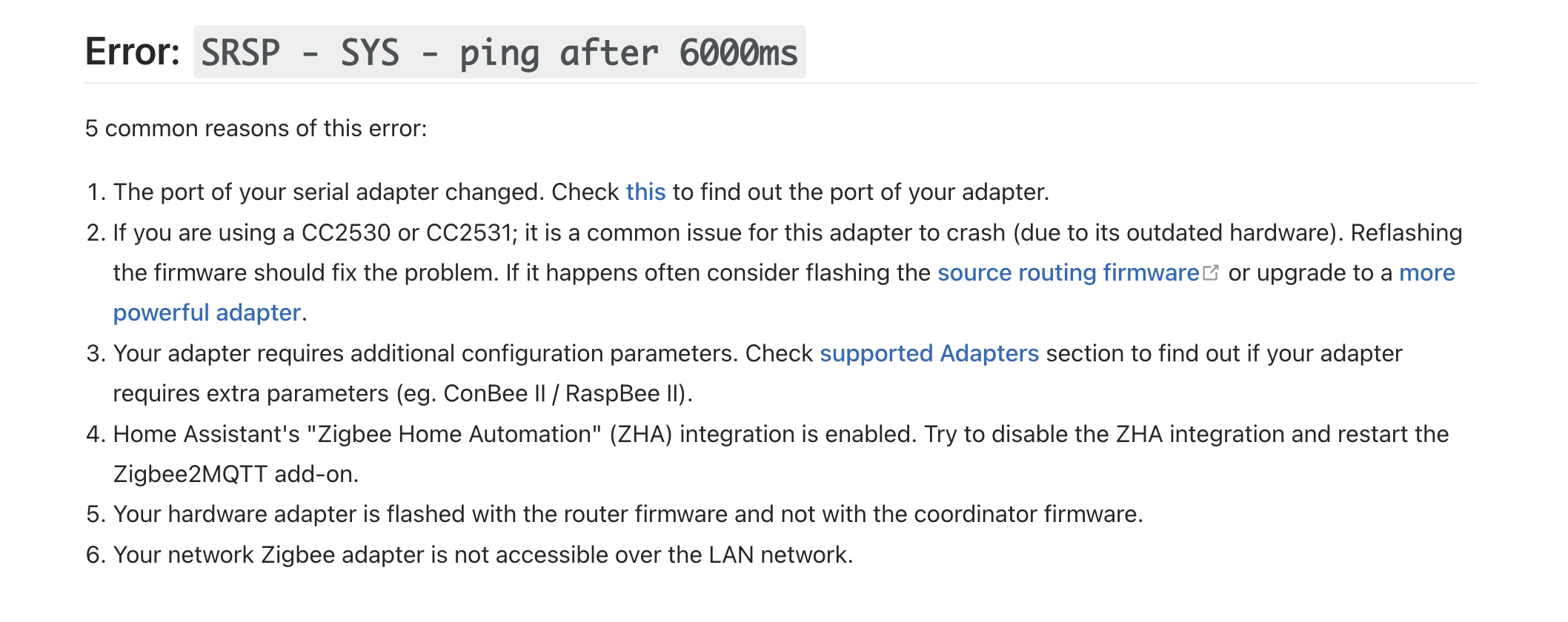
Good evening, my zigbee2mqtt is not working again. Since the day before yesterday evening nothing has been working. I no longer have access to the zigbee2mqtt interface that was working before. On the Gladys side everything seems configured and started correctly. When I run docker ps I see all my containers running. But when I run « docker logs gladys-z2m-zigbee2mqtt » I can clearly see there is a problem but I don’t know where it comes from. Previously I deleted the zigbee2mqtt container and reconfigured everything, and had to pair all my devices again. This time I tried restoring a version that had worked but it didn’t change anything.
I don’t know if it’s related — and it shouldn’t be since it has nothing to do with zigbee — but my blinds controlled via RFlink and Node-RED also stopped working since the day before yesterday evening.
Zigbee2MQTT:info  2023-05-31 18:56:50: Starting Zigbee2MQTT version 1.30.4 (comm                                                                                     it #b2dd21e)
Zigbee2MQTT:info  2023-05-31 18:56:50: Starting zigbee-herdsman (0.14.111)
Zigbee2MQTT:error 2023-05-31 18:57:10: Error while starting zigbee-herdsman
Zigbee2MQTT:error 2023-05-31 18:57:10: Failed to start zigbee
Zigbee2MQTT:error 2023-05-31 18:57:10: Check https://www.zigbee2mqtt.io/guide/in                                                                                        stallation/20_zigbee2mqtt-fails-to-start.html for possible solutions
Zigbee2MQTT:error 2023-05-31 18:57:10: Exiting...
Zigbee2MQTT:error 2023-05-31 18:57:10: Error: Failed to connect to the adapter (                                                                                        Error: SRSP - SYS - ping after 6000ms)
    at ZStackAdapter.start (/app/node_modules/zigbee-herdsman/src/adapter/z-stac                                                                                        k/adapter/zStackAdapter.ts:103:27)
    at Controller.start (/app/node_modules/zigbee-herdsman/src/controller/contro                                                                                        ller.ts:132:29)
    at Zigbee.start (/app/lib/zigbee.ts:58:27)
    at Controller.start (/app/lib/controller.ts:101:27)
    at start (/app/index.js:107:5)
Using '/app/data' as data directory
Zigbee2MQTT:info  2023-05-31 18:57:12: Logging to console and directory: '/app/d                                                                                        ata/log/2023-05-31.18-57-12' filename: log.txt
There’s your error.
Many of us have encountered this error.
What hardware did you install Gladys on?
Good evening, I’ve been using a mini PC Optiplex 3040M since the month of February. It was at that time that I lost Zigbee and had to re-pair everything. Since then, everything has been working correctly.
Strange. I also use a mini PC and everything has been working fine since the change.
Have you already flashed the USB stick?
My dongle is a Sonoff, the same as the one in Pierre Gille’s video tutorial. I didn’t need to flash it.
Hello,
Have you tried changing the USB port and then reconfiguring the dongle in Gladys?
Hello, I changed the USB port of my RFLink and my Zigbee key and I restarted the configuration and it didn’t change anything. Do I need to delete the Zigbee container before restarting the config? Gladys keeps telling me that everything is plugged in and configured correctly. And for my RFLink, Node-RED tells me it is connected to it.
Please, does anyone know if I should delete everything?
I solved my problem without understanding how. I had tried everything before following zigbee2mqtt’s suggestions, as you suggested to me, Pierre Gilles. I typed the command " ls -l /dev/serial/by-id" to check if my Sonoff dongle was on the right USB port and apparently it not only checked, it also solved my problem. I recovered all my devices and my scenes. One problem solved and another appears. Gladys tells me that my Node Red container has been stopped for 4 months and I can’t restart it. 12 days ago Node Red was working perfectly because my shutters were working.
Hello, I again have a problem: no more Zigbee since yesterday afternoon. My logs stop at 15:34 and then I have this.
ure chambre 1', payload '{\"battery\":100,\"humidity\":61.15,\"linkquality\":162,\"temp                                                                                        erature\":23.88,\"voltage\":3000}'
Zigbee2MQTT:info  2023-06-25 06:26:59: MQTT publish: topic 'zigbee2mqtt/Températ                                                                                        ure chambre 1', payload '{\"battery\":100,\"humidity\":60.38,\"linkquality\":159,\"temp                                                                                        erature\":23.88,\"voltage\":3000}'
error from daemon in stream: Error grabbing logs: invalid character '\\x00' looki                                                                                        ng for beginning of value
I searched and found on the Docker website and as I understand it, Docker needs to be reinstalled. What do you think?
Searching the internet, apparently this means that your Docker logs are corrupted.
Several possible causes:
- Are you on micro-SD storage and have you suffered file corruption?
- Is your instance not very stable, restarting often in an unclean way?
- Are you out of available disk space?
I’m on a mini PC with an SSD and my disk is only 12% used. I’m leaning toward it being an unclean restart. I restart my system by cutting the power to my mini PC and turning it back on.
And is the solution to reinstall Docker?
Ok, indeed shutting a PC down like that isn’t great.
I’m not sure the error you’re seeing there is the real error, but as a first step if you want it to go away, clear the container’s logs:
( Stack Overflow answer: https://stackoverflow.com/a/75723082 )
Arrfff, it’s all Greek to me — I can see that it doesn’t work, but I can’t figure out why.
unbutu@unbutu:~$ sudo sh -c 'echo \"\" \u003e $(docker inspect --format=\"{{.LogPath}}\"gladys-z2m-zigbee2mqtt )'
[sudo] password for unbutu:
"docker inspect" requires at least 1 argument.
See 'docker inspect --help'.

Usage:  docker inspect [OPTIONS] NAME|ID [NAME|ID...]

Return low-level information on Docker objects
sh: 1: cannot create : Directory nonexistent
Just run:
docker inspect --format="{{.LogPath}}" gladys-z2m-zigbee2mqtt
This will give you a path, it’s the path to the log file that contains the logs for this container.
Then do:
rm LE_CHEMIN
(Replace with the value retrieved earlier)
Then:
docker restart gladys-z2m-zigbee2mqtt
And then you can see what it shows in the logs 
I’m getting this.
rm: cannot remove '/var/lib/docker/containers/47f1e5a8bba77449c1fb4e0f171fbb0c2b5d3f2a289442d0910f7e6dddec109d/47f1e5a8bba77449c1fb4e0f171fbb0c2b5d3f2a289442d0910f7e6dddec109d-json.log': Permission denied
I tried with sudo in front, same result.
Did you stop the containers first?
‹ docker stop NomDuContainer ›