How many zigbee2mqtt containers do you have?
docker ps-a
Also, it surprises me that we see a date of 12 days if you just reinstalled
How many zigbee2mqtt containers do you have?
docker ps-a
Also, it surprises me that we see a date of 12 days if you just reinstalled
Don’t worry, the logs are from 12 days ago, not from the current issue
Here are today’s logs
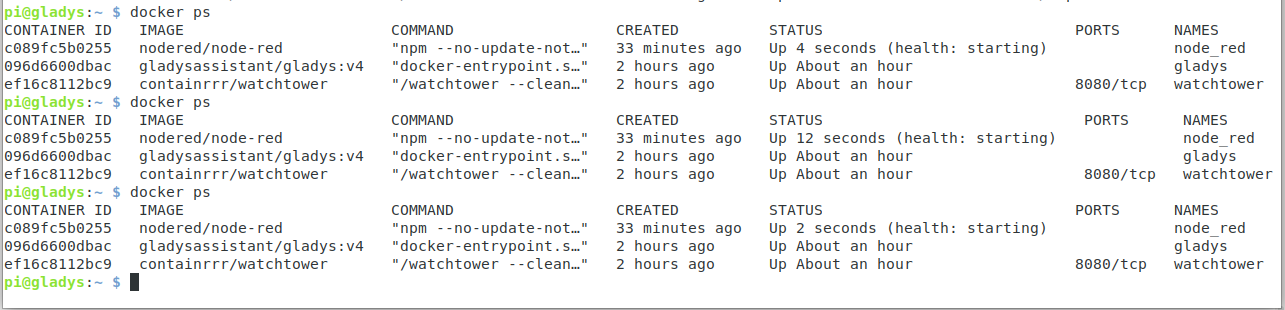
pi@gladys:~ $ docker ps
CONTAINER ID   IMAGE                       COMMAND                  CREATED        STATUS                             PORTS      NAMES
a3aadc45bb2d   nodered/node-red            "npm --no-update-not…"   10 hours ago   Up 11 seconds (health: starting)              node_red
3de89db60721   eclipse-mosquitto:2         "/docker-entrypoint.…"   10 hours ago   Up 31 minutes                                 eclipse-mosquitto
6ac1456a52ad   koenkk/zigbee2mqtt:latest   "docker-entrypoint.s…"   10 hours ago   Up 32 seconds                                 gladys-z2m-zigbee2mqtt
3194c5b7a37c   eclipse-mosquitto:2         "/docker-entrypoint.…"   10 hours ago   Up 31 minutes                                 gladys-z2m-mqtt
fd45f079236e   gladysassistant/gladys:v4   "docker-entrypoint.s…"   10 hours ago   Up 31 minutes                                 gladys
7ae977fecca2   containrrr/watchtower       "/watchtower --clean…"   10 hours ago   Up 31 minutes                      8080/tcp   watchtower
pi@gladys:~ $ docker ps
CONTAINER ID   IMAGE                       COMMAND                  CREATED        STATUS                                  PORTS      NAMES
a3aadc45bb2d   nodered/node-red            "npm --no-update-not…"   10 hours ago   Restarting (0) Less than a second ago              node_red
3de89db60721   eclipse-mosquitto:2         "/docker-entrypoint.…"   10 hours ago   Up 31 minutes                                      eclipse-mosquitto
6ac1456a52ad   koenkk/zigbee2mqtt:latest   "docker-entrypoint.s…"   10 hours ago   Up Less than a second                              gladys-z2m-zigbee2mqtt
3194c5b7a37c   eclipse-mosquitto:2         "/docker-entrypoint.…"   10 hours ago   Up 31 minutes                                      gladys-z2m-mqtt
fd45f079236e   gladysassistant/gladys:v4   "docker-entrypoint.s…"   10 hours ago   Up 31 minutes                                      gladys
7ae977fecca2   containrrr/watchtower       "/watchtower --clean…"   10 hours ago   Up 31 minutes                           8080/tcp   watchtower
pi@gladys:~ $
But I just noticed that Pascal had a disconnected device, I have several after a power outage, I will investigate this side
Thanks for your answer VonOx
Great, glad everything is working again! 
Just as I exported my flows for backup.
And I thought on Gladys 64-bit version I would have these new updates to install, so I performed the update on the 32-bit version that was in production, thinking I could do a new export of the flows once this update was done, but it never happened because Node-red crashed.
I will still try to install Gladys in 64 bits, I’ll keep you posted.
Good evening Bjm
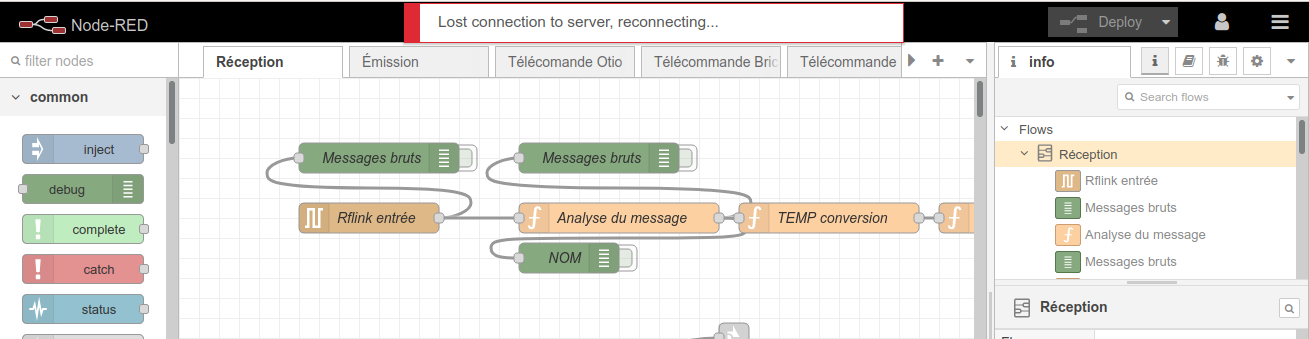
I just did that. I’ve reinstalled everything 4 times. 4 times it crashed, when I install Node_red, either Node RED crashes or there’s no access to the Node RED dashboard (before I get a message saying « server connection lost »), and when I stop Node Red (docker stop node_red), I no longer have a Zigbee2Mqtt connection. At the moment Gladys and Zigbee2Mqtt are working (a day’s work) and I’m afraid to reinstall Node Red (but I will do it). Hang in there 
Oh, that’s it  , keep me updated for the rest.
same, do you have Zigbee2Mqtt?
No, otherwise it would be on your post
They also made an update on April 1st
a docker stop node_red
et
docker start node_red
Doesn’t change anything
especially a node_red log to see why it reboots
Yes, that doesn’t solve anything. I wanted to stop Node-RED to recover Zigbee2Mqtt, because for me it crashes Zigbee2Mqtt.
AND Gladys still works for you.
That’s not a funny April Fool’s joke 
Yes Gladys is still working.
But Node-red is the first thing I installed, I don’t have anything else.
You haven’t even restored your flows?
You can display the Node-RED logs (docker logs node_red) for VonOx
docker logs node_red

> node-red-docker@2.2.2 start /usr/src/node-red
> node $NODE_OPTIONS node_modules/node-red/red.js $FLOWS "--userDir" "/data"

4 Apr 16:42:34 - [info]

Welcome to Node-RED
===================

4 Apr 16:42:34 - [info] Node-RED version: v2.2.2
4 Apr 16:42:34 - [info] Node.js  version: v14.18.2
4 Apr 16:42:34 - [info] Linux 5.10.103-v8+ arm64 LE
4 Apr 16:42:35 - [info] Loading palette nodes
4 Apr 16:42:38 - [info] Settings file  : /data/settings.js
4 Apr 16:42:38 - [info] Context store  : 'default' [module=memory]
4 Apr 16:42:38 - [info] User directory : /data
4 Apr 16:42:38 - [warn] Projects disabled : editorTheme.projects.enabled=false
4 Apr 16:42:38 - [info] Flows file     : /data/flows.json
4 Apr 16:42:38 - [info] Creating new flow file
4 Apr 16:42:38 - [warn]

---------------------------------------------------------------------
Your flow credentials file is encrypted using a system-generated key.

If the system-generated key is lost for any reason, your credentials
file will not be recoverable, you will have to delete it and re-enter
your credentials.

You should set your own key using the 'credentialSecret' option in
your settings file. Node-RED will then re-encrypt your credentials
file using your chosen key the next time you deploy a change.
---------------------------------------------------------------------

4 Apr 16:42:38 - [info] Server now running at http://127.0.0.1:1880/
4 Apr 16:42:38 - [info] Starting flows
4 Apr 16:42:38 - [info] Started flows
4 Apr 16:52:01 - [info] Stopping flows
4 Apr 16:52:01 - [info] Stopped flows

> node-red-docker@2.2.2 start /usr/src/node-red
> node $NODE_OPTIONS node_modules/node-red/red.js $FLOWS "--userDir" "/data"

4 Apr 16:52:05 - [info]

Welcome to Node-RED
===================

4 Apr 16:52:06 - [info] Node-RED version: v2.2.2
4 Apr 16:52:06 - [info] Node.js  version: v14.18.2
4 Apr 16:52:06 - [info] Linux 5.10.103-v8+ arm64 LE
4 Apr 16:52:07 - [info] Loading palette nodes
4 Apr 16:52:09 - [info] Settings file  : /data/settings.js
4 Apr 16:52:09 - [info] Context store  : 'default' [module=memory]
4 Apr 16:52:09 - [info] User directory : /data
4 Apr 16:52:09 - [warn] Projects disabled : editorTheme.projects.enabled=false
4 Apr 16:52:09 - [info] Flows file     : /data/flows.json
4 Apr 16:52:09 - [info] Creating new flow file
4 Apr 16:52:09 - [warn]

---------------------------------------------------------------------
Your flow credentials file is encrypted using a system-generated key.

If the system-generated key is lost for any reason, your credentials
file will not be recoverable, you will have to delete it and re-enter
your credentials.

You should set your own key using the 'credentialSecret' option in
your settings file. Node-RED will then re-encrypt your credentials
file using your chosen key the next time you deploy a change.
---------------------------------------------------------------------

4 Apr 16:52:09 - [info] Server now running at http://127.0.0.1:1880/
4 Apr 16:52:09 - [info] Starting flows
4 Apr 16:52:09 - [info] Started flows
4 Apr 16:57:16 - [info] Installing module: node-red-contrib-google-home-notify-volume-adjustable, version: 0.0.11
4 Apr 16:58:17 - [info] Installed module: node-red-contrib-google-home-notify-volume-adjustable
4 Apr 16:58:17 - [info] Added node types:
4 Apr 16:58:17 - [info]  - node-red-contrib-google-home-notify-volume-adjustable:googlehome-config-node
4 Apr 16:58:17 - [info]  - node-red-contrib-google-home-notify-volume-adjustable:googlehome-notify
4 Apr 16:59:39 - [info] Installing module: node-red-node-serialport, version: 1.0.1
4 Apr 17:00:05 - [info] Installed module: node-red-node-serialport
4 Apr 17:00:05 - [info] Added node types:
4 Apr 17:00:05 - [info]  - node-red-node-serialport:serial in
4 Apr 17:00:05 - [info]  - node-red-node-serialport:serial out
4 Apr 17:00:05 - [info]  - node-red-node-serialport:serial request
4 Apr 17:00:05 - [info]  - node-red-node-serialport:serial-port
4 Apr 17:00:36 - [info] Installing module: node-red-contrib-rflink, version: 0.1.1
4 Apr 17:00:43 - [info] Installed module: node-red-contrib-rflink
4 Apr 17:00:43 - [info] Added node types:
4 Apr 17:00:43 - [info]  - node-red-contrib-rflink:rflink device
4 Apr 17:00:43 - [info]  - node-red-contrib-rflink:rflink in
4 Apr 17:00:43 - [info]  - node-red-contrib-rflink:rflink out
4 Apr 17:01:16 - [info] Installing module: node-red-dashboard, version: 3.1.6
4 Apr 17:02:20 - [info] Installed module: node-red-dashboard
4 Apr 17:02:21 - [info] Dashboard version 3.1.6 started at /ui
4 Apr 17:02:21 - [info] Added node types:
4 Apr 17:02:21 - [info]  - node-red-dashboard:ui_base
4 Apr 17:02:21 - [info]  - node-red-dashboard:ui_button
4 Apr 17:02:21 - [info]  - node-red-dashboard:ui_dropdown
4 Apr 17:02:21 - [info]  - node-red-dashboard:ui_switch
4 Apr 17:02:21 - [info]  - node-red-dashboard:ui_slider
4 Apr 17:02:21 - [info]  - node-red-dashboard:ui_numeric
4 Apr 17:02:21 - [info]  - node-red-dashboard:ui_text_input
4 Apr 17:02:21 - [info]  - node-red-dashboard:ui_date_picker
4 Apr 17:02:21 - [info]  - node-red-dashboard:ui_colour_picker
4 Apr 17:02:21 - [info]  - node-red-dashboard:ui_form
4 Apr 17:02:21 - [info]  - node-red-dashboard:ui_text
4 Apr 17:02:21 - [info]  - node-red-dashboard:ui_gauge
4 Apr 17:02:21 - [info]  - node-red-dashboard:ui_chart
4 Apr 17:02:21 - [info]  - node-red-dashboard:ui_audio
4 Apr 17:02:21 - [info]  - node-red-dashboard:ui_toast
4 Apr 17:02:21 - [info]  - node-red-dashboard:ui_ui_control
4 Apr 17:02:21 - [info]  - node-red-dashboard:ui_template
4 Apr 17:02:21 - [info]  - node-red-dashboard:ui_link
4 Apr 17:02:21 - [info]  - node-red-dashboard:ui_tab
4 Apr 17:02:21 - [info]  - node-red-dashboard:ui_group
4 Apr 17:02:21 - [info]  - node-red-dashboard:ui_spacer
4 Apr 17:03:20 - [info] Installing module: node-red-node-ui-list, version: 0.3.6
4 Apr 17:03:32 - [info] Installed module: node-red-node-ui-list
4 Apr 17:03:32 - [info] Added node types:
4 Apr 17:03:32 - [info]  - node-red-node-ui-list:ui_list
4 Apr 17:12:09 - [info] Stopping flows
4 Apr 17:12:09 - [info] Stopped flows
4 Apr 17:12:09 - [info] Starting flows

> node-red-docker@2.2.2 start /usr/src/node-red
> node $NODE_OPTIONS node_modules/node-red/red.js $FLOWS "--userDir" "/data"

4 Apr 17:12:18 - [info]

Welcome to Node-RED
===================

4 Apr 17:12:18 - [info] Node-RED version: v2.2.2
4 Apr 17:12:18 - [info] Node.js  version: v14.18.2
4 Apr 17:12:18 - [info] Linux 5.10.103-v8+ arm64 LE
4 Apr 17:12:19 - [info] Loading palette nodes
4 Apr 17:12:22 - [info] Dashboard version 3.1.6 started at /ui
4 Apr 17:12:23 - [info] Settings file  : /data/settings.js
4 Apr 17:12:23 - [info] Context store  : 'default' [module=memory]
4 Apr 17:12:23 - [info] User directory : /data
4 Apr 17:12:23 - [warn] Projects disabled : editorTheme.projects.enabled=false
4 Apr 17:12:23 - [info] Flows file     : /data/flows.json
4 Apr 17:12:23 - [warn]

---------------------------------------------------------------------
Your flow credentials file is encrypted using a system-generated key.

If the system-generated key is lost for any reason, your credentials
file will not be recoverable, you will have to delete it and re-enter
your credentials.

You should set your own key using the 'credentialSecret' option in
your settings file. Node-RED will then re-encrypt your credentials
file using your chosen key the next time you deploy a change.
---------------------------------------------------------------------

4 Apr 17:12:23 - [info] Server now running at http://127.0.0.1:1880/
4 Apr 17:12:23 - [info] Starting flows

> node-red-docker@2.2.2 start /usr/src/node-red
> node $NODE_OPTIONS node_modules/node-red/red.js $FLOWS "--userDir" "/data"

4 Apr 17:12:31 - [info]

Welcome to Node-RED
===================

4 Apr 17:12:31 - [info] Node-RED version: v2.2.2
4 Apr 17:12:31 - [info] Node.js version: v14.18.2
4 Apr 17:12:31 - [info] Linux 5.10.103-v8+ arm64 LE
4 Apr 17:12:33 - [info] Loading palette nodes
4 Apr 17:12:36 - [info] Dashboard version 3.1.6 started at /ui
4 Apr 17:12:36 - [info] Settings file  : /data/settings.js
4 Apr 17:12:36 - [info] Context store  : 'default' [module=memory]
4 Apr 17:12:36 - [info] User directory : /data
4 Apr 17:12:36 - [warn] Projects disabled : editorTheme.projects.enabled=false
4 Apr 17:12:36 - [info] Flows file     : /data/flows.json
4 Apr 17:12:36 - [warn]

---------------------------------------------------------------------
Your flow credentials file is encrypted using a system-generated key.

If the system-generated key is lost for any reason, your credentials
file will not be recoverable, you will have to delete it and re-enter
your credentials.

You should set your own key using the 'credentialSecret' option in
your settings file. Node-RED will then re-encrypt your credentials
file using your chosen key the next time you deploy a change.
---------------------------------------------------------------------

4 Apr 17:12:36 - [info] Server now running at http://127.0.0.1:1880/
4 Apr 17:12:36 - [info] Starting flows

> node-red-docker@2.2.2 start /usr/src/node-red
> node $NODE_OPTIONS node_modules/node-red/red.js $FLOWS "--userDir" "/data"

4 Apr 17:12:45 - [info]

Welcome to Node-RED
===================

4 Apr 17:12:45 - [info] Node-RED version: v2.2.2
4 Apr 17:12:45 - [info] Node.js version: v14.18.2
4 Apr 17:12:45 - [info] Linux 5.10.103-v8+ arm64 LE
4 Apr 17:12:46 - [info] Loading palette nodes
4 Apr 17:12:49 - [info] Dashboard version 3.1.6 started at /ui
4 Apr 17:12:50 - [info] Settings file  : /data/settings.js
4 Apr 17:12:50 - [info] Context store  : 'default' [module=memory]
4 Apr 17:12:50 - [info] User directory : /data
4 Apr 17:12:50 - [warn] Projects disabled : editorTheme.projects.enabled=false
4 Apr 17:12:50 - [info] Flows file     : /data/flows.json
4 Apr 17:12:50 - [warn]

---------------------------------------------------------------------
Your flow credentials file is encrypted using a system-generated key.

If the system-generated key is lost for any reason, your credentials
file will not be recoverable, you will have to delete it and re-enter
your credentials.

You should set your own key using the 'credentialSecret' option in
your settings file. Node-RED will then re-encrypt your credentials
file using your chosen key the next time you deploy a change.
---------------------------------------------------------------------

4 Apr 17:12:50 - [info] Server now running at http://127.0.0.1:1880/
4 Apr 17:12:50 - [info] Starting flows

> node-red-docker@2.2.2 start /usr/src/node-red
> node $NODE_OPTIONS node_modules/node-red/red.js $FLOWS "--userDir" "/data"

4 Apr 17:12:58 - [info]

Welcome to Node-RED
===================

4 Apr 17:12:58 - [info] Node-RED version: v2.2.2
4 Apr 17:12:58 - [info] Node.js version: v14.18.2
4 Apr 17:12:58 - [info] Linux 5.10.103-v8+ arm64 LE
4 Apr 17:12:59 - [info] Loading palette nodes
4 Apr 17:13:03 - [info] Dashboard version 3.1.6 started at /ui
4 Apr 17:13:03 - [info] Settings file  : /data/settings.js
4 Apr 17:13:03 - [info] Context store  : 'default' [module=memory]
4 Apr 17:13:03 - [info] User directory : /data
4 Apr 17:13:03 - [warn] Projects disabled : editorTheme.projects.enabled=false
4 Apr 17:13:03 - [info] Flows file     : /data/flows.json
4 Apr 17:13:03 - [warn]

---------------------------------------------------------------------
Your flow credentials file is encrypted using a system-generated key.

If the system-generated key is lost for any reason, your credentials
file will not be recoverable, you will have to delete it and re-enter
your credentials.

You should set your own key using the 'credentialSecret' option in
your settings file. Node-RED will then re-encrypt your credentials
file using your chosen key the next time you deploy a change.
---------------------------------------------------------------------

4 Apr 17:13:03 - [info] Server now running at http://127.0.0.1:1880/
4 Apr 17:13:03 - [info] Starting flows

> node-red-docker@2.2.2 start /usr/src/node-red
> node $NODE_OPTIONS node_modules/node-red/red.js $FLOWS "--userDir" "/data"

4 Apr 17:13:12 - [info]

Welcome to Node-RED
===================

4 Apr 17:13:12 - [info] Node-RED version: v2.2.2
4 Apr 17:13:12 - [info] Node.js version: v14.18.2
4 Apr 17:13:12 - [info] Linux 5.10.103-v8+ arm64 LE
4 Apr 17:13:14 - [info] Loading palette nodes
4 Apr 17:13:17 - [info] Dashboard version 3.1.6 started at /ui
4 Apr 17:13:17 - [info] Settings file  : /data/settings.js
4 Apr 17:13:17 - [info] Context store  : 'default' [module=memory]
4 Apr 17:13:17 - [info] User directory : /data
4 Apr 17:13:17 - [warn] Projects disabled : editorTheme.projects.enabled=false
4 Apr 17:13:17 - [info] Flows file     : /data/flows.json
4 Apr 17:13:17 - [warn]

---------------------------------------------------------------------
Your flow credentials file is encrypted using a system-generated key.

If the system-generated key is lost for any reason, your credentials
file will not be recoverable, you will have to delete it and re-enter
your credentials.

You should set your own key using the 'credentialSecret' option in
your settings file. Node-RED will then re-encrypt your credentials
file using your chosen key the next time you deploy a change.
---------------------------------------------------------------------

4 Apr 17:13:17 - [info] Server now running at http://127.0.0.1:1880/
4 Apr 17:13:17 - [info] Starting flows

> node-red-docker@2.2.2 start /usr/src/node-red
> node $NODE_OPTIONS node_modules/node-red/red.js $FLOWS "--userDir" "/data"

4 Apr 17:13:26 - [info]

Welcome to Node-RED
===================

4 Apr 17:13:26 - [info] Node-RED version: v2.2.2
4 Apr 17:13:26 - [info] Node.js version: v14.18.2
4 Apr 17:13:26 - [info] Linux 5.10.103-v8+ arm64 LE
4 Apr 17:13:27 - [info] Loading palette nodes
4 Apr 17:13:30 - [info] Dashboard version 3.1.6 started at /ui
4 Apr 17:13:30 - [info] Settings file  : /data/settings.js
4 Apr 17:13:30 - [info] Context store  : 'default' [module=memory]
4 Apr 17:13:30 - [info] User directory : /data
4 Apr 17:13:30 - [warn] Projects disabled : editorTheme.projects.enabled=false
4 Apr 17:13:30 - [info] Flows file     : /data/flows.json
4 Apr 17:13:30 - [warn]

---------------------------------------------------------------------
Your flow credentials file is encrypted using a system-generated key.

If the system-generated key is lost for any reason, your credentials
file will not be recoverable, you will have to delete it and re-enter
your credentials.

You should set your own key using the 'credentialSecret' option in
your settings file. Node-RED will then re-encrypt your credentials
file using your chosen key the next time you deploy a change.
---------------------------------------------------------------------

4 Apr 17:13:31 - [info] Server now running at http://127.0.0.1:1880/
4 Apr 17:13:31 - [info] Starting flows

This repeats endlesslyIf I installed the flows, it was when I deployed that it went wrong.
Try deleting the flows.json file and that should restart it. File corruption?
Command
$ cd /var/lib/node-red
$ ls
$ sudo rm flows.json
Node-RED restarts without the flows
In sudo nano /var/lib/node-red/settings.js there is this
    /** The file containing the flows. If not set, defaults to flows_<hostname>.json **/
    flowFile: 'flows.json',

    /** By default, credentials are encrypted in storage using a generated key. To
     * specify your own secret, set the following property.
     * If you want to disable encryption of credentials, set this property to false.
     * Note: once you set this property, do not change it - doing so will prevent
     * node-red from being able to decrypt your existing credentials and they will be
     * lost.
     */
    //credentialSecret: "a-secret-key",

    /** By default, the flow JSON will be formatted over multiple lines making
     * it easier to compare changes when using version control.
     * To disable pretty-printing of the JSON set the following property to false.
     */
    flowFilePretty: true,
Should I not put
credentialSecret: "fast"
on Gladys 32 bits before exporting and similarly on Gladys 64 bits before importing.