hello
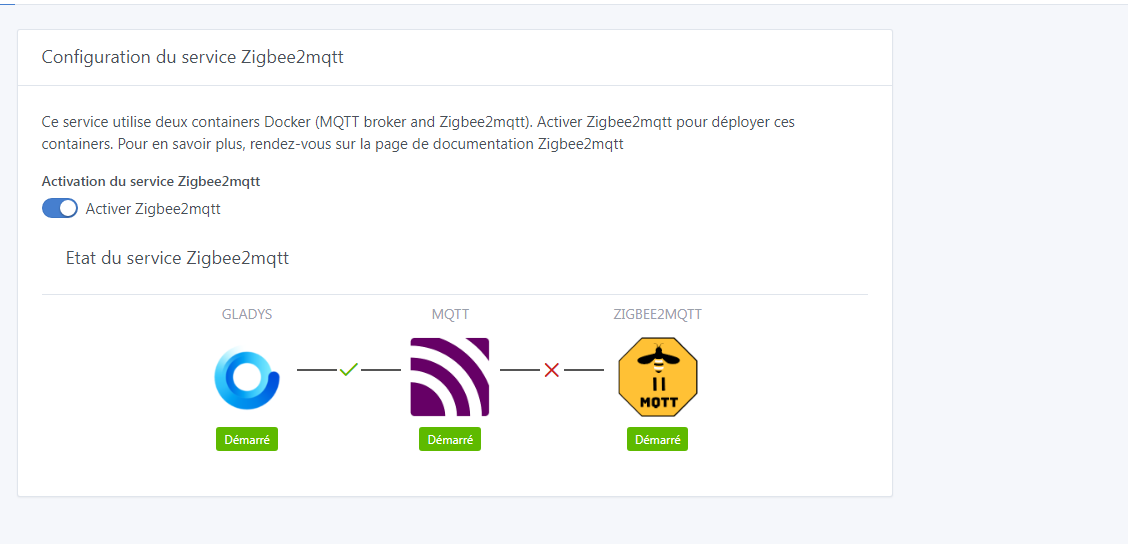
I can no longer access the zigbee2mqtt interface on port 8080
my motion sensors are acting strangely
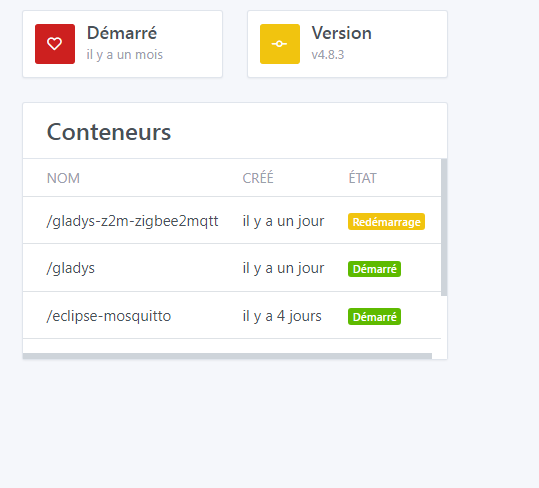
the container says it is restarting but nothing happens
in the config the connection is not being made
The solution is here, if it’s the same problem many people have encountered after a Zigbee2mqtt update.
hmm, thanks
but for me it’s not understandable for the solution?
sorry not very user-friendly
To perform the operation, you need to connect to your machine via SSH (a Raspberry Pi, perhaps?). Once connected, you can simply copy and paste the commands provided in the link, one after the other.
If you need help, don’t hesitate! 
hum, yes I see I’m on a raspi3
but when I see the miles of settings, I give up, I think I’ll remove the ziegbee system
Well if you plan to remove it, I imagine you don’t need it… So it’s not a bad thing.
However, there aren’t miles of things to do.
4 lines to copy/paste, it’s doable even if it’s not the most intuitive.
Yes, I have a use for it, but for me it must remain simple and not a complicated system, lol. For information, I started remote management in 1986. I thought we had made progress, but now you have to be a computer scientist to make the slightest node work. If I spend more time on configuration, maintenance, and operation, apart from being a geek—which I was but no longer am—I’ll give up. It’s fun for a while, but after that… meh.
I understand what you’re saying, if I responded like this it’s for several reasons:
I agree with you that the ideal is to NEVER have to intervene in this way 
Yes, that’s certain, well, don’t take it the wrong way, I’m a bit on edge, usually I manage, but well, with experience I tell myself that all the efforts to make something simple work, turning on a lamp lol.
In any case, thank you to the entire project team for being very responsive.
Download the latest Gladys Raspberry Bullseye image that doesn’t have this issue.
Should I reinstall everything?
Does this mean the issue will persist without this version?
Yes
Yes, a system dependency is missing, necessary for zigbee2mqtt (the problem is not on the gladys side)
So you don’t want to reinstall everything, you need to install the package in question. (which @guim31 detailed)
This kind of thing will happen again, the zigbee2mqtt project is independent and we cannot anticipate this kind of change.
In 3 steps the problem is solved (it’s an opportunity to learn things  )
)
ssh pi@192.168.1.1 Replace with the IP address of your pi, the password raspberry will be requested
sudo apt-key adv --keyserver hkps://keyserver.ubuntu.com:443 --recv-keys 04EE7237B7D453EC 648ACFD622F3D138
echo "deb http://httpredir.debian.org/debian buster-backports main contrib non-free" | sudo tee -a "/etc/apt/sources.list.d/debian-backports.list"
sudo apt update
sudo apt install libseccomp2 -t buster-backports
sudo reboot
Good evening VonOx,
is this valid for the new Gladys image « gladys-os-rpi-rev5 »?
I don’t know what rev 5 corresponds to. If it’s not the latest Debian Bullseye image (the image is dated 29/03/22).
This is the latest version, the one found in the Gladys installation tutorial on RPI by Pierre-Gilles
« gladys-os-rpi-rev5 » is the name of the Gladys image
Thanks for your answer 
In this case, yes, you are concerned
Always take the latest version on the website, the links are not necessarily up to date depending on the date of the tutorial’s publication.
I’ll leave the link in case others come across this
Following the zigbee2mqtt issue resolved yesterday, I thought it might be a good idea to switch to the 64-bit version before adding more devices.
I proceed to take screenshots of scenes and other settings and export my Node-red flow.
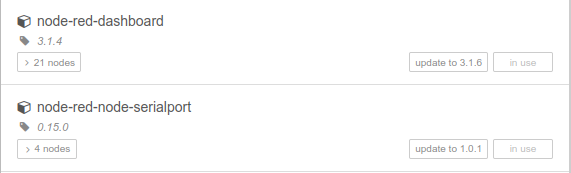
I notice that Node-red offers me 2 updates: node-red-dashboard and node-red-node-serialport
I perform the dashboard update, restart the Raspberry, everything is fine, I do the serialport update, restart the Raspberry and I can no longer connect to node-red, the docker restarts every 30 seconds.
I had made a backup of my SD card yesterday, so I restored it, so no problem for me.
But be careful if you perform this update.
I think you should have updated before importing the flows
Same for me,
VonOx I installed the version of Gladys that you indicate. After 6 reinstalls, I notice that if I restore Gladys with Gladys + backup, before installing NodeRed, all Gladys services are installed and work correctly, then I load Node red everything is fine, I reinstall my palettes (which are not in the NodeRed backup, I restore my flows everything loads correctly, but after « loss of connection to the server », I no longer have a connection to the Xiaomi gateway, no MQTT connection. And incidentally, do not forget to reset the Gladys MQTT broker, (because it does not restart by itself). And when I restart Node red I no longer have a connection to the Node RED dashboard (IpGladys:1880). Yes, I also have the Node Red restart loop, mine every 15 seconds (it reminds me of my problem with Zigbbe2Mqtt. « it seems that the container reboots every 20 seconds approximately. »)
koenkk/zigbee2mqtt:latest « docker-entrypoint.s… » 12 days ago Up 18 seconds gladys-z2m-zigbee2mqtt
koenkk/zigbee2mqtt:latest « docker-entrypoint.s… » 12 days ago Up 18 seconds gladys-z2m-zigbee2mqtt
koenkk/zigbee2mqtt:latest « docker-entrypoint.s… » 12 days ago Up 1 second gladys-z2m-zigbee2mqtt``)
And checking, I realize that gladys-z2m-zigbee2mqtt, also loops every 30 seconds
Is it serious doctor?
Hello, well here we go again, everything is working again, just one sensor that I had to repair, a leak detector, thanks for the help, I’ve launched all the commands even though I don’t really know what they correspond to or what they do, that’s also what scares me lol