ZwaveJS: Added noDon Octan Remote CRC-3100

I own a NodOn Octan Remote CRC-3100 remote recognized by Z-Wave JS UI.
https://devices.zwave-js.io/?jumpTo=0x0165:0x0002:0x0001:0.0

https://domotique-home.fr/octan-remote-nodon-et-hc2hcl/

https://blog.domadoo.fr/53746-guide-dutilisation-de-telecommande-murale-nodon-octan-vera-edge/

The documentation in English

I also have it in French but I don’t know if I can include it in a post.

Thanks for the feedback :slight_smile:

@Sescandell You who have done quite a few PRs on this integration, would it be complicated to integrate this remote control?

So I’d also like screenshots of the « Events » tab for this remote control :slight_smile:

If you can try to capture all the modes you want to see, that’s best for integrating them afterwards

Hello,

I also have a scene controller remote at home. It is recognized by zWaveJSUI. But I integrated it directly as a scene link with the other devices.

I can look into integrating button handling: receiving the events. We’re not talking about handling associations, right (which could be another topic).

I’ll look into it over the next two weeks. Would that be okay?

The remote has 4 buttons with 4 different actions:

  • single click
  • double click
  • long press
  • button released

So there are 16 possibilities.
The « button released » action is only active after a « long press » according to the events
I’ve never understood the point of this mode. If anyone can enlighten me…

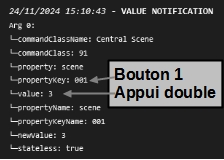
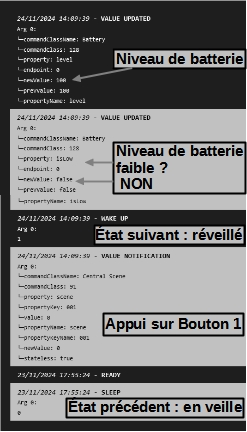
Here are the different messages obtained :


I also have this remote that you install in place of a double switch.
https://devices.zwave-js.io/?jumpTo=0x0165:0x0002:0x0003:0.0
Should I start a new thread right away or wait to see how it goes with that one?

Edit:
I checked last night.
The events are the same for both remotes.

Great, that would be perfect :slight_smile:

Thanks!! That helps us a lot

:+1:
There’s nothing urgent for me.
Thanks in advance.

Hello,

Opening a PR on the subject: [WIP] ZwaveJS scene controller by sescandell · Pull Request #2178 · GladysAssistant/Gladys

I haven’t really tested with my device yet. I just looked at the messages that are passing through. I need to find a way to test this while my installation is actually running.

Support for battery level => I’ll make a dedicated PR for that.

To be continued :wink:

1 Like

Awesome @Sescandell, thank you very much for your help with that :folded_hands:

If you need help, or have any questions, don’t hesitate!

Hello,

I just pushed an update to GitHub with the tests and code coverage.
I’m relying on the real values I see passing through MQTT, but I haven’t tested it on my Gladys installation yet… I need to think about how I can do it without breaking everything :smiley:

Hello,

I just tested on my setup with the device I have and, in my context, it works.
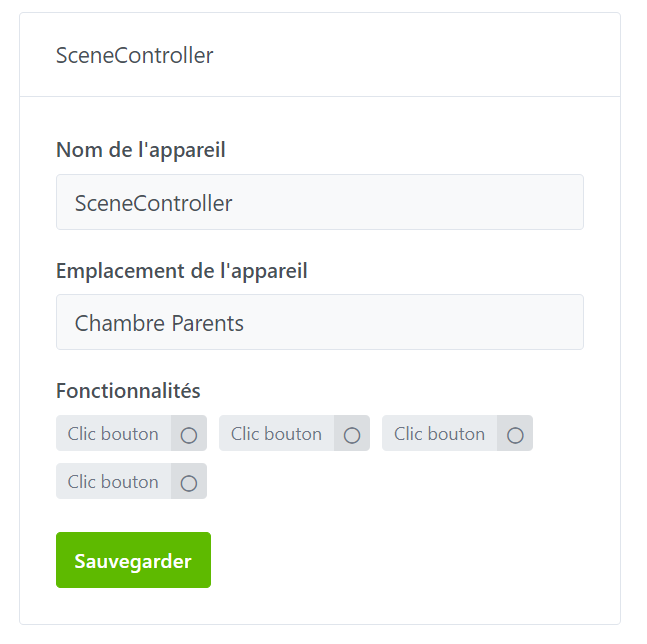
A new command class is recognized, which corresponds to the buttons:

As a result, you can use state changes in scenes to act on any other device on your network:

There is no write capability on these devices. They are only trigger buttons.

For me it’s ready-to-merge.

@pierre-gilles the ball is in your court :wink:

Hoping this is useful to others

(phew… I’m keeping to my announced 15-day deadline :stuck_out_tongue: )

2 Likes

Thank you for the work.
However, there are also long clicks and double clicks

Excellent @Sescandell!! Thanks for your PR, super fast :smiley:

I read the code, it looks good to me.

I’ve accepted and merged the PR :slight_smile:

It will be included in the next Gladys release!

According to the code, it’s handled properly

1 Like

It’s available in Gladys Assistant 4.51.0:

1 Like