This evening I’m coming back from the weekend and when I return home I have about 10 seconds to disable alarm mode, otherwise the alarm sounds and a red light flashes in my entrance.
I waited a bit too long and to my great surprise… no alarm.
I try to deactivate surveillance mode, I do receive my Telegram notification saying it’s deactivated… but my red light is blinking frantically!
I’m writing to you and it’s been blinking for about 40 minutes…
It blinks even after a reboot of my RPi
My Gladys logs are totally flooded with this:
2022-10-23T21:01:40+0200 <warn> handleMqttMessage.js:101 () Zigbee2mqtt device Spot Couleur Entrée, feature color_mode not configured in Gladys.
2022-10-23T21:01:40+0200 <warn> handleMqttMessage.js:101 () Zigbee2mqtt device Spot Couleur Entrée, feature color_mode not configured in Gladys.
2022-10-23T21:01:40+0200 <warn> handleMqttMessage.js:101 () Zigbee2mqtt device Spot Couleur Entrée, feature color_mode not configured in Gladys.
2022-10-23T21:01:41+0200 <warn> handleMqttMessage.js:101 () Zigbee2mqtt device Spot Couleur Entrée, feature color_mode not configured in Gladys.
2022-10-23T21:01:41+0200 <warn> handleMqttMessage.js:101 () Zigbee2mqtt device Spot Couleur Entrée, feature color_mode not configured in Gladys.
2022-10-23T21:01:42+0200 <warn> handleMqttMessage.js:101 () Zigbee2mqtt device Spot Couleur Entrée, feature color_mode not configured in Gladys.
I imagine there’s a link, since it’s the Spot in question that’s blinking!
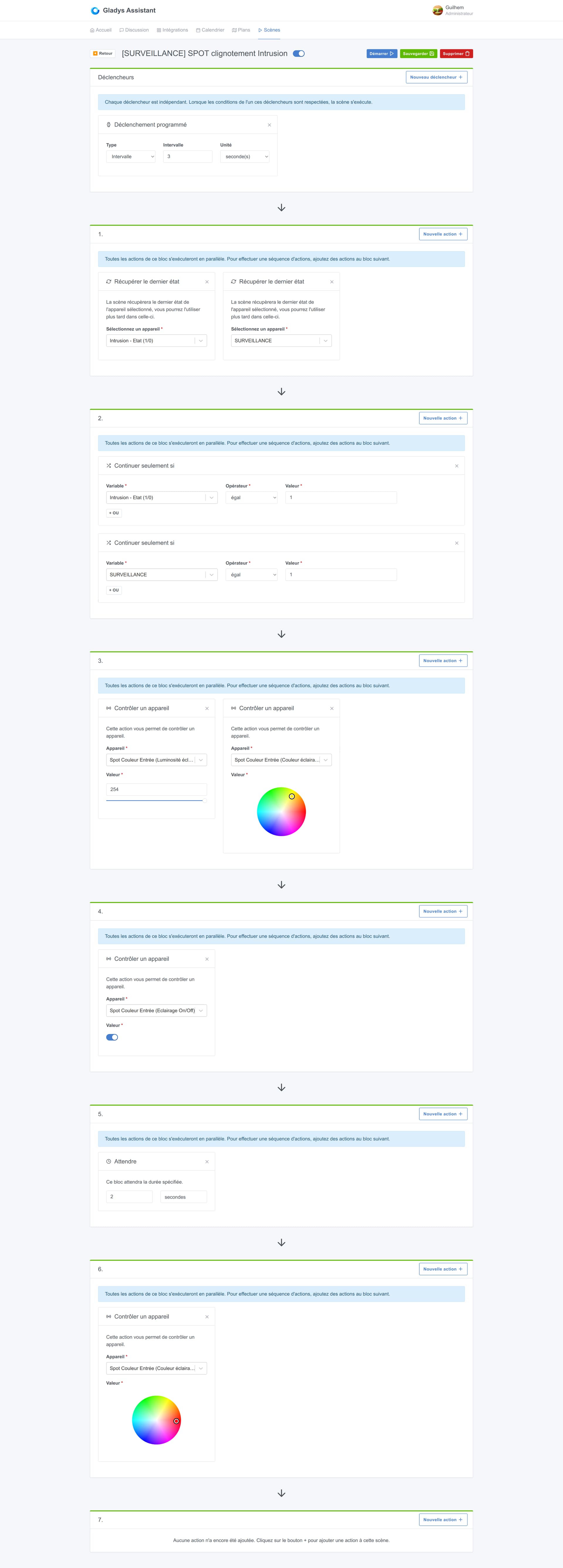
Here is the scene that’s supposed to make it blink during an intrusion:
I thought the same thing, because several scenes are « connected » to each other… But I haven’t found anything so far (not much time either)
@pierre-gilles I think I didn’t give enough info to make myself better understood!
Logically when the alarm starts (flashing + audible alarm) I can deactivate it by using a SURVEILLANCE toggle.
But this time, even when SURVEILLANCE was set to 0 the spot kept flashing.


 Thanks!