Hello @spenceur
Can you help me with the application setup?
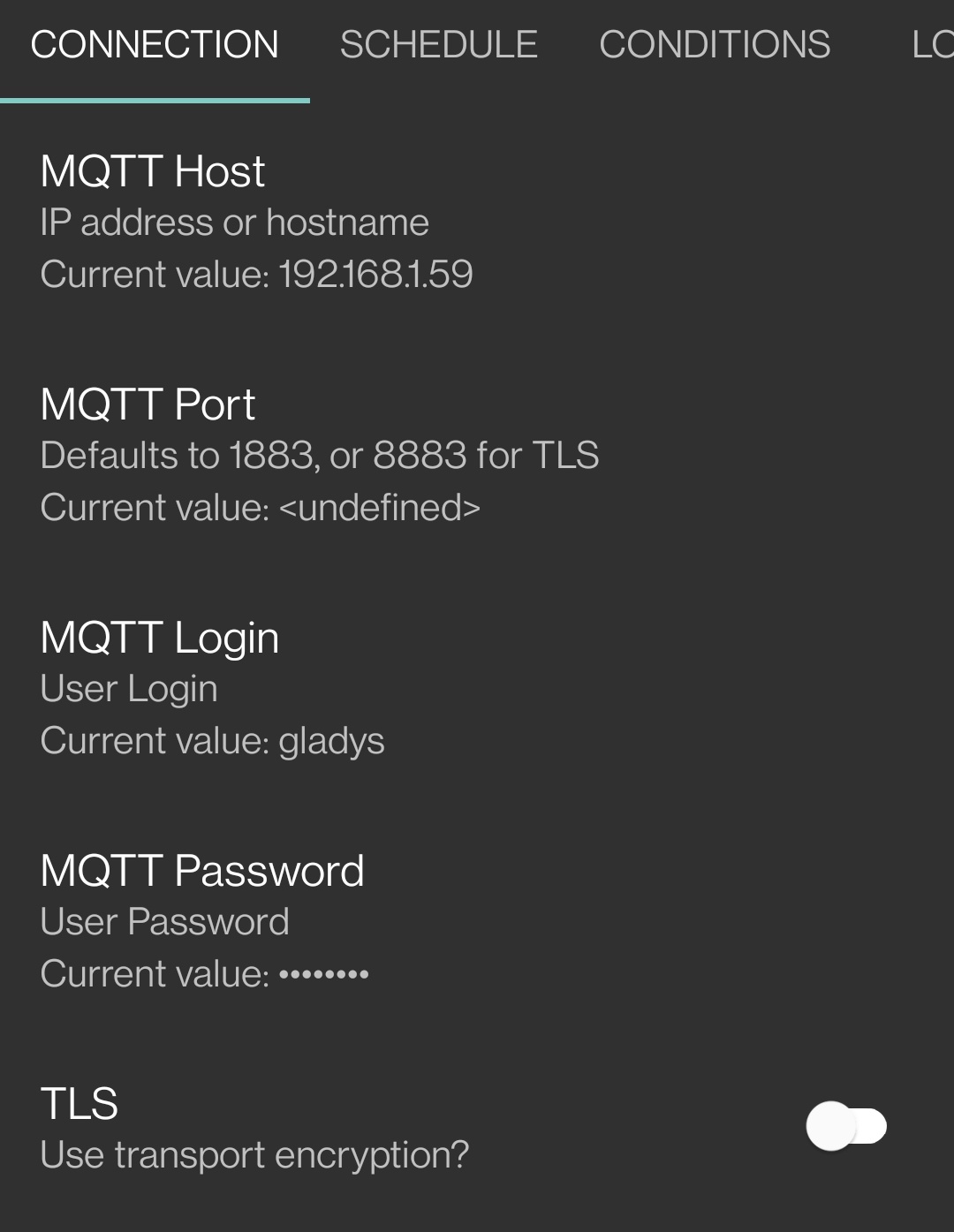
When I click on « Check Connection » I always get an error « Connection Failed ».
Which port did you configure? TLS or not?
Thanks for your help 
Hello @spenceur
Can you help me with the application setup?
When I click on « Check Connection » I always get an error « Connection Failed ».
Which port did you configure? TLS or not?
Thanks for your help
Thanks for your reply
I don’t understand, but it’s impossible to connect with the « test connection ». Every time I get a « Timeout » error.
Yet I even checked the firewall on my Raspberry Pi, port 1883 is open, the Gladys password is correct, I have no more ideas for debugging..
I wonder if there isn’t a restriction on the default MQTT server at localhost.
[EDIT]
$ sudo cat /var/lib/gladysassistant/mosquitto/mosquitto.conf

allow_anonymous false
connection_messages true
password_file /mosquitto/config/mosquitto.passwd
listener 1883
The ports are open in and out on iptables, so I don’t see what’s not working.
At the mosquitto log level, there are only the Gladys connections:
0: mosquitto version 2.0.12 starting
0: Config loaded from /mosquitto/config/mosquitto.conf.
0: Opening ipv4 listen socket on port 1884.
0: Opening ipv6 listen socket on port 1884.
0: mosquitto version 2.0.12 running
0: New connection from 127.0.0.1:32768 on port 1884.
0: New client connected from 127.0.0.1:32768 as mqttjs_cb088900 (p2, c1, k60, u'z2m').
0: New connection from 127.0.0.1:32770 on port 1884.
0: New client connected from 127.0.0.1:32770 as gladys-main-instance-473225 (p2, c1, k60, u'gladys').
[EDIT 2]
Via my Wireguard VPN which is on the Raspberry Pi, I can connect the application to MQTT. So it is indeed an incoming traffic issue.
Thanks for your confirmation of the application config
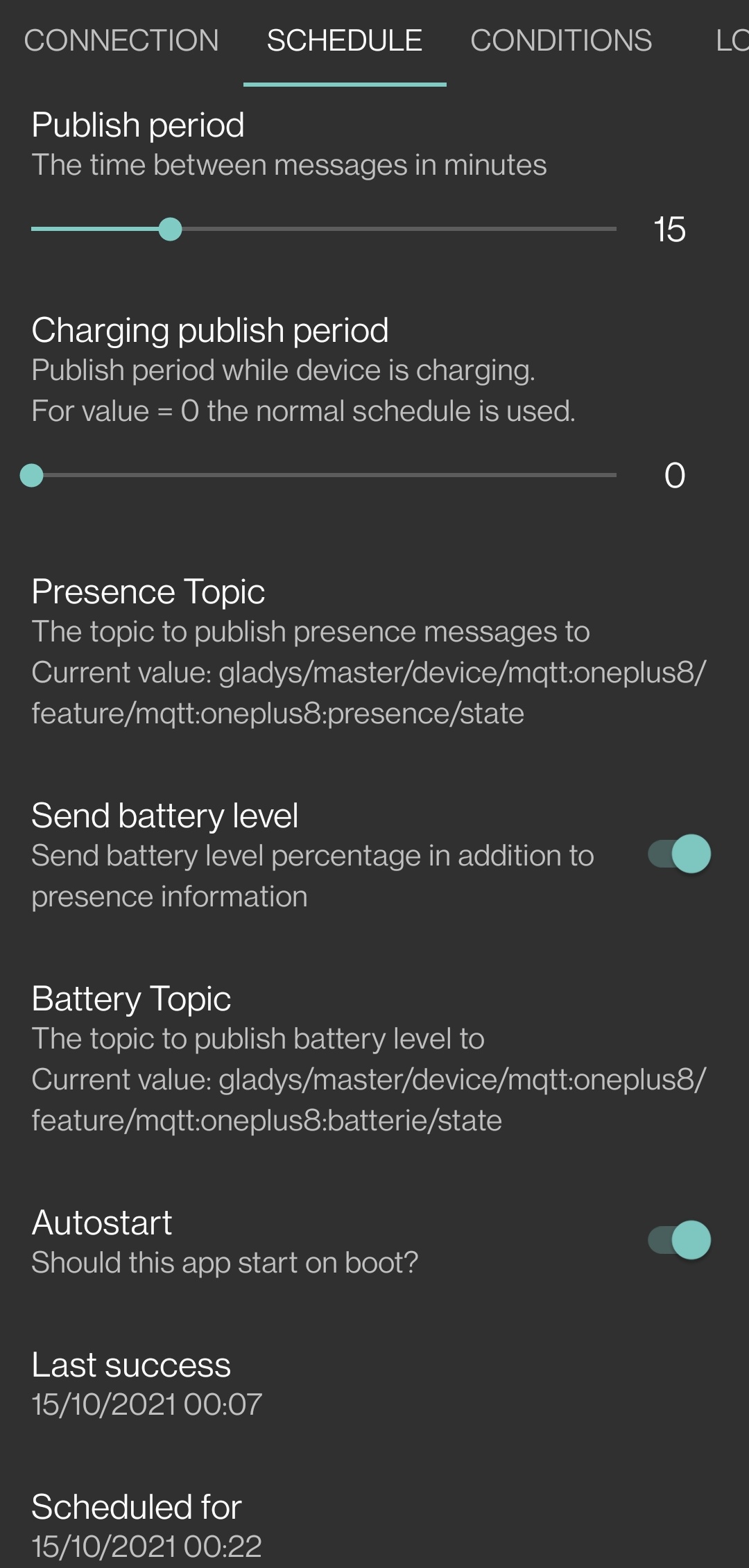
In the « Schedule » section of the application, how did you configure it?
I put this in the Android application, it sends successfully, but Gladys doesn’t seem to understand the data (I don’t see anything in Gladys, or in the logs):
[EDIT]
Actually, it’s indicated in Gladys, to know:
gladys/master/device/mqtt:oneplus7tpro/feature/mqtt:oneplus7tpro:presence/state
Exactly
If you need more information, don’t hesitate
I just created a few scenes to manage my presence but it doesn’t work as I want.
In case of a change in the status of my phone, it indicates « User seen at home ».
Every 16 minutes it triggers « Check presence over the last 15 min » and marks me as away if that’s the case.
My phone sends a Wi-Fi signal every 15 minutes to say that I am there. If I turn off my Wi-Fi, the signal is no longer received and Gladys marks me as away, Perfect!
EXCEPT THAT when I reactivate the Wi-Fi, the signal is well received by Gladys, but identical to the previous ones, it does not trigger scene 1, which never marks me as present.
Moreover, the « Check presence » block can mark me as away but does not mark me as present if it detects me (it is even specified that Gladys does nothing if it detects me).
How to manage this case? For me, this is a problem that we should not have, either a trigger is missing or the « Check presence » block needs to be improved.
Or maybe I missed something too 
Did you set up the application 1 when you connect to the network?
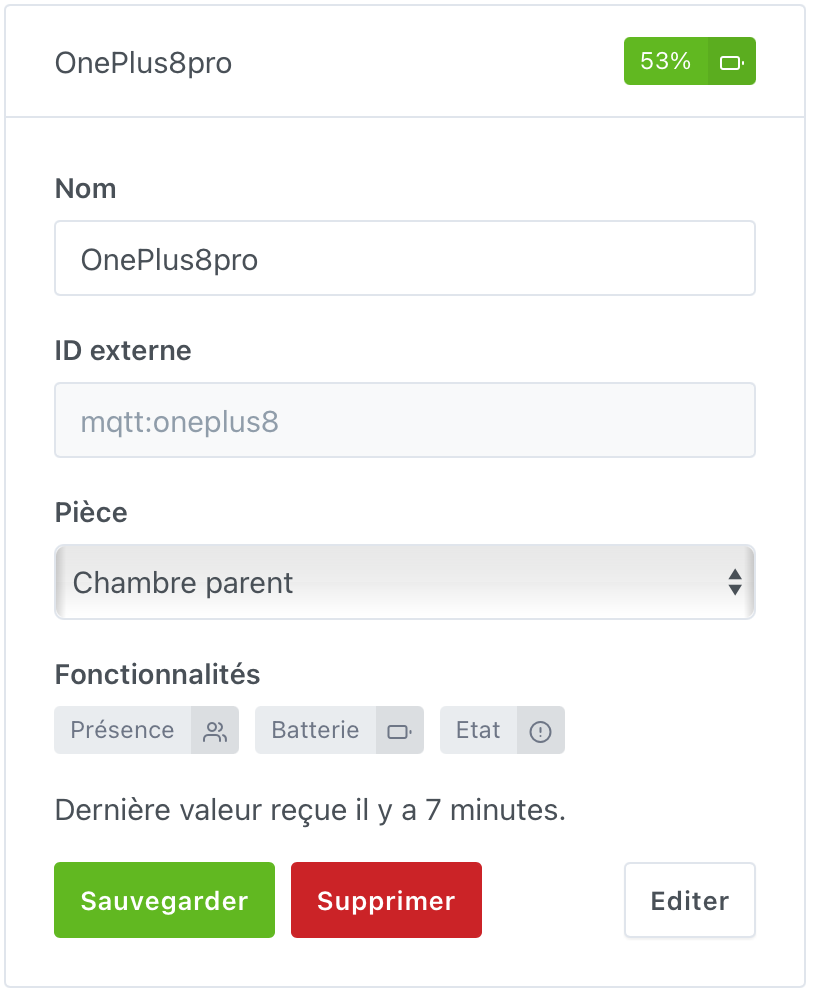
Here is my device:
For information, I also send the status of my battery, it might be useful
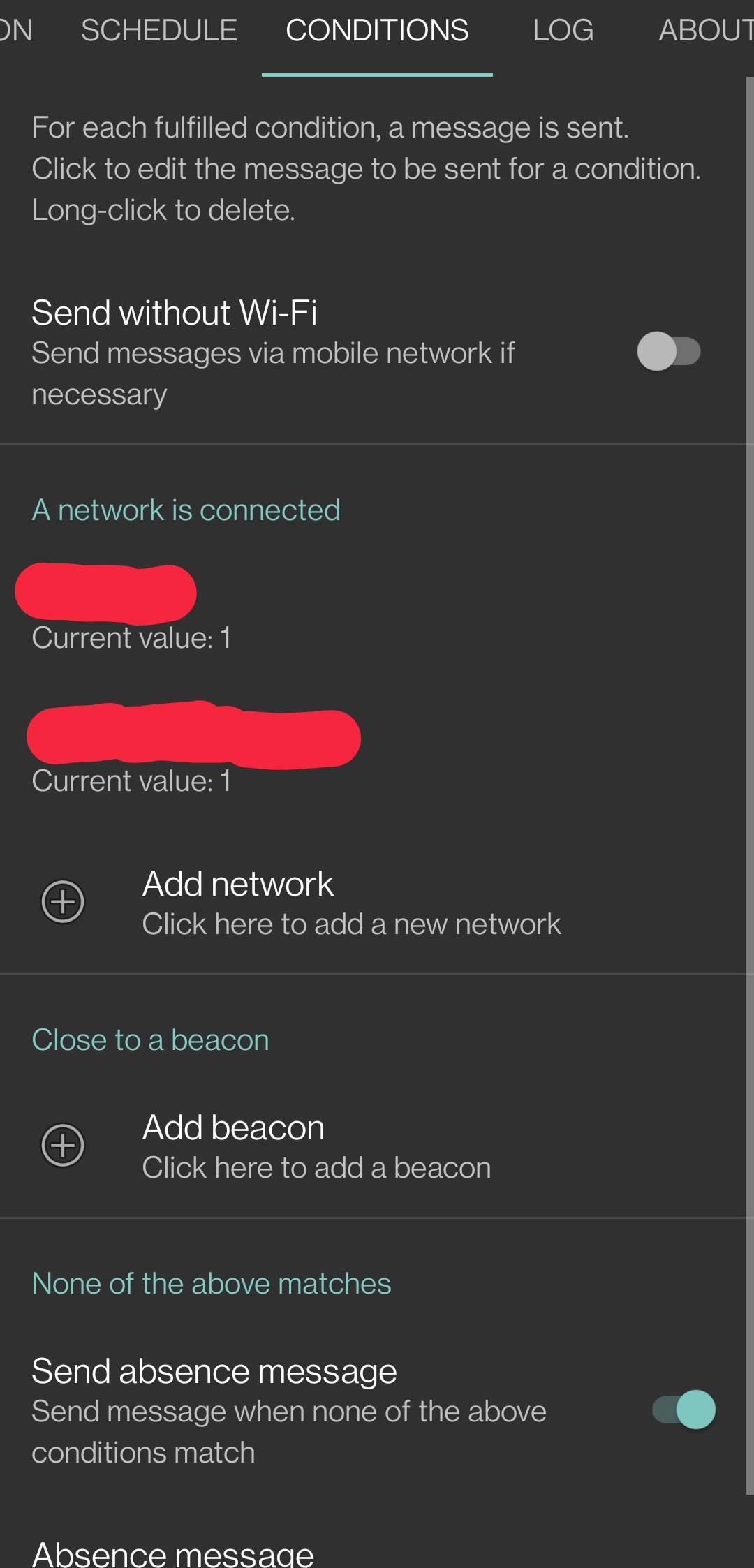
And on the application side
I have two because I have multiple networks at home
Then, in terms of scenes, I check the status of my OnePlus (presence and absence) and that’s it
The difference between our two situations lies in the type of message.
Everything is identical on my side except that I do not send absence messages.
I would rather have Gladys detect the signal as a « keepalive ».
I found the problem, it’s the « Detect Presence » trigger that waits for a signal to change. Unlike the trigger on a basic device that can take into account all events.
And in my case, there is only one presence signal sent every 15 minutes and no absence signal. So the new signals are not taken into account.
Is this intended @pierre-gilles?
My only trick is to use the battery value of my phone to have a sensor value that allows using the standard trigger for all sensors.
That’s exactly how it’s supposed to work The Bluetooth integration works the same way; it expects to receive a « 1 » every time a Bluetooth device is seen, but it doesn’t expect a Bluetooth device to send « 0 » when it’s not seen. It’s the absence of sending « 1 » that creates an absence on Gladys’s side.
Similarly, when you return, you normally don’t need to go through a 0 for the 1 to be compatible.
See Bluetooth tutorial:
Can you elaborate?
Can you share screenshots of your scenes so we can see where it’s not working?
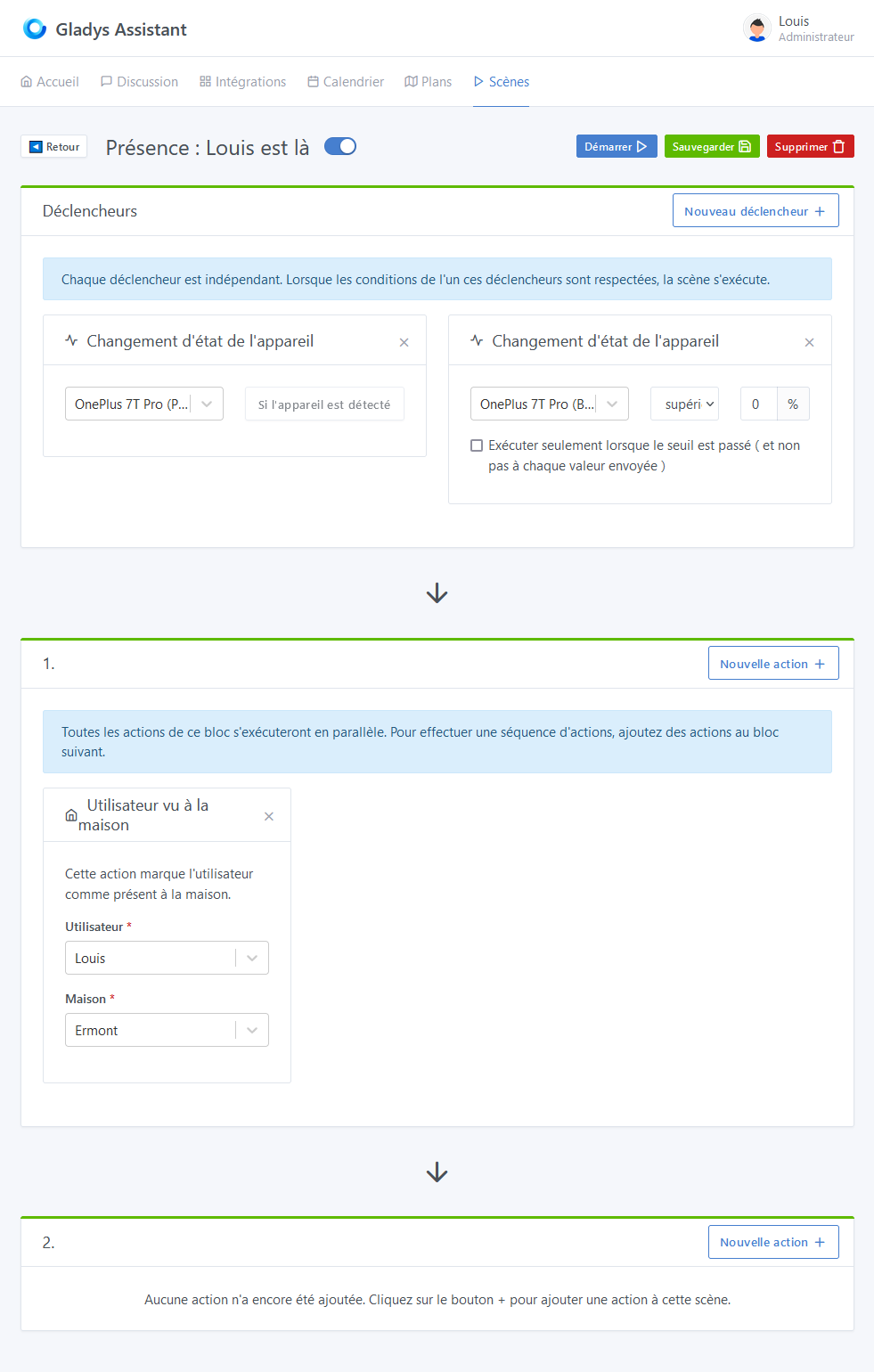
Here are the two scenes I use to manage my presence.
In scene #1, if I only rely on « Device state change, » Gladys never marks me as present, even though the « presence » device display in the dashboard is correct (for example, a few seconds ago). By adding the « battery » device linked to my phone and sent at the same time as my presence, I can uncheck the option « Run only when the threshold is crossed, » which allows me to be marked as present with each message received.
[EDIT]
Last question: Why can’t the « Check Presence » block mark me as Present or Absent if it detects a signal within the declared period? Currently, it can only mark me as absent, but I would have liked to be able to use this function to be marked as present as well.
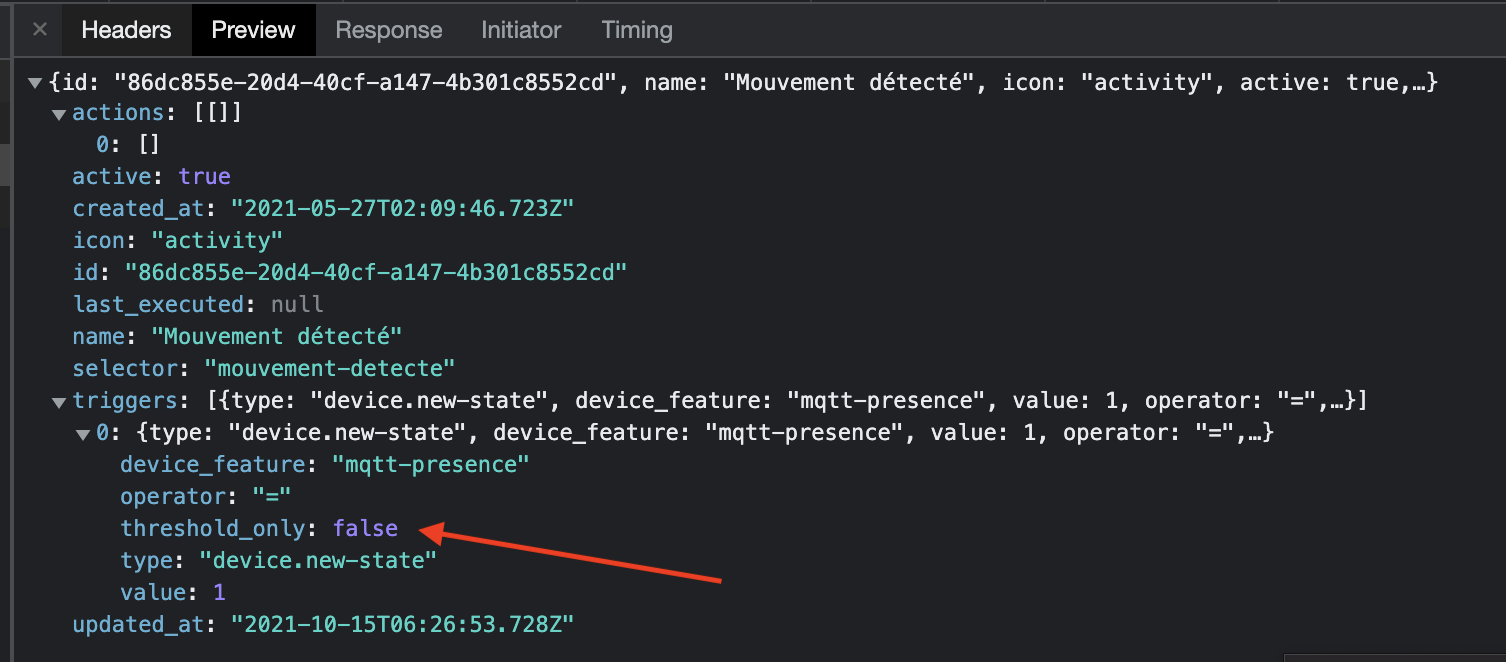
Super weird! The « presence detection » triggers have the option « execute only when the threshold is passed » hidden and set to « false » by default. You can check in the API calls, the GET /api/scene/:scene_selector route should show you something like this:
I just did the test at my place, and I can’t reproduce your problem: the scene is executed every time for me…
Because we want to mark the user as present as quickly as possible when you arrive, and not necessarily every X minutes if you run your scheduled scene every X minutes.
If you run your scheduled scene every 10 minutes, that means your user will only be marked as home potentially after 10 minutes.
By creating a scene that triggers as soon as the device is seen, at least it’s almost instantaneous and if you have a scene « when I arrive home » that turns on the lights and everything, you want it to be direct.
I understand, in this case, an option is missing from this block « mark me as absent if no signal has been detected during the period ».
Because that’s what I wanted to do without being able to, as it doesn’t seem possible by default.
Exactly, I don’t think we want this option, it’s not great in terms of user experience!
On the other hand, I would really like to understand why this presence detection is not working for you, for me it works perfectly! ^^
Can you check the JSON of your scene via the API as shown in my previous post?
{
    "id": "b1a0b488-02eb-4b3d-b5d9-d8fb3b016328",
    "name": "Presence: Louis is home",
    "icon": "home",
    "active": true,
    "selector": "presence-louis-is-home",
    "actions": [
        [
            {
                "type": "user.set-seen-at-home",
                "user": "louis",
                "house": "ermont"
            }
        ],
        []
    ],
    "triggers": [
        {
            "type": "device.new-state",
            "device_feature": "mqtt-oneplus7tpro-presence",
            "value": 1,
            "operator": "=",
            "threshold_only": false
        },
        {
            "type": "device.new-state",
            "device_feature": "mqtt-oneplus7tpro-battery",
            "value": 0,
            "operator": ">="
        }
    ],
    "last_executed": null,
    "created_at": "2021-03-29T16:02:53.000Z",
    "updated_at": "2021-10-14T20:51:33.668Z"
}
« threshold_only »: false
It looks good to me!
Do you have specific logs on the Gladys side that could explain why it’s not working? Are you 1000% sure that an integer value 1 is sent via the MQTT integration every time you enter?
Because I really can’t reproduce it, at my place if I send 1 several times in a row, the scene executes each time
In fact, I think it comes from my presence publisher application that sends « online » instead of « 1 ».
I just made the change in the application (which lacks documentation), this should solve the problem!
On the other hand, for the presence detection component, I ask the question differently:
How to detect that I am present based on a visible signal when I am on WiFi and then a lack of signal?
I thought so.
What do you mean? What do you want to do?
I want Gladys to detect me at home when my phone is on Wi-Fi and send an MQTT signal.
And if the signal is not received within 15 minutes, it means I’m away. And that’s the part I can’t get to work.
Well, isn’t that what you’re already doing with the « Check Presence » action? I thought that part was working fine
Sorry, I think I got myself in a muddle!
To summarize and provide some context:
Procedure:
Warning: by default, the application sends « online » and not « 1 » to Gladys. Once I modified the parameter in the Android application, the scenes are functional as expected (before I thought it was 1 and 0).
Tip: I wanted the application to send messages without giving it access to the GPS and keep my GPS always on (necessary to allow it to know the Wi-Fi SSID).
I use what the application calls « Absence messages » to notify Gladys that I am home on Wi-Fi (logical ). Knowing that Gladys marks me as present when it has messages and absent when it has nothing, it works as I want!
For this: