Introduction to François and beginner questions

Hello
I’m François, I’m 61 years old and I’m an industrial computer and automation specialist in the paper industry.
I’m new to the world of home automation, as I’m very cautious about using connected objects at home for cybersecurity reasons. (professional bias).
Three months ago, I started researching on the internet.
I discovered Gladys, its French-made aspect, and its simplicity seem very interesting to me, so I embarked on this adventure.
I’m not a developer and don’t have real knowledge in that area.

I bought a Raspberry Pi (I’m discovering Linux), I installed Gladys by following your videos, and I also installed Node-RED.

  • I bought two TP-Link outlets to start with, and in 10 minutes I created two scenarios!!
  • Before going any further, I thought to myself, let’s start with the most complicated thing for me, connecting my Somfy roller shutters and my Mitsubishi heat pump.
    I found a small Toscorp box on the internet to control the Somfy shutters. After installing the Arduino software on my Mac to configure the box and through Node-RED, I control my shutters from Gladys individually and in groups.

Small problem, there is no push button in Gladys to control a device, which is a shame, I have to use an ON/OFF button for now. Do you think you could create this type of button?
Or create a feature with three push buttons (like a Somfy remote control)?

I retrieve the data from my heat pump via Node-RED and an MQTT device in Gladys, this device has two features (measure and setpoint) but the names displayed on the graph for the curves are not the names of the features but the name of the MQTT device, which is a shame. How can I fix this problem?
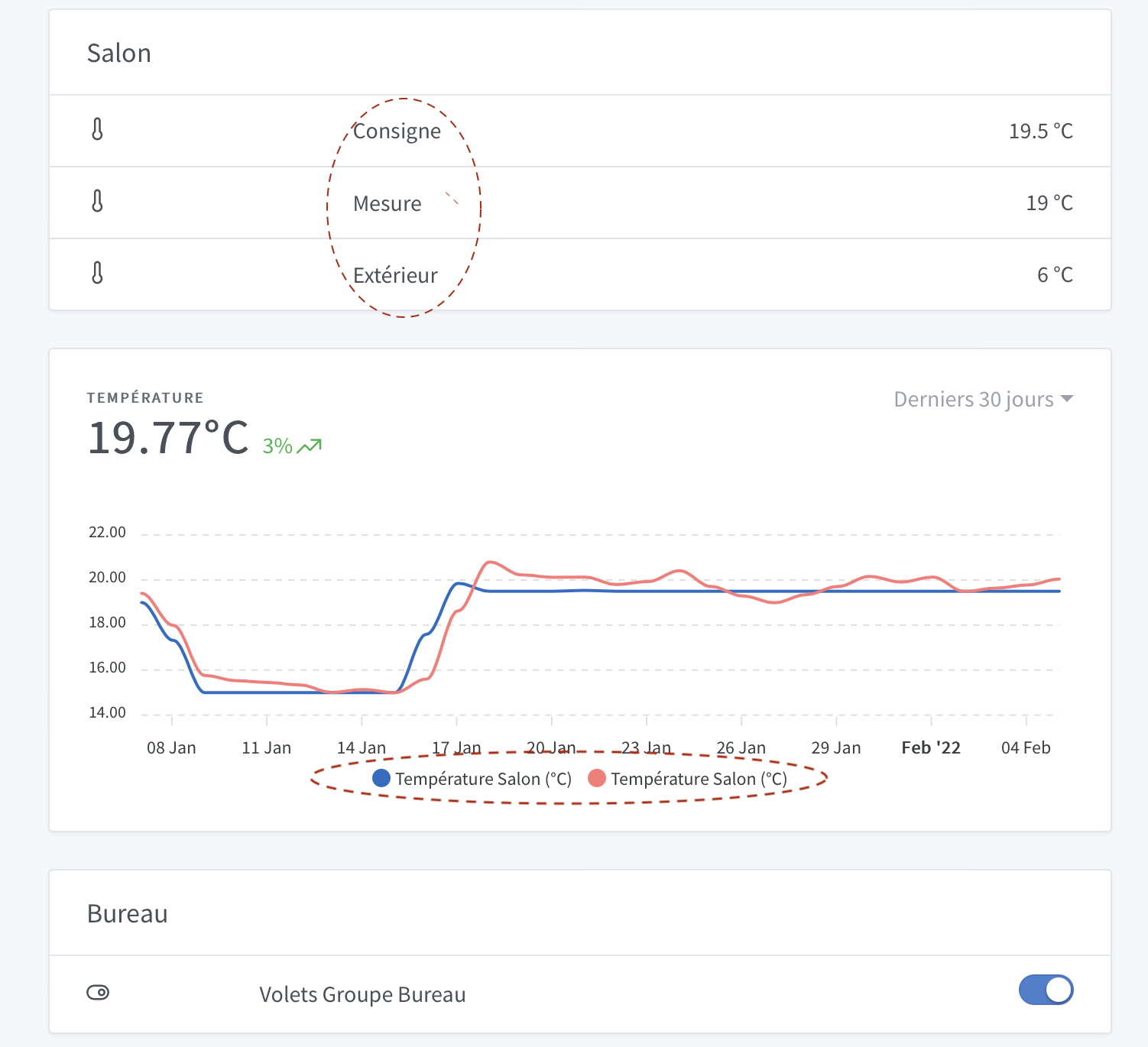
I think I will subscribe to Gladys Plus if I continue this adventure.
Another question I ask myself, not being a developer, is the Gladys application made for people like me?

Hello and welcome @froch!

Thank you for your presentation and your feedback, it’s always very interesting :blush:

Personally, I prefer to avoid using Wi-Fi home automation equipment to separate my local network from my home automation and thus avoid exposing it too much in terms of security. I guess that’s a profession deformation (cybersecurity) :innocent:
So protocols like Zigbee are perfect for me. It’s local and not mixed with everyday computing.

Also, @pierre-gilles did an excellent job on Gladys Plus which provides a great way to access remotely, without compromising security or privacy.

Finally, to return to your button issue, I don’t think it’s possible yet in the Gladys interface, but if you have a home automation button, it will be recognized as such and fully usable. What is your use case here?

Otherwise, the Gladys app doesn’t exist, it’s the web page that can be installed on your computer or phone (web app).

Bonjour François et bienvenue! :slight_smile:

It’s great to read that!

Yes! This is a comment we often get. We have 2 feature requests that go in this direction:

and:

Interesting use case, in fact the philosophy was to have a maximum of one feature of each type per device, this is a bit what is done on other home automation platforms, because behind the voice assistants (Alexa, Google Home), are not able to manage several features of the same type in the same device.

Here the problem is surely that a different type is missing: these are not really temperature sensors, it is really a heating device with 2 different features: measurement (this is a temperature sensor), and setpoint (which is not a sensor in the strict sense)

We were discussing this in this topic with connected plugs that have 4 outputs:

You could for example split your device into 2 different devices?

Thank you! :slight_smile: This is indeed the best way to access Gladys remotely, to have backups, etc… And this is what allows to support the project :slight_smile:

Completely, on the contrary Gladys 4 was designed mainly for a non-dev audience. And given your setup, you have for me much more knowledge than 90% of the Gladys community :wink:

Hello @froch and welcome!

I will follow you closely as I have a Mitsubishi heat pump but I have no idea how to integrate it into Gladys… Maybe even if you are a beginner you can guide me a little bit! :wink:

See you on the forum

Good evening Froch:
Welcome to the Club :wink:
Since you have installed Node Red, you should be able to create an On Off button that returns to the Off position automatically.
image
My kitchen ceiling light turns on and off by sending the same command, in other words by pressing the same button on my remote control. So I made this NodeRed setup. What you are interested in is the Mqtt in Node, the Trigger Node, and the Mqtt out Node. The first node receives the command from the Gladys button with its topic: gladys/device/mqtt:cusine_plaf (and the rest), the trigger delays it by 500ms and then sends a 0 to the Mqtt out, and the subtlety is to copy/paste the topic of the Mqtt in and modify it like this: gladys/master/device/mqtt:cusine_plaf (and the rest). You add the term « master » and there you have it, a nice sliding button. You retrieve the info from the Mqtt in node to send it to your device and that’s it. In the meantime, this keeps you busy. I hope that’s what you were looking for.
Good evening

Good evening @Psoy,
Is it possible to have the export in JSON format with the schema? This will allow us to have both the code and the configuration of the nodes and the flow at the same time! :wink:

Good evening cce66, (it’s the PO 66),
the schema I posted is extracted from an RFlink flow, with 17 Mqtt devices, do you want all that or is it just the button you want. The entire flow is linked to my hardware and not necessarily to yours

Yes not far from the first incident :face_with_thermometer: :mask: to say the least! :nerd_face: Oh well that’s all the flow it’s great because it allows you to see other approaches and consider other developments! :wink:

@Psoy, I used exactly the same trick (which I also set to 0.5s). Here is the flow:

[{"id":"d2599d92.81b8e","type":"tab","label":"Flow 4","disabled":false,"info":""},{"id":"b7b145ad.c410a","type":"change","z":"d2599d92.81b8e","name":"return switch","rules":[{"t":"set","p":"payload","pt":"msg","to":"0","tot":"num"}],"action":"","property":"","from":"","to":"","reg":false,"x":730,"y":360,"wires":[["c5c69dc3.53d4f8"]]},{"id":"a9f5cac0.17145","type":"delay","z":"d2599d92.81b8e","name":"return switch delay","pauseType":"delay","timeout":"500","timeoutUnits":"milliseconds","rate":"1","nbRateUnits":"1","rateUnits":"second","randomFirst":"1","randomLast":"5","randomUnits":"seconds","drop":false,"x":490,"y":360,"wires":[["b7b145ad.c410a"]]},{"id":"c5c69dc3.53d4f8","type":"mqtt out","z":"d2599d92.81b8e","name":"Gladys-reading","topic":"","qos":"2","retain":"","broker":"","x":1000,"y":360,"wires":[]},{"id":"c3b5249.0cc8458","type":"mqtt in","z":"d2599d92.81b8e","name":"","topic":"","qos":"2","datatype":"auto","broker":"","x":190,"y":360,"wires":[["a9f5cac0.17145"]]}]

In MQTT it works, for Tasmota it’s more complicated!

Good evening Fabic,
Indeed, I haven’t tried with Tasmota. I only have the problem with Rflink and MQTT. With Tasmota, I only have SonOff devices and it works automatically. The SonOff sends its state with its command (small button).

Thanks for the info, I tested it and it works well!!! In the meantime, it’s perfect
Good evening

Super
Have a great evening too :wink:
