Hello,
In this topic, I propose to give you an update on my research regarding connected thermostatic heads, which allow you to control a radiator.
I will update this topic as soon as I have news!
 [Edit on October 13, 2023] Read the message marked as « Solution », it is my latest update on the subject.
A bit of context
It’s been a few years now that I’ve been following with great interest the evolution of Gladys and of course of @pierre-gilles. He gave me the desire to get into home automation and to get the best out of Gladys!
But before diving in headfirst, I prefer to wait and think carefully about my installation so that it is perennial, practical and secure (I work in computer security, in terms of awareness it’s not too bad  ).
).
So I want my home automation installation to be an improvement to the house and not bring any constraints. For example, it is impossible to say: never turn off this switch, or we will never be able to control this light via WiFi!
Last crucial point: nothing is exposed on the internet (directly) or uses the manufacturers’ servers, imagine the impact on privacy or in case of attack / unavailability.
Regarding thermostats, I want to be able to manage them locally only, of course with Gladys. Before buying, I must make sure:
- Compatible with the central heating system of the condominium (no access to the boiler)
- There is documentation for developers
- The model can work without the internet, locally only
TL;DR
So far, there are several solutions to ensure that everything is local:
- Home automation protocols ZigBee, Z-Wave, Bluetooth, etc.
- HomeKit
For ZigBee, there is zigbee2mqtt which makes integration with Gladys very simple (list of officially supported devices). The ZigBee ecosystem is very large.
But many manufacturers prefer to sell the connected object and the bridge that goes with it. So much for compatibility with these home automation protocols (ZigBee, Z-wave, etc).
This is where the compatibility of connected objects with Apple’s protocol comes into play: HomeKit. This protocol is, by its nature, designed to work locally using either the wired network (or WiFi) or Bluetooth.
By developing a HomeKit controller for Gladys, we would thus be able to force the local operation of all objects compatible with this protocol and not originally intended to work without the internet.
The project hap-controller-node could be integrated or be a source of inspiration for a Gladys module.
Research report
For the beginning of this research, two brands seemed obvious to me to connect my radiators, certainly because they are the most well-known and the best visually successful?
- Netatmo (HomeKit, Alexa, Google) ~ €80 the head without the starter pack
- Tado° (HomeKit, Alexa, Google) ~ €75 the head without the starter pack
- Siterwell ~ €25 the head
Netatmo
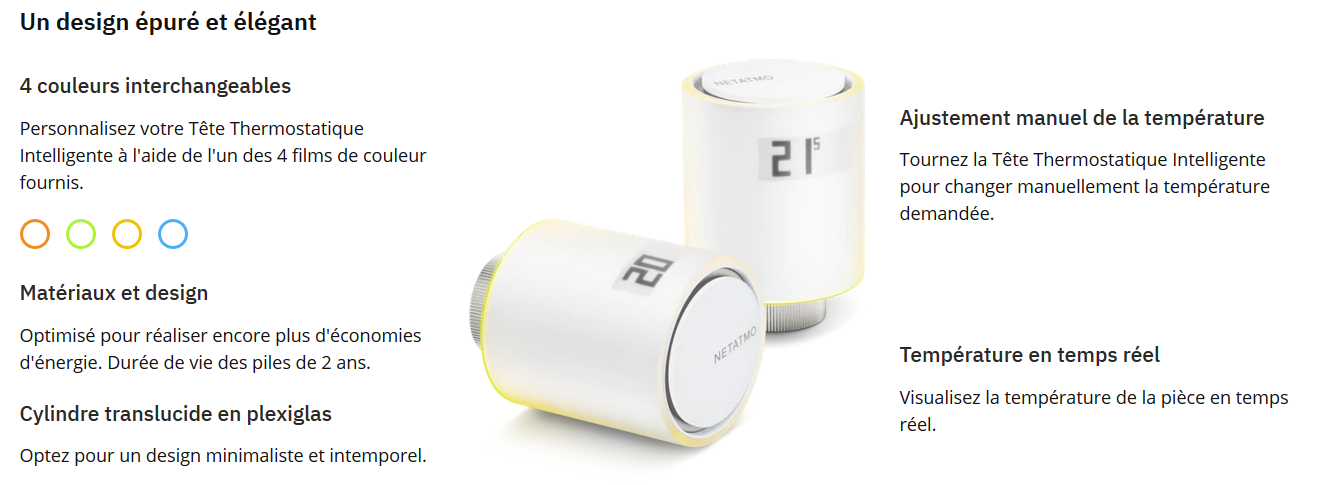
The design made-by stark is really pleasant, but above all, there is no light in all directions and the e-Paper screen allows you to display the information 100% of the time without consuming the battery!
This is the part I prefer.
@Tlse-vins bought several for his home and appreciates being able to control his heating from the outside. But everything necessarily goes through the mobile application.
I will contact Netatmo support, just in case 
Here is the support’s response:
All the products we offer are designed to work with the cloud. The only exception concerns products compatible with HomeKit to a certain extent.
You can of course use the products without connecting them but you will lose a very large majority of the functionalities.
It will be impossible to use the API (which goes through our servers), the application, the outdoor temperature data (provided by the internet), the anticipation and many others.
Addition:
To start the HomeKit connection, you will need to enter the HomeKit code on the Thermostat label.
You will also need to temporarily connect (you can use your phone as a hotspot for example if you want to keep the local router offline) to start the procedure with the application.
In the application, go to manage my home, the Thermostat Relay then configure HomeKit. > You will need to enter the HomeKit code that will appear on the Thermostat screen or the one you have > on the label.
Here is the User manual of the Energy products
If you need more details, our Support includes the vast majority of information and procedures: https://helpcenter.netatmo.com/fr/thermostat-intelligent/search?query=homekit
Note that I insist on the fact that the Netatmo Thermostat is designed to work online.
Offline control via HomeKit is a workaround and the vast majority of the product’s advantages will not be functional.I remain at your disposal for any additional information and I wish you a beautiful day.
In conclusion, it is possible to use Netatmo connected thermostatic heads locally only, without the internet, using Apple’s HomeKit protocol.
Tado°
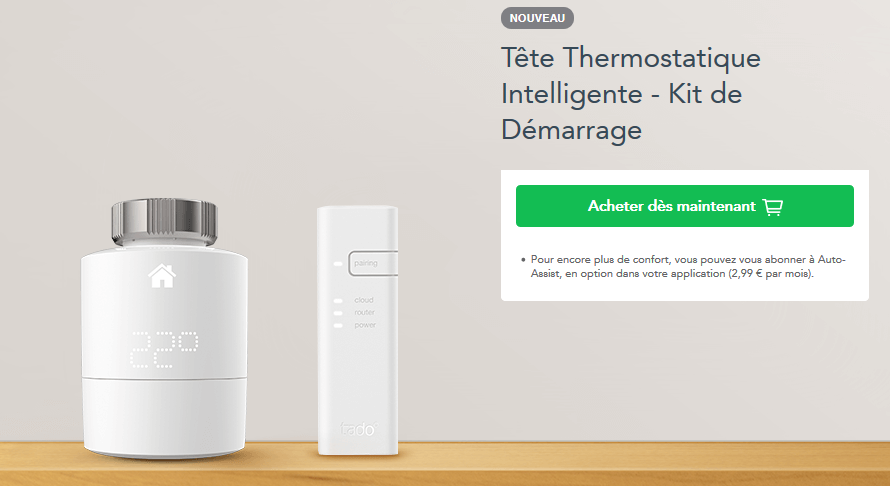
The latest model (v3) consists of:
- The thermostatic head
- The bridge to interconnect everything on the internet
Communications are made in 868 MHz (6LoWPAN) up to the relay, connected via RJ45 to the operator’s box. Management is then done via the mobile application.
This time, I contacted technical support directly to ask if there was any documentation for developers and if it was possible to make everything work in offline mode.
The answer is clear: no.
All tado° heating thermostats are meant to work via the Internet Bridge. The reason for this is that the thermostats do NOT connect directly to the wifi, but to the Internet Bridge via radio frequency.
Therefore, our system is only meant to work with the official tado° Internet Bridge. Third-party radio frequency receivers are not supported.Regarding the API, we do not have an official one. There has been an API developed by our customer community, but it is not officially supported by us. Feel free to take a look here and ask questions directly to other members of the community.
However, over at our colleagues Home Assistant, a certain jimz011 indicates here and there that local operation is possible via the use of HomeKit.
Tado is great, and since 0.93 (or 0.92 if you had followed the special steps) it is possible to have them run locally through the HomeKit controller (NOT the HomeKit component, they are different things, so you DON’T need an Apple device for this at all).
Works locally and via the cloud. Been using this since November, and they are great, easy to install and setup. Batteries last pretty long.
Trust me they can be fully operated without a cloud connection! However if you want to use the Tado app then no you can’t without an internet connection. You would also be dependent on their servers.
However if you add them to Home Assistant with the HomeKit controller you can use them without an internet/cloud connection and you could do all the basic scheduling through Home Assistant (the same is true for using it with HomeKit itself).
You don’t need an Apple for this!!! (If you don’t know the difference between the HomeKit component and the HomeKit controller I will suggest looking this up as the HomeKit Controller has nothing to do with Apple!).
I hope this helps, I have been using Tado for over a year now without an internet/cloud connection!
The conclusion is the same as for Netatmo products, but the support team doesn’t seem to know.
Via the HomeKit protocol, you can force local connection only.
HomeKit
Disclaimer: I summarize here my research and what I understood from it. There may be some inaccuracies.
HomeKit is a communication protocol for connected objects developed by Apple. It relies on Wi-Fi or BLE (Bluetooth Low Energy).
It allows you to control everything from an Apple application. The main difference with others is that everything is done locally and the application contains the database of the home objects.
To control everything from the outside, you need to have an Apple TV for example, which will act as a controller instead of the iPhone.
It therefore seems that the compatibility of products with HomeKit allows them to be controlled locally, without going through the internet 
homebridge
Edit: One of the creators explained to me that it is a bridge between HomeKit and other protocols, allowing you to control Zigbee with SIRI via HomeKit for example.
The good news is that there is an open-source project in NodeJS that emulates the HomeKit API: https://homebridge.io/
Homebridge is powered by Node.js and can run on any computer. Even a $5 Raspberry Pi Zero.
Does that remind you of something, Node.JS + Raspberry Pi? 
On the occasion, @pierre-gilles or someone who knows well the evolutions of Gladys and the functioning of HomeKit could indicate to me if this project is a good lead or completely off topic?
There are quite a few plugins for this project, so one for Netatmo products: https://www.npmjs.com/package/homebridge-netatmo.
HomeKit Controller
The solution would therefore be to go through a HomeKit controller, which will replace the control application installed on an iPhone.
This controller will be able to communicate with all HomeKit objects and will itself be controlled by Gladys.
The presentation page of the integration of HomeKit in home assistant allows to well understand the difference between the HomeKit controller and integration with HomeKit.
Next project I will delve into:
The rest
I continue my research, hoping to be able to find a thermostatic head for my radiators
