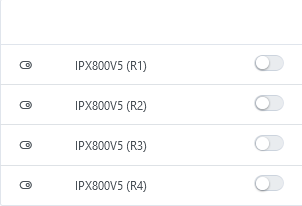
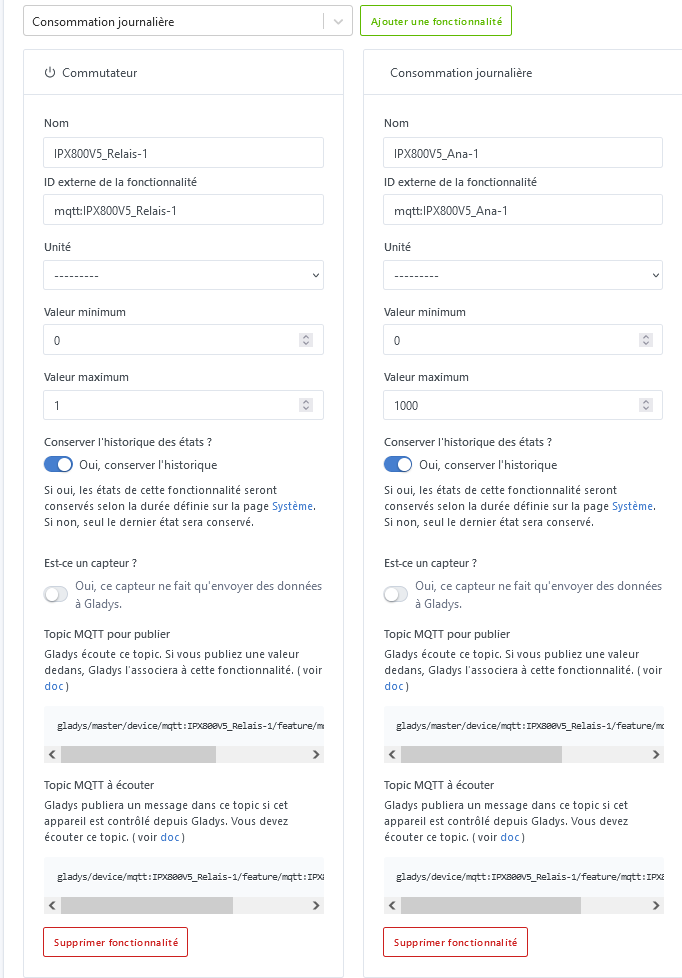
I created an MQTT topic with the « Is this a sensor? » option disabled, because I do indeed want to access it from the « Control a device » action in a scene. By doing this, I cannot display that « MQTT topic to listen to » on my dashboard, because it is not offered in the « Device » or « Room device » widgets. Only the « MQTT topics to publish » are available.
Is there any particular reason for this limitation? It’s a bit strange actually, because I can display that « MQTT topic to listen to » as a graph with the « Graph » widget (because there, all MQTT topics are offered).
Should I do it differently? In practice, what I want to do is calculate a value from other info in my home automation (using the « control a device » action and the ‹ calculated value › variant), and display it on my dashboard.
Concrete example: I have the Tempo EDF option, and I want to display on my dashboard the kWh price that I calculate based on the time of day and the day’s color (retrieved via Node-RED in another MQTT topic… )
Thanks for your reply. It’s true that I could put that calculation to determine the price per kWh in Node-RED, as I already do to process the Tempo day’s color information.
But my question was mainly about displaying MQTT topics in the dashboard that are not just sensors: why can you do it in a ‹ graph › widget but not in a ‹ device › or ‹ room device › widget?
I can indeed manage with Node-RED, but it’s more intuitive to work in Gladys
If you watch this tutorial too, you can push back relay info here as switches; I could also have pushed back analog values and added « temperature » or « signal strength » features to have the analog values reported in the Gladys dashboard
you just need to adapt on the hardware side the MQTT subscribe and publish so that they match those on the Gladys side (it’s not possible to do it the other way around at the device level for now)
In fact, if I understand correctly, an MQTT topic defined as ‹ controlled by Gladys › (that is, the « Is it a sensor? » option is unchecked) is only displayable on the dashboard in a « device » or « room device » widget if a ‹ controller › has been developed.
This is, for example, the case for a topic of type « temperature setpoint » but not for a topic of type « integer counter ».
I could ask you to add some controllers, but actually I don’t need to ‹ control from the dashboard ›, I simply want to display the value on the dashboard to monitor how it was ‹ controlled from a scene ›.
A specific need: I want to monitor how many times per day my power outlet is turned on. So I created an MQTT topic of type ‹ integer counter › which is incremented from a scene (trigger = change of the outlet’s state). And I would like to display it.
Am I clear enough? (I hope so and if not I’m happy to try to explain it differently…)
Also, I was trying to list the types of topics for which I’ve already encountered this need. I identified: integer counter, text, unknown, currency.
But actually, I’m wondering if it’s not ‹ simply › about making all MQTT topics displayable without exception, either as a controller when one has been developed because it’s relevant, or as a simple display of the value.
The option « Is it a sensor » is used to define whether the device only sends data (e.g.: temperature sensor) or whether it sends data and receives some (case of a plug: it can send the energy consumption to Gladys to display but you can also ask it to turn off or on). In the first case it’s unidirectional — your device publishes its temperature to Gladys; in the second it’s bidirectional — your device publishes its consumption to Gladys and Gladys publishes to the device the command ‹ turn on or off ›!
[quote=« StephaneB, post:7, topic:8529 »]
A specific need: I want to monitor how many times per day my power outlet is turned on. So I created an MQTT topic
@pierre-gilles : si ‹ read-only › c’est quand on laisse cochée l’option ‹ Is this a sensor? › du MQTT topic (dans mon esprit, c’est du ‹ read-only ›, parce que dans ce cas je ne peux pas modifier le topic depuis une scène), alors on peut bien afficher sur le dashboard.
Mais mon besoin est l’inverse : un MQTT topic ‹ editable ›, pour pouvoir le modifier depuis une scène. Ce qui impose de décocher l’option ‹ Is this a sensor? › du MQTT topic. Et dans ce cas : si c’est un type ‹ integer counter › (ou ‹ unknown ›, ou ‹ text ›,…) il n’est pas affichable dans le dashboard. Alors que si c’est un type ‹ temperature setpoint › (ou ‹ lighting on/off ›,…) il est affichable, sous la forme d’un controller.
 )
)