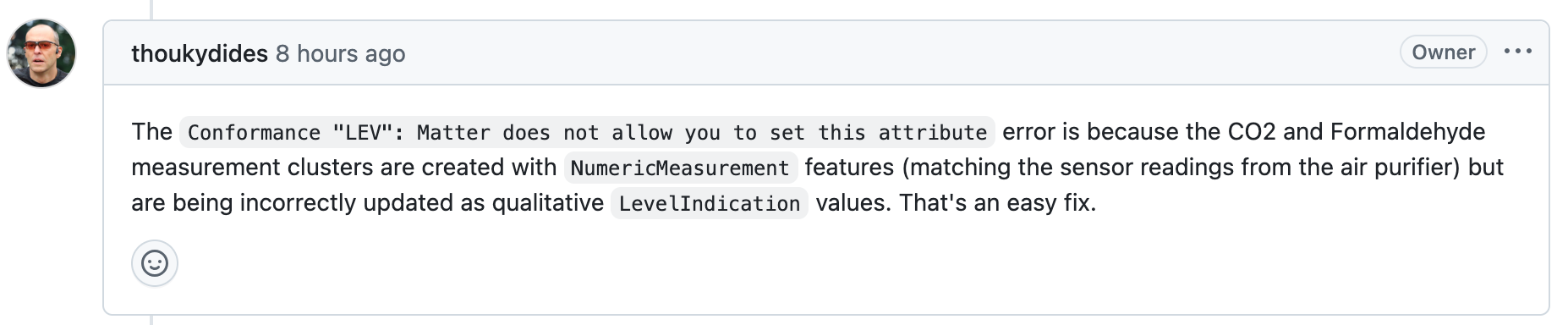
[Matterbridge] Dyson plugin - missing configuration?

So Matterbridge this is amazing!
I just looked at what was happening on GitHub and I came across a plugin for Dyson devices.
I don’t have a robot but I have a tower fan.
So I installed the plugin, I logged in (cloud login/password) and my fan appeared!


24 are the controls, 25 is all the air quality data.

It should also work locally but I need to dig into the tokens and understand them.

So I go back into Gladys and… I don’t see it :frowning:
And I do have the latest device view because after updating Matterbridge, I had to update all my Somfy devices, and 2 new devices appeared (reboot and restart Matterbridge, 22 and 23 below):

Here is part of the matterbridge log:

info [21:39:54.308] [Dyson Robot] Configuring matterbridge-dyson-robot
info [21:39:54.350] [Dyson Robot - Dyson Pure Cool™] Subscribed endpoint dyson-tp06-3717b93708d3197899bd6-airpurifier:24 attribute FanControl.fanMode$Changed
info [21:39:54.350] [Dyson Robot - Dyson Pure Cool™] Subscribed endpoint dyson-tp06-3717b93708d3197899bd6-airpurifier:24 attribute FanControl.percentSetting$Changed
info [21:39:54.350] [Dyson Robot - Dyson Pure Cool™] Subscribed endpoint dyson-tp06-3717b93708d3197899bd6-airpurifier:24 attribute FanControl.rockSetting$Changed
info [21:39:54.350] [Dyson Robot - Dyson Pure Cool™] Subscribed endpoint dyson-tp06-3717b93708d3197899bd6-airpurifier:24 attribute FanControl.speedSetting$Changed
info [21:39:54.351] [Dyson Robot - Dyson Pure Cool™] Subscribed endpoint dyson-tp06-3717b93708d3197899bd6-airpurifier:24 attribute FanControl.windSetting$Changed
info [21:39:54.351] [Dyson Robot - Dyson Pure Cool™] Reachable: true
info [21:39:54.352] [Dyson Robot - Dyson Pure Cool™] Reachable: true
info [21:39:54.352] [Dyson Robot - Dyson Pure Cool™] On/Off: Off
info [21:39:54.352] [Dyson Robot - Dyson Pure Cool™] Fan Control: current speed 0 (0 %), set speed 10 (100 %), High (3), rock left/right, and Forward (0)
info [21:39:54.353] [Dyson Robot - Dyson Pure Cool™] HEPA Filter: 73% Ok (0) installed
info [21:39:54.353] [Dyson Robot - Dyson Pure Cool™] Air Quality Measurements: Good (1) air quality, 23.75 °C, 45.00 % RH, Low (1) VOC, Low (1) NOx, 2 µg/m³ PM2.5, and 2 µg/m³ PM10
info [21:39:54.355] [Dyson Robot - Dyson Pure Cool™] Trigger event BridgedDeviceBasicInformation.reachableChanged with { reachableNewValue: true } on endpoint dyson-tp06-3717b93708d3197899bd6-airpurifier:24
info [21:39:54.355] [Dyson Robot - Dyson Pure Cool™] Trigger event BridgedDeviceBasicInformation.reachableChanged with { reachableNewValue: true } on endpoint dyson-tp06-3717b93708d3197899bd6-airqualitysensor:25
info [21:39:54.357] [Dyson Robot - Dyson Pure Cool™] Update endpoint dyson-tp06-3717b93708d3197899bd6-airpurifier:24 attribute HepaFilterMonitoring.condition from 0 to 73
info [21:39:54.357] [Dyson Robot - Dyson Pure Cool™] Update endpoint dyson-tp06-3717b93708d3197899bd6-airqualitysensor:25 attribute AirQuality.airQuality from 0 to 1
info [21:39:54.357] [Dyson Robot - Dyson Pure Cool™] Update endpoint dyson-tp06-3717b93708d3197899bd6-airqualitysensor:25 attribute TemperatureMeasurement.measuredValue from null to 2375
info [21:39:54.357] [Dyson Robot - Dyson Pure Cool™] Update endpoint dyson-tp06-3717b93708d3197899bd6-airqualitysensor:25 attribute RelativeHumidityMeasurement.measuredValue from null to 4500
info [21:39:54.357] [Dyson Robot - Dyson Pure Cool™] Update endpoint dyson-tp06-3717b93708d3197899bd6-airqualitysensor:25 attribute TotalVolatileOrganicCompoundsConcentrationMeasurement.levelValue from 0 to 1
info [21:39:54.358] [Dyson Robot - Dyson Pure Cool™] Update endpoint dyson-tp06-3717b93708d3197899bd6-airqualitysensor:25 attribute NitrogenDioxideConcentrationMeasurement.levelValue from 0 to 1
info [21:39:54.358] [Dyson Robot - Dyson Pure Cool™] Update endpoint dyson-tp06-3717b93708d3197899bd6-airqualitysensor:25 attribute Pm25ConcentrationMeasurement.measuredValue from null to 2
info [21:39:54.358] [Dyson Robot - Dyson Pure Cool™] Update endpoint dyson-tp06-3717b93708d3197899bd6-airqualitysensor:25 attribute Pm10ConcentrationMeasurement.measuredValue from null to 2
info [21:39:54.359] [Dyson Robot - Dyson Pure Cool™] Activated Carbon Filter: 73% Ok (0) installed
info [21:39:54.359] [Dyson Robot - Dyson Pure Cool™] Update endpoint dyson-tp06-3717b93708d3197899bd6-airpurifier:24 attribute ActivatedCarbonFilterMonitoring.condition from 0 to 73
info [21:39:54.360] [Dyson Robot - Dyson Pure Cool™] Update endpoint dyson-tp06-3717b93708d3197899bd6-airpurifier:24 attribute ActivatedCarbonFilterMonitoring.inPlaceIndicator from false to true
info [21:39:54.397] [Dyson Robot - Dyson Pure Cool™] Update endpoint dyson-tp06-3717b93708d3197899bd6-airpurifier:24 attribute FanControl.fanMode from 0 to 3
info [21:39:54.475] [Dyson Robot - Dyson Pure Cool™] Update endpoint dyson-tp06-3717b93708d3197899bd6-airpurifier:24 attribute FanControl.percentSetting from 0 to 100
info [21:39:54.555] [Dyson Robot - Dyson Pure Cool™] Update endpoint dyson-tp06-3717b93708d3197899bd6-airpurifier:24 attribute FanControl.rockSetting from { rockLeftRight: false, rockUpDown: false, rockRound: false } to { rockLeftRight: true, rockUpDown: false, rockRound: false }
info [21:39:54.612] [Dyson Robot - Dyson Pure Cool™] Update endpoint dyson-tp06-3717b93708d3197899bd6-airpurifier:24 attribute FanControl.speedSetting from 0 to 10
info [21:39:54.612] [Dyson Robot] Configured 1 Dyson device
notice [21:39:54.613] [PluginManager] Configured plugin matterbridge-dyson-robot type DynamicPlatform

@pierre-gilles do you need to declare anything specific to add the fan?

2 Likes

@mutmut, excellent !!

To see the compatible categories/types, check this file: Gladys/server/services/matter/utils/convertToGladysDevice.js at master · GladysAssistant/Gladys · GitHub

Everything related to air quality is not yet integrated, but indeed Temperature and Humidity could have, I suppose …

Totally!! There are more and more integrations!

Some features are not yet supported by Gladys, but normally you should at least see the on/off, the temperature and the humidity, so it’s not normal that you see nothing!

Do you have any logs on the Gladys side?

well I don’t see anything in the Gladys logs :thinking:


Knowing that for the test I started from a clean Gladys, I set up matterbridge and then I disabled all services except Matter and MQTT.

The two internal matterbridge devices appeared (reboot and update).
I then added the example device, which appeared in Gladys’s devices.
And I finally installed the Dyson plugin, added my account, and my fan is indeed in matterbridge.


And I see devices 5 and 6 in Gladys!!!

And actually it took a little time to appear, I don’t know, I’d say 5 minutes, I was taking screenshots and typing my… negative reply and when I looked at my test Gladys again, it was there.

When checking my production Gladys, my Dyson also showed up.

And since a video is worth more than a long speech :stuck_out_tongue_winking_eye:

Here are some screenshots of the matterbridge config for the fan and what should be added, as well as what I see in the app for the air quality part:
Fan control


speed: auto mode or manual mode from 1 to 10
airflow direction: forward flow (0) or backward (1)
oscillation: on/off
oscillation angle:
timer
night mode: on/off

HEPA filter


condition = 73% corresponds to its efficiency level (0% → change the filter)

Activated carbon filter


same as HEPA filter.

Air quality


This indicator is based on the highest value among PM2.5/PM10/VOCs (COV)/NO2 and indicates its level, tied to the scales below.

PM2.5 particles


PM10 particles


VOCs (COV)


NO2


same scale as VOCs (COV)

After a few minutes of operation:

And for info, Dyson devices integrate an MQTT broker and matterbridge retrieves the info like this :grimacing:

EDIT: some info on my request to add my Dyson TP04 here, some functions are not yet supported by Matter 1.4.

1 Like

Ok thanks for the detail, great if it appeared in Gladys !

I’ve made a note to add all of that to the Matter integration :slight_smile:

2 Likes

I’ve started a PR here:

For now there are only the PM2.5 sensors; I’ll gradually add the rest :slight_smile:

2 Likes

Hi,

I also have a Dyson tower, so I installed Matterbridge and the plugin.
It shows up correctly in the devices:

I do, however, have an error:

info [11:05:13.501] [Frontend] WebSocketServer client "::ffff:192.168.1.25" connected to Matterbridge
warn [11:09:17.417] [Dyson Robot - Salon] MQTT topic '438E/\u003cSERIAL_NUMBER: K3G-...RFA0690A\u003e/status/current':
warn [11:09:17.418] [Dyson Robot - Salon] └─ DysonAirMsgStateChange.productState is not a DysonAirProductStateChange
warn [11:09:17.419] [Dyson Robot - Salon] └─ DysonAirMsgStateChange.productState.sltm is extraneous
info [11:09:17.420] [Dyson Robot - Salon] {
info [11:09:17.420] [Dyson Robot - Salon] modeReason: 'PRC',
info [11:09:17.420] [Dyson Robot - Salon] msg: 'STATE-CHANGE',
info [11:09:17.421] [Dyson Robot - Salon] productState: {
info [11:09:17.421] [Dyson Robot - Salon] ancp: [ '0090', '0090' ],
info [11:09:17.421] [Dyson Robot - Salon] auto: [ 'ON', 'OFF' ],
info [11:09:17.421] [Dyson Robot - Salon] bril: [ '0002', '0002' ],
info [11:09:17.421] [Dyson Robot - Salon] cflr: [ 'INV', 'INV' ],
info [11:09:17.421] [Dyson Robot - Salon] cflt: [ 'SCOG', 'SCOG' ],
info [11:09:17.421] [Dyson Robot - Salon] corf: [ 'ON', 'ON' ],
info [11:09:17.421] [Dyson Robot - Salon] ercd: [ '51C2', '51C2' ],
info [11:09:17.421] [Dyson Robot - Salon] fdir: [ 'ON', 'ON' ],
info [11:09:17.421] [Dyson Robot - Salon] fnsp: [ 'AUTO', '0002' ],
info [11:09:17.421] [Dyson Robot - Salon] fnst: [ 'FAN', 'FAN' ],
info [11:09:17.421] [Dyson Robot - Salon] fpwr: [ 'ON', 'ON' ],
info [11:09:17.421] [Dyson Robot - Salon] hflr: [ '0019', '0019' ],
info [11:09:17.421] [Dyson Robot - Salon] hflt: [ 'GCOM', 'GCOM' ],
info [11:09:17.421] [Dyson Robot - Salon] nmdv: [ '0004', '0004' ],
info [11:09:17.422] [Dyson Robot - Salon] nmod: [ 'OFF', 'OFF' ],
info [11:09:17.422] [Dyson Robot - Salon] osal: [ '0134', '0134' ],
info [11:09:17.422] [Dyson Robot - Salon] osau: [ '0224', '0224' ],
info [11:09:17.422] [Dyson Robot - Salon] oscs: [ 'ON', 'ON' ],
info [11:09:17.422] [Dyson Robot - Salon] oson: [ 'ON', 'ON' ],
info [11:09:17.422] [Dyson Robot - Salon] rhtm: [ 'ON', 'ON' ],
info [11:09:17.422] [Dyson Robot - Salon] sltm: [ 'OFF', 'OFF' ],
info [11:09:17.422] [Dyson Robot - Salon] wacd: [ 'NONE', 'NONE' ]
info [11:09:17.422] [Dyson Robot - Salon] },
info [11:09:17.422] [Dyson Robot - Salon] scheduler: { dstv: '0001', srsc: '0000000065be1612', tzid: '0001' },
info [11:09:17.422] [Dyson Robot - Salon] stateReason: 'MODE',
info [11:09:17.422] [Dyson Robot - Salon] time: '2025-06-04T11:09:18.000Z'
info [11:09:17.422] [Dyson Robot - Salon] }
warn [11:09:17.422] [Dyson Robot - Salon] Received unknown error code: 51C2
warn [11:17:04.378] [Dyson Robot - Salon] Received unknown error code: 51C2
warn [11:19:37.148] [Dyson Robot - Salon] Received unknown error code: 51C2
warn [11:19:37.482] [Dyson Robot - Salon] Received unknown productErrors: sen7
warn [11:19:46.900] [Dyson Robot - Salon] Received unknown error code: 51C2
warn [11:19:47.091] [Dyson Robot - Salon] Received unknown productErrors: sen7
warn [11:20:07.060] [Dyson Robot - Salon] Received unknown error code: 51C2
warn [11:20:07.329] [Dyson Robot - Salon] Received unknown productErrors: sen7
warn [11:20:16.838] [Dyson Robot - Salon] Received unknown error code: 51C2
warn [11:20:17.513] [Dyson Robot - Salon] Received unknown productErrors: sen7
warn [11:20:37.061] [Dyson Robot - Salon] Received unknown error code: 51C2
warn [11:20:37.329] [Dyson Robot - Salon] Received unknown productErrors: sen7

Is this a mistake on my part, or is it more a Matterbridge issue that doesn’t support this tower?

@mutmut where did you find your pairing code to add it to Gladys? Thanks

Ah, I just realized it’s the QR code — it’s fine.

Hi @Nagromdark
I think your fan isn’t fully configured in the plugin; my TP04 wasn’t there.
You can create an issue on GitHub to have your model added, here is my issue for the TP04.
You’ll need to set the logs to debug for matterbridge, Matter and the plugin.

For now we won’t be able to do everything because some features don’t yet exist in Matter, but they’ll come.

Thanks @mutmut for your reply, indeed for the moment only on/off, temperature and humidity are reported to Gladys — it’s not great.
I still use the node-red-contrib-dyson-purelink plugin in parallel, I don’t know if you’re familiar with it. But it’s the same: it doesn’t always work, it’s quite random.

I confirm that it’s indeed on my to-do list to add everything that Matterbridge manages :wink:

1 Like

Issue created, I confess I kind of copied from you :slight_smile:

I saw it :wink: , you did well and the fix is already available !

1 Like

I merged the PR regarding PM2.5 via Matter, this will be available in the next Gladys release! :tada:


:white_check_mark: What remains to be integrated (and is relatively simple):

  • PM10
  • VOC
  • NO₂
  • Air quality: check whether this corresponds to the standard “AQI” unit already supported in Gladys, or whether it is a new unit to handle separately.

:construction: What is not yet supported in Gladys (including outside Matter):
  • Fan control
  • HEPA filter
  • Activated carbon filter

@mutmut I think it would be a good idea to create a few feature requests on the forum to document these needs and not lose the requests :slight_smile: Thanks!

2 Likes

Support for PM2.5 sensors is available in Gladys Assistant 4.61 :

I created feature requests for all remaining developments so as not to lose track of them :

1 Like

hi @pierre-gilles
thanks for setting everything up, I had planned to do this tonight, sorry for not being quicker :frowning:

1 Like

Ah darn, don’t worry, it only took me 2 minutes :smiley:

1 Like

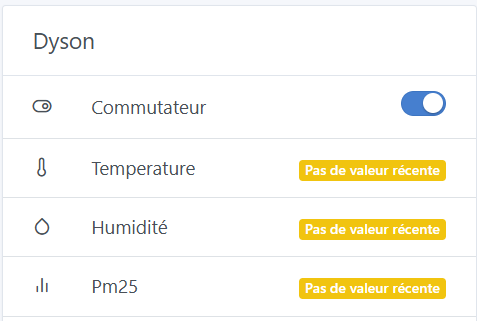
Hi, I’m bumping this thread — I reinstalled Matterbridge yesterday with the matterbridge-dyson-robot plugin. It’s been more than 24 hours but I’m still not receiving any data; I can only turn the tower off/on:

@mutmut does it work for you?

I just realized I logged out of the MyDyson app and the info immediately showed up in Gladys.