I would like to be able to zoom in on the camera from the dashboard to better view it.
I’m reposting here what I said on another topic for archive:
Basically: Yes, having live cameras is something I want in Gladys, and it will be offered on Gladys Plus to allow you to monitor your home remotely, live and on video.
But it’s a big undertaking, because it’s a whole end-to-end encrypted video streaming infrastructure to set up.
As soon as I get started on the topic I’ll post a message here!
That would indeed be a big plus 
That said, I think we should clearly set limits for the feature. I’m basing this on my personal example: my outdoor cameras are managed by Frigate. This software lets me define zones / masks / objects to detect / recordings / photos… it’s pretty comprehensive.
I can definitely see Gladys offering a live view, which is very convenient, but I think we should limit it to that, otherwise it’s going to become a nightmare ^^
It doesn’t seem to me that the feature request mentions the ability to perform video analysis to trigger events 
It’s clear that video analysis is something else. A project in its own right, like ZoneMinder, MotionEye and Shinobi for example (not to mention camera vendors’ solutions).
For my part I’m trying to deploy ZoneMinder, which is open source and offers video analysis, on a Raspberry Pi 4. If possible, I’ll try to interconnect it with Gladys to trigger scenes and display the live feed (when that becomes possible).
Displaying a video stream would be awesome in Gladys, but I can’t even imagine the amount of work! And which streams? WebRTC, RTSP, HLS, MPEG, ONIF, etc..
[quote=« lmilcent, post:5, topic:6610 »]
On my side I’m trying to deploy
You really sold me on that 
That’s interesting and a great idea to have a remote TPU!
At first I’ll test on the bare Pi 4, otherwise on my mini PC that hosts Gladys (i5 CPU).
As for the solution, Frigate also looks interesting, especially since a container is ready to go!
I use Frigate too and it’s pretty lightweight, running in Docker mode
For your information, to be ready when I start this development, I began writing functional specifications to be sure of the requirements.
Feature
The goal is to be able to view the live video (and audio?) stream from a camera from the Gladys dashboard.
The user can click a button on the « Camera » box to display the live image in a larger view (mockup below, non-contractual), and access a live stream.

Limits
In order not to overload local instances (in terms of CPU usage), and remote Gladys Plus (video streaming is expensive), I propose the following limits:
- Maximum 1 simultaneous stream
- Max 5 minutes per stream (return to the dashboard afterwards)
- Resolution of 480p, 720p or 1080p, chosen by the user according to their setup. Given the « average user’s » Gladys instance, I don’t think streaming in all three formats and doing adaptive streaming based on the client’s internet connection is realistic — it would be too resource-intensive. We’ll do more tests together during a private alpha, I think.
Roadmap
I’ve written the technical specs on my side and was able to estimate the development time. It’s much less than I thought, but it’s still an expensive development
As soon as I finish everything I’m currently developing, I think this feature is the next « big » one that could arrive on Gladys!
The limits seem « fair » to me, especially for the 5-minute display limit.
Question regarding Gladys Plus: could the behavior be different if one is accessing Gladys directly?
Because going through the Gladys Plus « cloud », the limit holds. But accessing locally, there would only be a potential CPU issue, with no network impact.
Either:
- The 5-minute limit is not active in « local » mode
- A configuration of the « camera » service allows removing this limitation only in local mode (option unchecked by default)
Because I can well imagine wanting to potentially access 2 or 3 live cameras for 10 minutes if something important is happening at home (even if it means connecting via VPN to avoid using the cloud and its limitation).
If the stream arrives in 1080p, will Gladys automatically « downgrade » the quality? Isn’t that too resource-intensive?
For now I haven’t yet decided whether I’ll develop this feature outside Gladys Plus, because they’re really two different developments that will work differently.
My goal in 2023 is really to solidify the Gladys Plus offering to make it attractive and to be profitable on the project
The idea is that Gladys Plus meets the need — if the limits are too low, then we’ll change them! If you have to use your VPN, it’s because Gladys Plus isn’t doing the job ^^
Is 1 simultaneous camera not enough?
When I say « 5 minutes », it’s just that at the end of the 5 minutes you have to click again to start the live; it’s to prevent users who leave a tab open without using it, but basically if you want to watch 10 minutes in a row you just have to click 
No, 1080p sent = 1080p displayed!
I have some of the same questions as @lmilcent and I pretty much agree that, in terms of usage, it would be interesting to be able to watch multiple streams live.
For example, at my place I have two cameras looking at the front of my house; I have two because the field of view of each one doesn’t cover everything and I’m not interested in a camera with a distorted spherical view.
At home I’m used to checking the two cameras live at the same time because it actually gives me an overall view rather than piece by piece.
That’s my feedback because from a development point of view I can’t imagine what the size of the streams vs the capacity of the pipes vs the securing of the data looks like…
Let’s say that in an ideal world multiple simultaneous streams would be welcome ^^
Regarding the 5-minute limit, would it be possible to only return to the dashboard in case of user inactivity? (like we all do to prevent our computer from going to sleep by moving the mouse).
Hello I find the proposals really very interesting !
However, I don’t understand the need to go through the paid version of gladys to access a camera 
If I’m at home on the tablet on the wall I want to quickly check a camera.
The tablet is always on gladys (local) and on clicking the image I display the live for x seconds.
If I want to access it via the cloud, I go through G+
So for me, this dev shouldn’t be G+ only.
For me you have two workstreams here,
- live video in gladys
- end-to-end encryption in the G+ offering
If one day you do what you wanted to do (several subscription levels), those who subscribe to the end-to-end encrypted live stream from A to Z access their cameras from outside, the others don’t access them and on click you offer to upgrade to subscription level x to access this feature.
What do you think?
I started an initial POC of this development, it’s working really well!
I added a new button to go live (the icon isn’t fixed) :
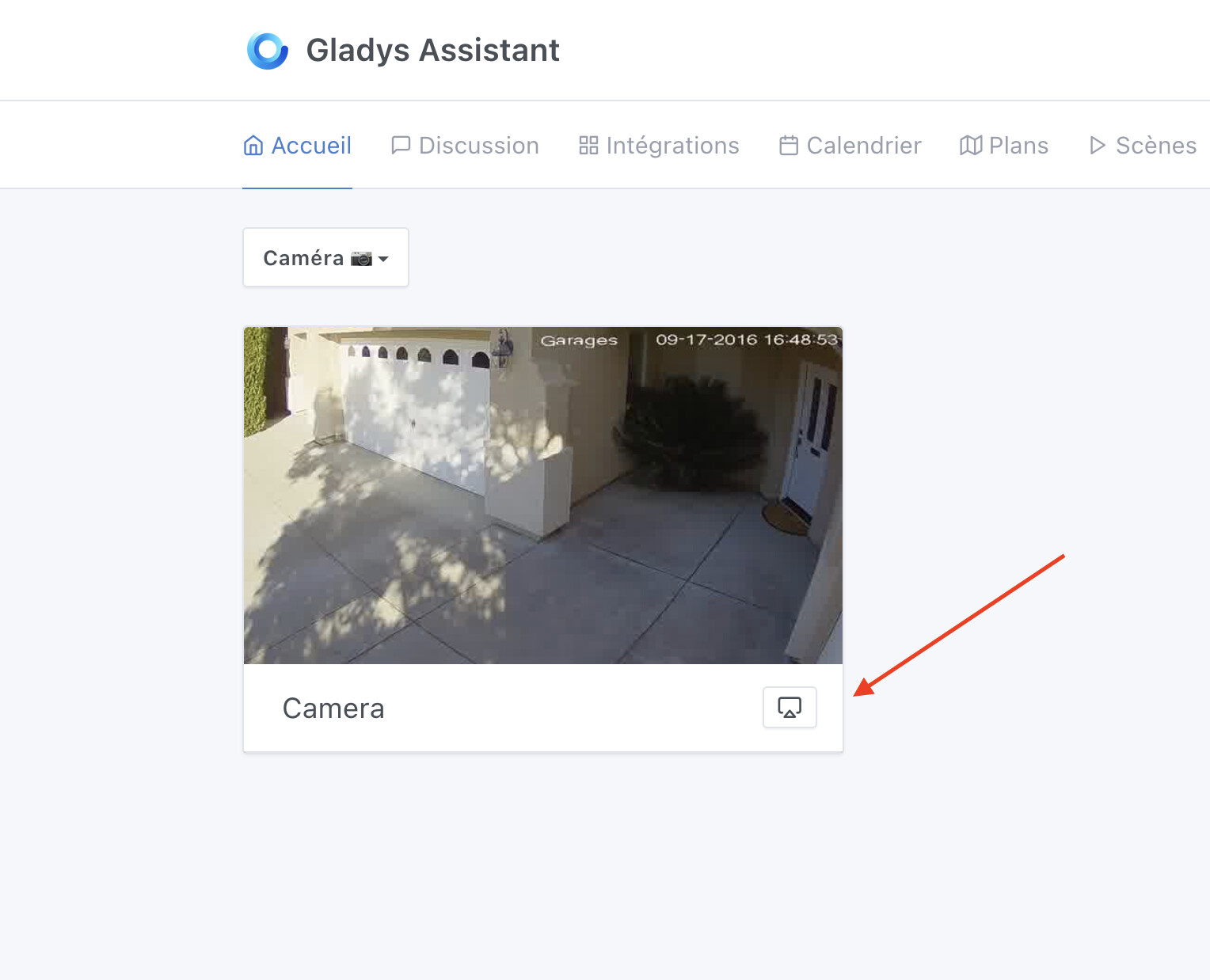
Short demo video :
There’s a small latency to « catch » the stream — I’ll run lots of tests to reduce this latency as much as possible, but we can’t avoid it entirely; there will inevitably be some.
I’ll think about it
And to think I was going to start on my side without even having seen all that, I can’t wait to see the code!
Hi everyone!
I made good progress on the feature today, and good news — it’s 100% functional on my side, both locally and via Gladys Plus. I’m very happy with the result 
Both locally and via Gladys Plus, video streaming will be end-to-end encrypted to guarantee your privacy.
I have to admit I struggled a lot with this part, because I wanted true end-to-end encrypted streaming (which is quite different from streaming that is only encrypted).
For each « session » of streaming, Gladys generates a unique encryption key that will be destroyed after the session. When you stream via Gladys Plus, the local instance sends it to the browser by encrypting this key with the frontend’s public key, so that the frontend — and only it — is aware of the encryption key.
What remains to be done
I’d like to do as we did with Enedis and provide a private alpha as soon as possible to an initial batch of testers, mainly to get feedback on the Gladys Plus part because I really need real-world tests to know if the latency is acceptable for you.
Before providing this private alpha, I need to test quite a few cases to make sure the UX is really solid.
Above all, I need to make sure there are no memory leaks, because this feature is quite prone to leaving streams running in the background.
In the case of Gladys Plus, there are 3 separate streams, so if one cuts off, the others must also stop so there aren’t « ghost » and useless streams running in the background:
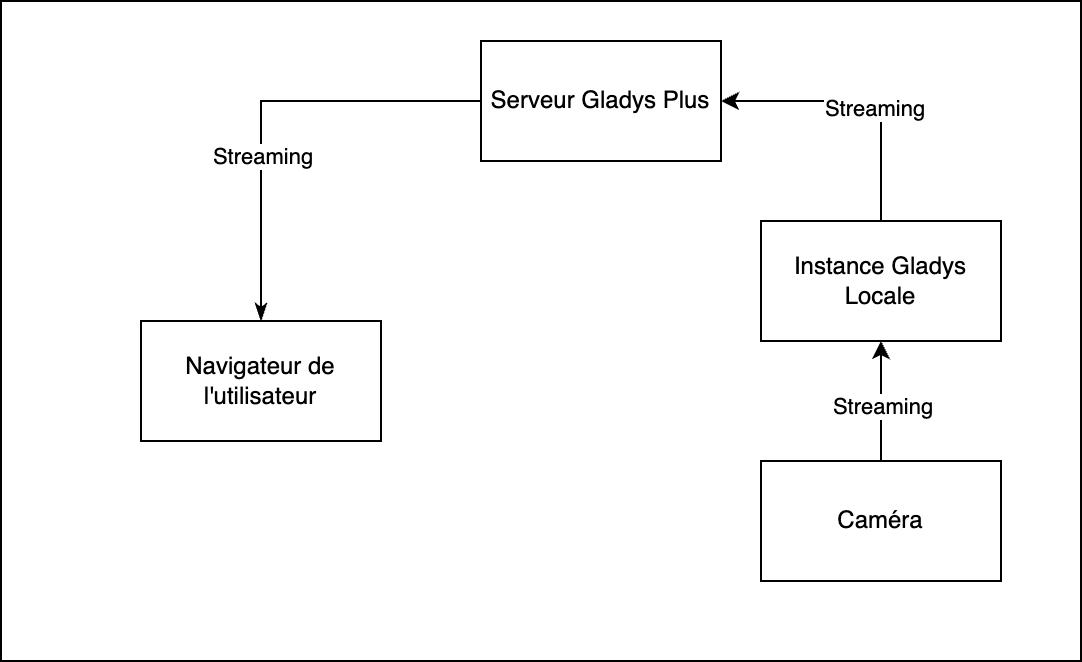
So all the work is about testing every possible case (The user closes their browser, the instance restarts, etc…)
I’ll keep you posted as soon as I have more to show.
Can’t wait to try this! It’s a feature I’ve been eagerly awaiting, simply because I sometimes use Gladys to open my gate — it’s just a momentary/pulse command, but if I’m not standing in front of my gate there’s nothing that really tells me whether I just opened it / stopped it / closed it.
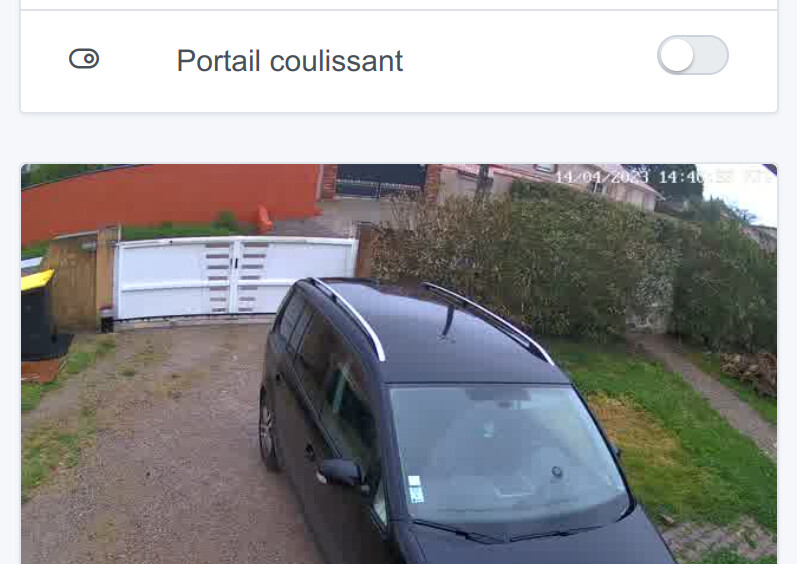
So a live view of the gate would be a really useful safety feature for me!!
Hi everyone!
I worked hard yesterday and today to finish this development this week, and it’s done 
This feature is available in private alpha. I sent invitations to a limited group of users for now, and depending on the feedback I’ll expand this alpha.
If you’re interested in testing this feature in alpha (you need to know how to run a Docker image), leave a message here
Interested
Interested!