@pierre-gilles, I reread this thread following this exchange :
Well, it seems to me that your proposal of November 6, 2023 was received rather favorably, except by those who were worried that it would reduce the number of scenes. But that was before the appearance of tags, so I think that would no longer be an issue.
In any case, for a topic that is the top 1 by number of votes, it’s worth thinking about
You were asking how Apple does it in Shortcuts. I illustrate it with the screen below. And I find that it’s satisfactory if there are few actions in the ‹ then › path and the ‹ else › path. But if it becomes long, in my opinion it’s not very readable and what you propose (by sending the else to another scene) is preferable.
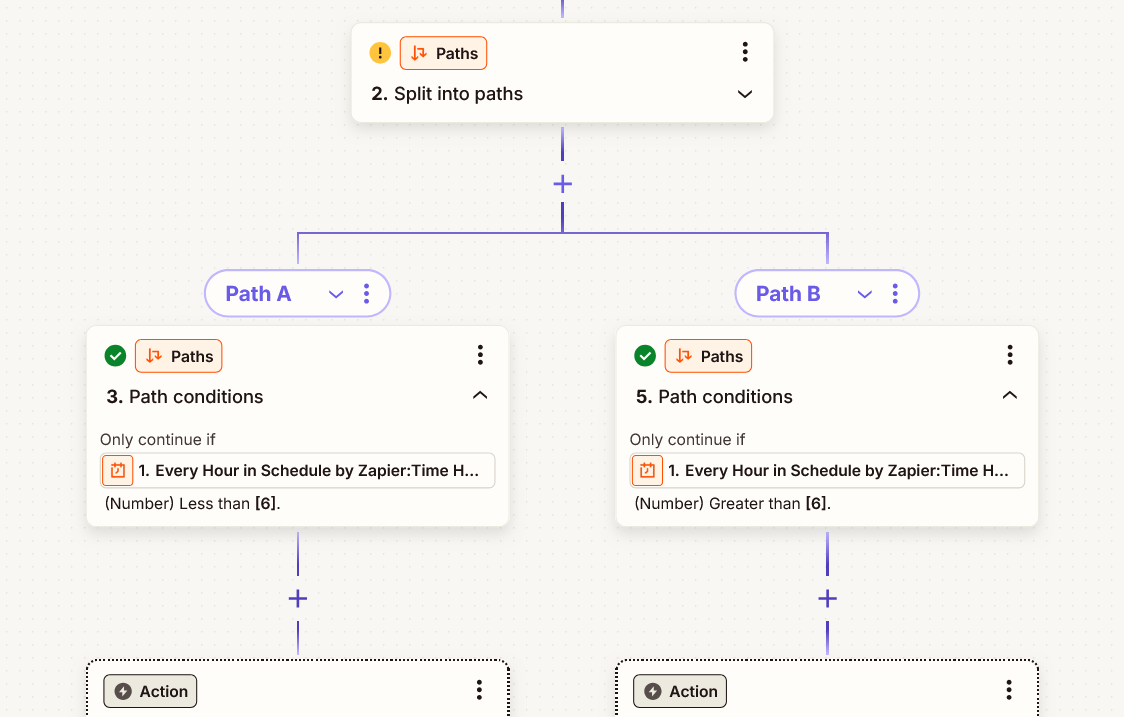
And in Zapier, it’s the screen below. Pretty nice, but not easily adaptable to the current presentation of scenes in Gladys, so that would mean too many things to rework to get there. Your proposal is more pragmatic
I think it’s possible to make a compromise on this function si/alors/sinon with a single action to perform (and then move on to the next) or if there are several actions to chain we launch a scene (whether in the alors or the sinon).
However, if we launch a scene, should we stop or wait for the scene execution to return?
Personally I’d lean toward a return (currently I know that’s not the case because I got caught out).
And I’d go a bit further in the UI, namely that we could « switch » into the scene to edit it (saving the current one with a small alert message asking whether to save or not), and if we edit this scene on its own, we should know that it has a parent scene (or several, actually, kind of like a subroutine).
I may be getting a bit carried away here…
I forgot to say that we keep the continuer si, for me it’s additional functions.
I admit my proposal was a bit of a workaround, and in hindsight I agree with the feedback: it doesn’t really change much about the problem
The real issue here isn’t so much having a “Continue only if” with an “otherwise”, but rather introducing scenes with multiple possible execution flows, rather than a single linear scenario as is currently the case.
I tested Apple’s proposal with Shortcuts, and it works pretty well! In any case, it works well on mobile, which seems to me to be the number one criterion.
Zapier is interesting too, but I can see myself using it less on mobile. I’m curious to see how it looks on mobile!
Zapier on mobile doesn’t have a dedicated app (at least on iOS), so it’s a web app and the display isn’t modified. It’s like with node-red, you only see a small part of your complete algorithm… And Zapier displays a warning "Zapier works better on a
@StephaneB Would you like to lead this topic and put together a proposal on Whimsical inspired by what Apple does?
The idea would be to have a block « IF » that would contain two blocks « THEN » and « ELSE » which would themselves be groups of Gladys’ standard actions.
To keep scenes clean, we could put limits on depth (max 1 or 2 I think), but at least it would already be much better than it is now!
It’s true that that’s what Zapier does and it completely opens up the possibilities: it’s not an « if then else », it’s a crossroads where each possible path has its own condition to access it. Which means, I imagine, that the scene can start to follow multiple paths in parallel if several conditions are met. But I’m not sure we need to go that far.
I agree that it works, but I think we should find a very clear way to identify that we’re in the steps of a « then » or an « else ». The simple, slight indentation of blocks in Shortcuts isn’t great…
Yes, I just think that on the iOS side it’s poorly presented; if we encapsulate it well in Gladys as we already do with action groups, it will be clear
Just two things I already notice with this mockup:
you say « The ‹ Then › and ‹ Else › areas would be exactly the same as area 1 »: does that mean we can only put actions there that run in parallel (so it would be a single block)? Or do you envision that we could define blocks that run sequentially, one after the other?
with the condition displayed like that, I understand it’s a block equivalent to ‹ continue only if ›, so we can add 'OR’s if we want. But I see less clearly how to chain multiple ‹ condition blocks › so that they’re treated as 'AND’s.
I think in both cases it should be possible: to chain blocks inside a Then and inside an Else, and to define conditions with ‹ AND › logic. Are you okay with that?
If that’s the case, will you continue the mockup or do you want me to take over? And can you share in Whimsical what you’ve started?
That’s indeed a possibility. But I’ll try to make a mockup where sequential is possible, that will be better. And if it makes the interface unreadable, we may have to revert to what you propose
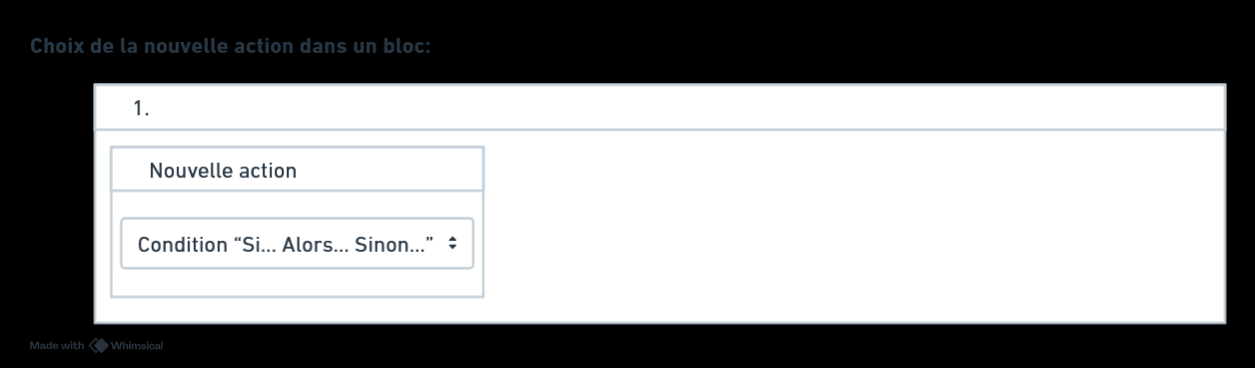
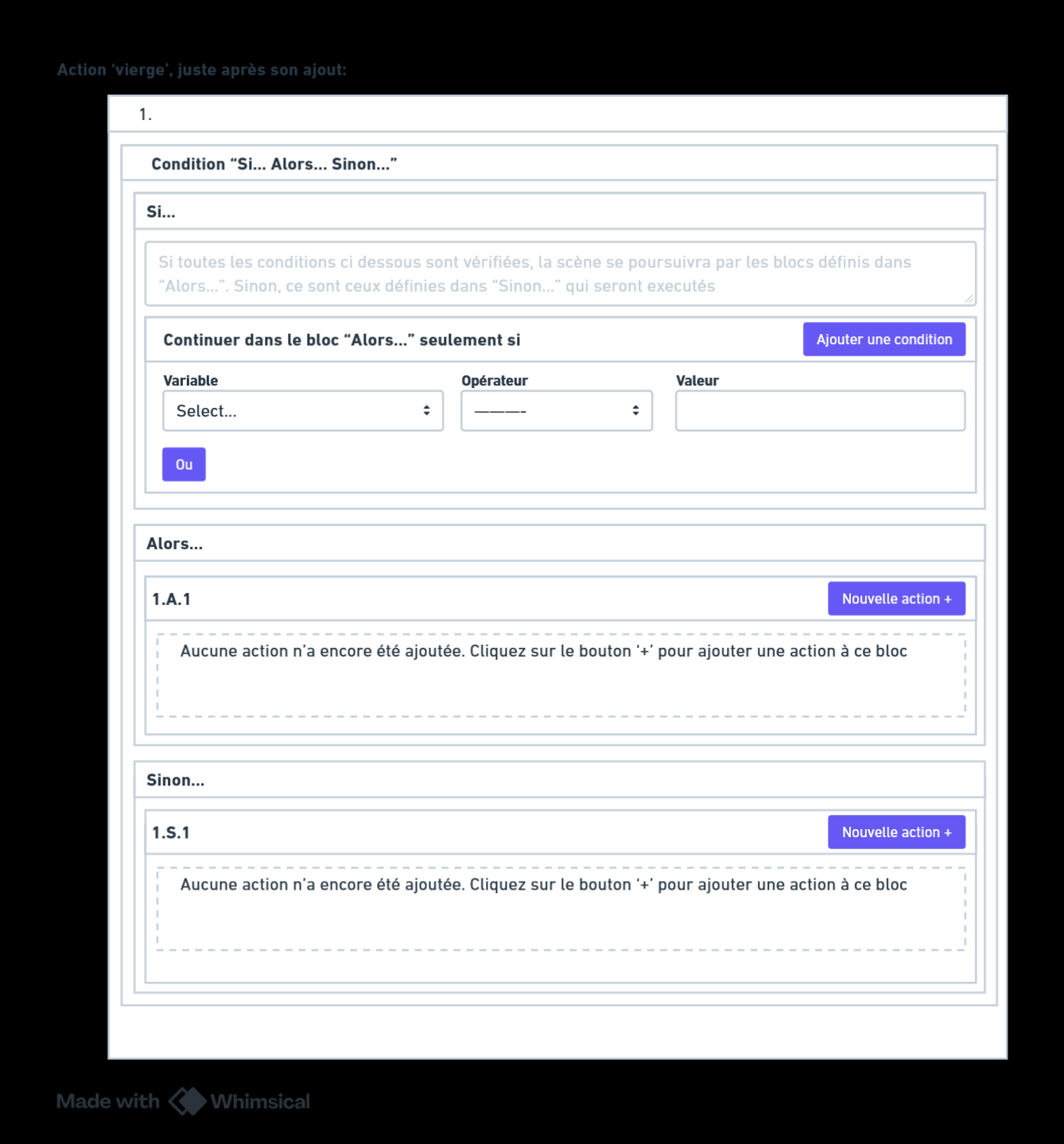
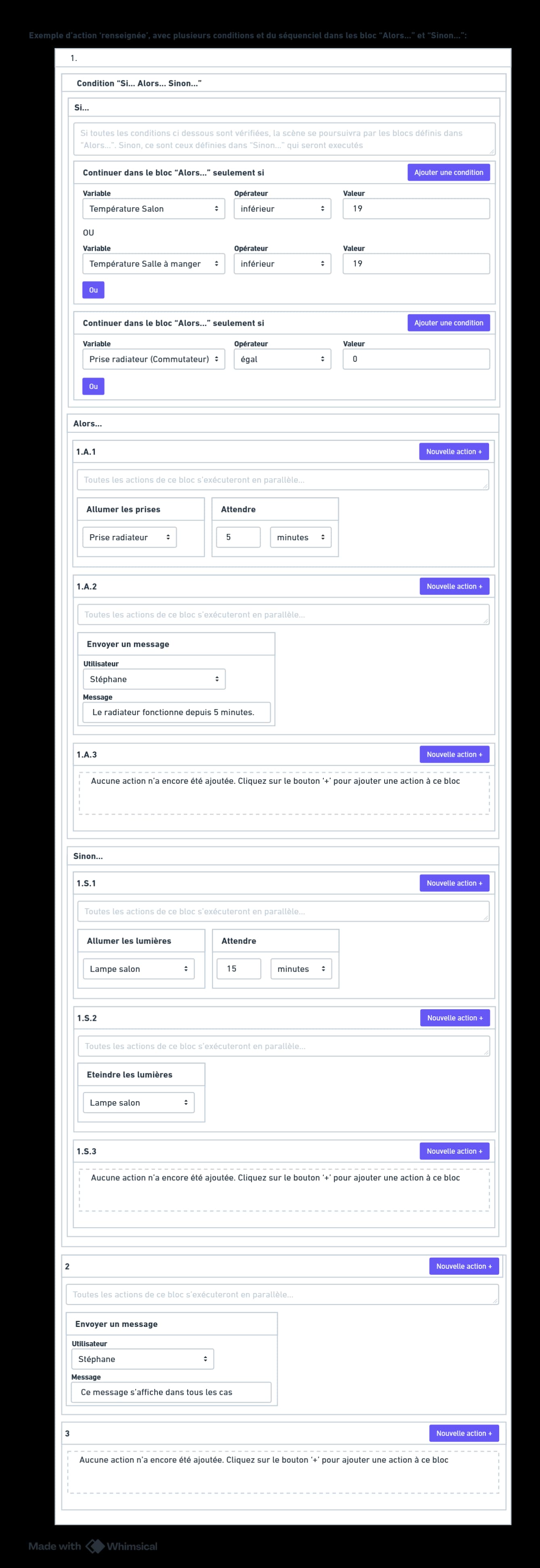
So here are 3 mockups to propose a new action « Condition If… Then… Else… »:
Mockup 1: choose the action
Mockup 2: the action is displayed, with the different areas to configure: If / Then / Else
Mockup 3: an example scene to illustrate. If the heating is off and it’s cool in the living room or the dining room, I turn on the radiator and confirm it by message 5 minutes later. And otherwise (if the radiator is already on, or if it’s warm enough in one of the two rooms), the living room light turns on and then turns off after 15 minutes (don’t ask me why, this example is ridiculous, I know…). Finally, in both cases, a message is sent.
The conditions in the « If » section are very similar to the « Continue only if » action. I actually only changed the title. And in this « If » section, you could only add conditions like that, not other actions of course. Hence the fact that the button is « Add a condition » and not « New action ».
The two blocks « Then » and « Else » would allow chaining sequential blocks. Numbering the blocks with ‹ A › for ‹ Alors › and ‹ S › for ‹ Sinon › should make it easier to find your way…
And the other point concerns the A and the S in the numbering.
At first glance, I might confuse the S with the 5 (yes, my eyesight gets worse every year ).
For French (the language of Molière), A=Alors / S=Sinon, but for other languages, does the letter change automatically?
If it’s in English, we have T=Then / E=Else; in German we’d have D=Dann / S=Sonst but maybe O=Oder (I’m not bilingual in German).
Not sure that this is ideal, but that’s my very personal opinion.
And also the O (o) and the I (i) which could be confused with 0 and 1.
Lowercase might do the trick, or a specific icon… I don’t have a brilliant idea right now…
After a brief chat with Perplexity, a few ideas:
1. (block) If/Then/Else
  IF condition
  Then
    1.A01.1 action 1
    1.A01.2 action 2
  Else
    1.B01.1 action 3
    1.B01.2 action 4
1. (block) If/Then/Else
  IF condition
  Then
    1.#.1 action 1
    1.#.2 action 2
  Else
    1.*.1 action 3
    1.*.2 action 4
1. (block) If/Then/Else
  IF condition
  Then
    1.\u003e.1 action 1
    1.\u003e.2 action 2
  Else
    1.\u003c.1 action 3
    1.\u003c.2 action 4
1. (block) If/Then/Else
  IF condition
  Then
    1.→.1 action 1
    1.→.2 action 2
  Else
    1.←.1 action 3
    1.←.2 action 4
 ): improving the « continue only if ».