@pierre-gilles, J’ai relu ce sujet suite à cet échange :
Et bien il me semble que ta proposition du 6 novembre 2023 avait été accueillie plutôt favorablement, sauf par ceux qui étaient inquiets que cela ne diminue pas le nombre de scènes. Mais c’était avant l’apparition des tags, donc je me dis que ce ne serait plus un souci.
En tout cas, pour un sujet qui est le Top1 en nombre de vote, ça mérite d’y réfléchir
Tu demandais comment faisait Apple dans ces raccourcis. Je l’illustre par l’écran ci-dessous. Et je trouve que c’est satisfaisant si il y a peu d’actions dans le chemin ‹ alors › et le chemin ‹ sinon ›. Mais si ça devient long, à mon avis c’est peu lisible et ce que tu proposes (en envoyant le sinon vers une autre scène) est préférable.
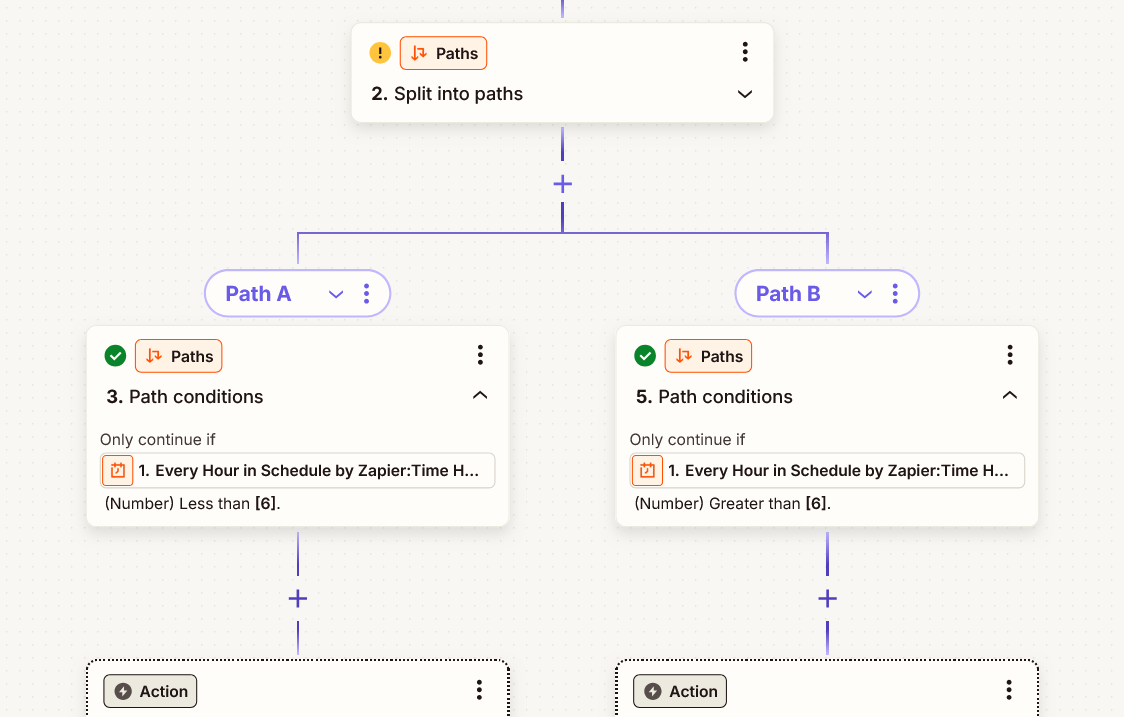
Et dans Zapier, c’est l’écran ci-dessous. Plutôt sympa, mais pas facilement adaptable à la présentation actuelle des scènes dans Gladys, donc ça signifierait trop de choses à remanier pour y arriver. Ta proposition est plus pragmatique
Je pense qu’il est possible de mettre effectivement un compromis sur cette fonction si/alors/sinon avec une seule action à faire (et on passe au suivant) ou bien si il y a plusieurs actions à enchaîner on lance une scène (que ce soit dans le alors ou le sinon).
Par contre si on lance une scène, est-ce qu’il faut arrêter ou attendre le retour de l’exécution de la scène ?
Perso je pencherai pour un retour (actuellement je sais que ce n’est pas le cas car je me suis fais avoir).
Et j’irai un peu plus loin dans l’UI, à savoir que l’on pourrait « basculer » dans la scène pour l’éditer (en sauvegardant l’actuelle avec un petit message d’alerte si il faut sauvegarder ou pas), et si on édite cette scène toute seule, il faudrait qu’on sache qu’elle a une scène parent (ou plusieurs d’ailleurs, un peu comme une sous-routine).
Je m’emballe peut-être un peu là…
J’oubliais de dire qu’on garde le continuer si, pour moi c’est des fonctions en plus.
J’avoue que ma proposition était un peu une solution de contournement, et avec du recul, je suis d’accord avec les retours : ça ne change finalement pas grand-chose au problème
Le vrai sujet ici, ce n’est pas tant d’avoir un “Continuer seulement si” avec un “sinon”, mais plutôt d’introduire des scènes avec plusieurs flux d’exécution possibles, plutôt qu’un seul scénario linéaire comme c’est le cas actuellement.
J’ai testé la proposition d’Apple avec Shortcuts, et ça fonctionne plutôt bien ! En tout cas, ça marche bien sur mobile, ce qui me semble être le critère n°1.
Zapier est intéressant aussi, mais je me projette moins sur son usage mobile. Je suis curieux de voir comment ça rend sur mobile !
Zapier sur mobile n’a pas d’app spécifique (en tout cas sur ios), donc c’est une web app et l’affichage n’est pas modifié. C’est comme avec node-red, tu ne vois qu’un petit bout de ton algorithme complet… Et Zapier affiche un avertissement "Zapier fonctionne mieux sur un grand écran "
@StephaneB Ca te dirait de leader ce sujet et de nous faire une proposition sur Whimsical inspirée de ce que fait Apple ?
L’idée, ce serait d’avoir un bloc "SI " qui contiendrait deux bloc « ALORS » et « SINON » qui serait eux même des groupes d’actions classique de Gladys.
Afin de garder des scènes clean, on pourra mettre des limites sur la profondeur (max 1 ou 2 je pense), mais au moins ça sera déjà bien mieux qu’actuellement!
C’est vrai que c’est ce que fait Zapier et ça ouvre complètement les possibilités : ce n’est pas un « si alors sinon », c’est un carrefour où chaque chemin possible possède sa condition propre pour y accéder. Ce qui fait j’imagine que la scène peut se mettre à suivre plusieurs chemins en parallèle, si plusieurs conditions sont remplies. Mais je ne suis pas sûr qu’il faille aller jusque là.
je suis d’accord que ça fonctionne, mais je pense qu’il faudrait trouver une façon bien claire d’identifier qu’on est dans les étapes d’un « alors » ou d’un « sinon ». La simple et légère indentation des blocs dans Shortcuts est pas top…
Je peux essayer oui, mais il faut que je prenne en main Whimsical. C’est l’outil obligatoire pour toi (parce que derrière ça te permet de faire une sorte de conversion automatique en code pour le front end Gladys) ? Ou si j’utilise autre chose pour faire un rendu visuel ça te va aussi ?
La zone « Alors » et « Sinon » seraient exactement les mêmes zones que le « 1. » plus haut, c’est un groupe d’action qu’on peut remplir de ce qu’on veut.
Juste deux trucs dont je me rends compte déjà avec cette maquette:
tu dis « Les zones Alors et Sinon seraient exactement les mêmes que la zone 1 » : ça signifie qu’on ne peut y mettre que des actions qui se réalisent en parallèle (ce serait donc un unique bloc) ? Ou tu envisages qu’on puisse y définir des blocs qui s’enchainent l’un après l’autre ?
avec la condition affichée comme ça, je comprends que c’est un bloc équivalent au ‹ continuer seulement si ›, donc on pourra ajouter des ‹ OU › si on veut. Mais je vois moins comment enchainer plusieurs ‹ blocs de conditions › pour qu’ils soient traités comme des ‹ ET ›.
Je pense dans les deux cas qu’il faudrait que ce soit possible : enchainer des blocs dans un Alors et dans un Sinon, et définir des conditions avec la logique ‹ ET ›. Tu es ok ça ?
Si c’est le cas, tu poursuis la maquette ou tu veux que je prenne le relais ? Et c’est possible dans whimsical que tu me partages ce que tu as débuté ?
C’est effectivement une possibilité. Mais je vais essayer de faire une maquette où le séquenciel est possible, ce sera mieux. Et si ça rend l’interface illisible, il faudra peut-être revenir à ce que tu proposes
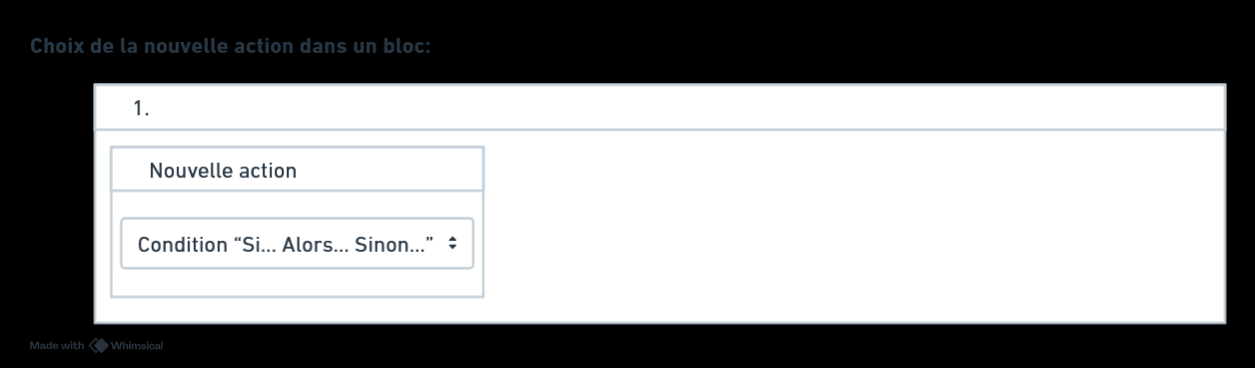
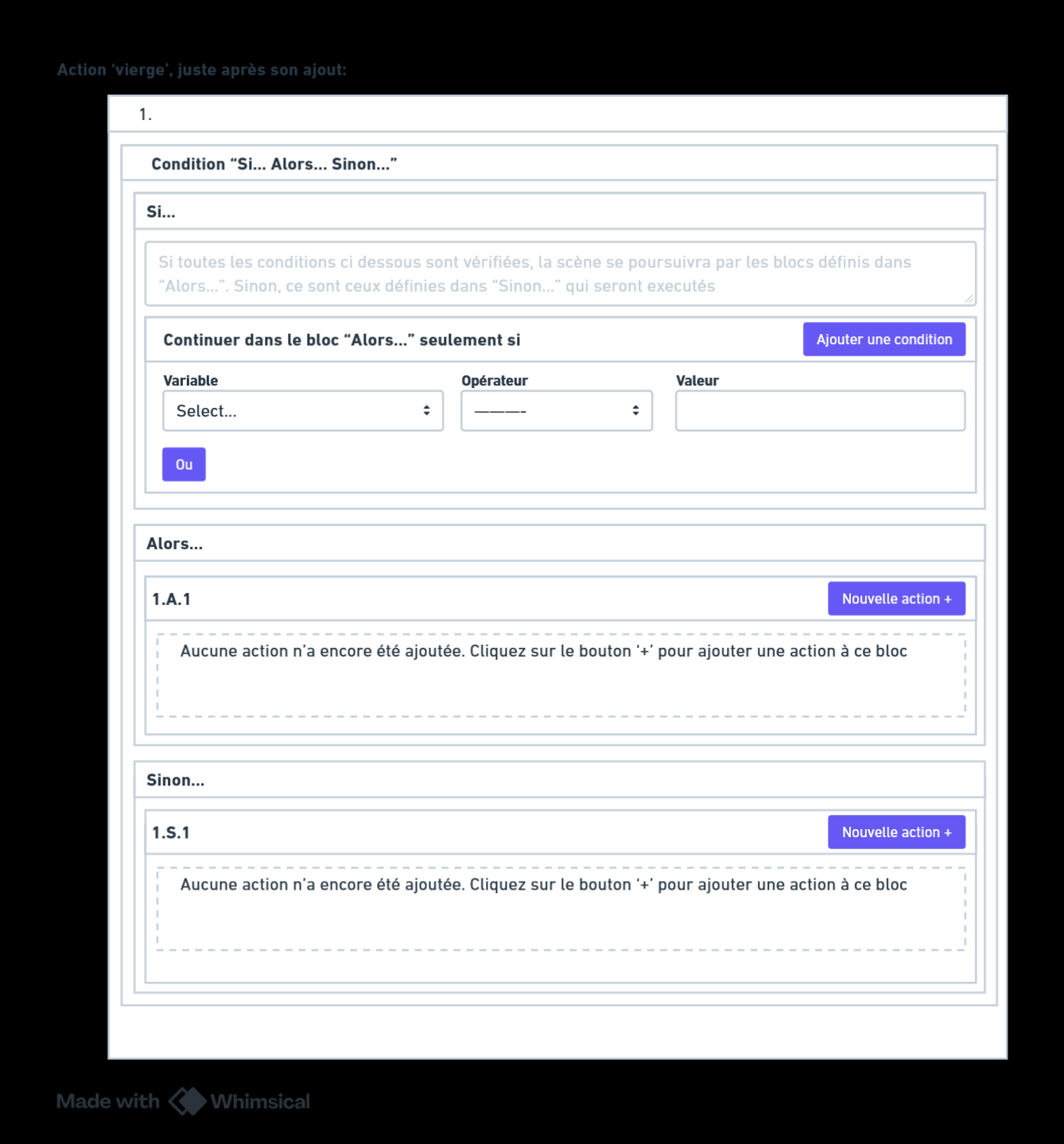
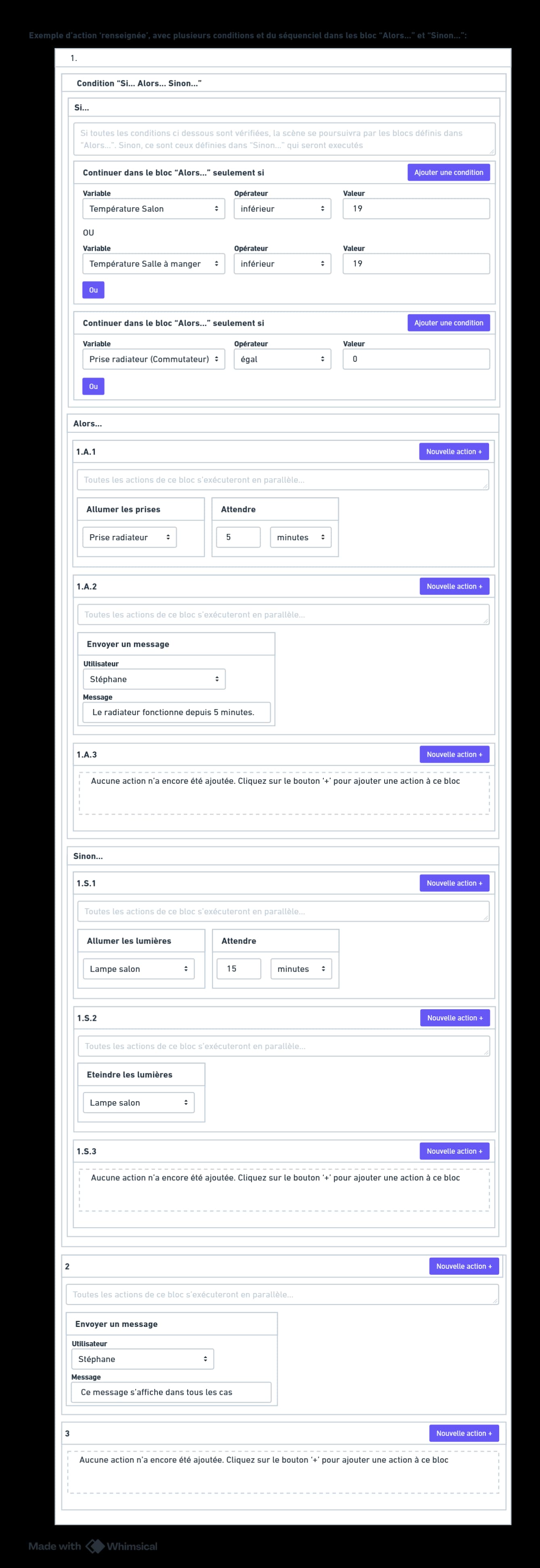
Alors voilà 3 maquettes pour porposer une nouvelle action « Condition Si… Alors… Sinon… » :
Maquette 1 : on choisit l’action
Maquette 2 : l’action s’affiche, avec les différentes zones à configurer : Si / Alors / Sinon
Maquette 3 : un exemple de scène pour illustrer. Si le chauffage est éteint et qu’il fait frais dans le salon ou la salle à manger, j’allume le radiateur et je le confirme par message 5 minutes plus tard. Et sinon (si le radiateur est déjà allumé, ou si il fait assez chaud dans une des deux pièces), la lumière du salon s’allume puis s’éteint après 15 minutes (me demandez pas pourquoi, cet exemple est ridicule, je sais…). Enfin, dans les deux cas, on envoie un message.
Les conditions dans la partie « Si » sont très similaires à l’action « Continuer seulement si ». Je n’ai en fait modifié que le titre. Et dans cette section « Si », on ne pourrait ajouter que des conditions comme celle-là, pas d’autres actions bien sûr. D’où le fait que le bouton soit « Ajouter une condition » et pas « Nouvelle action ».
Les deux blocs « Alors » et « Sinon » permettraient d’enchainer des blocs séquentiels. la numérotation des blocs avec le ‹ A › pour ‹ Alors › et le ‹ S › pur ‹ Sinon › devrait permettre de s’y retrouver…
Et l’autre point concerne le A et le S dans la numérotation.
A première vue, je peux confondre le S et le 5 (oui ma vue faiblit chaque année ).
Pour la langue de molière, A=Alors / S=Sinon, mais pour les autres langues, la lettre change de manière auto ?
Si c’est en anglais, on a un T=Then / E=Else, en allemand on aurait un D=Dann / S=Sonst mais peut-être O=Oder (je ne suis pas bilingue allemand).
Pas sûr que ce que ce soit l’idéal, mais c’est mon avis très perso.
Et sûrement que le O (o) et le I (i) qui pourrait être confondus avec des 0 et 1.
En passant avec une minuscule ça pourrait le faire, ou bien un icône spécifique… je n’ai pas l’idée du siècle à l’instant même…
Après un petit dialogue avec Perplexity, quelques idées :
1. (bloc) Si/Alors/Sinon
  SI condition
  Alors
    1.A01.1 action 1
    1.A01.2 action 2
  Sinon
    1.B01.1 action 3
    1.B01.2 action 4
1. (bloc) Si/Alors/Sinon
  SI condition
  Alors
    1.#.1 action 1
    1.#.2 action 2
  Sinon
    1.*.1 action 3
    1.*.2 action 4
1. (bloc) Si/Alors/Sinon
  SI condition
  Alors
    1.>.1 action 1
    1.>.2 action 2
  Sinon
    1.<.1 action 3
    1.<.2 action 4
1. (bloc) Si/Alors/Sinon
  SI condition
  Alors
    1.→.1 action 1
    1.→.2 action 2
  Sinon
    1.←.1 action 3
    1.←.2 action 4
 ) : améliorer le « continuer seulement si ».